Installation and commissioning
Instructions for use • AIDA C WD310 • AAB272_EN_V2.0_12-2021_IFU_CE-MDR 25
3. Confirm with
OK
or by pressing
ENTER
.
ð The
Manage Profiles
window, in which the currently assigned default or group profile
is displayed, appears.
4. Edit the assigned profile or reset all settings.
ð Edit the profile: The configuration area appears.
ð Reset the profile: The group profile assigned by the administrator or the default profile is
reset.
6.1.2
General
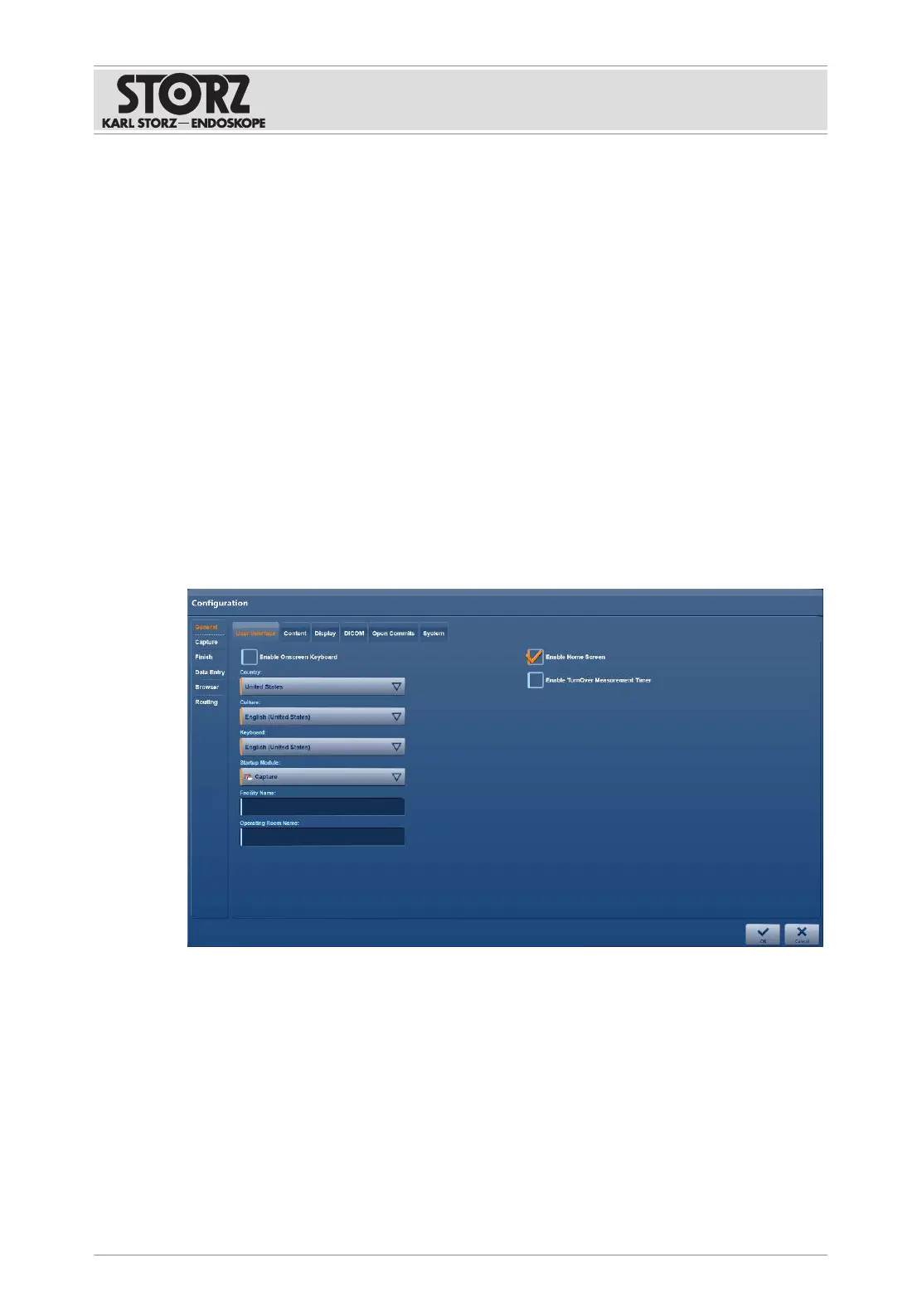
6.1.2.1 User interface
The following can be defined and enabled on the
User Interface
tab:
– System language
– Keyboard layout
– Start screen
– Onscreen keyboard
1. Tap the
General
menu.
ð The
User Interface
tab is displayed:
2. Place a check mark next to
Enable Onscreen Keyboard
if the virtual keyboard is to be
available for entering text on the touch screen.
3. Open the drop-down menus and define the following:
Country:
location
Culture:
system language
Keyboard:
keyboard layout
Startup Module:
module displayed once the system has started
4. Enter the facility name.
5. Enter the name of the operating room if the room is to be available for a room-to-room
connection.
6. Place a check mark next to
Enable Home Screen
to enable the home screen.













 To Next Page