25
02.11
Strapex SMA 20
6.3 START STRAPPING
Prerequisites
– Machine is connected to the mains supply. Power
supply according to identifi cation plate.
– Both locking wheels locked.
– Strap coil has been installed and strap feed is
performed (see Chapter 6.5).
– Turn Main switch (3/1) to position „1“.
– Toggle switch (3/6) on.
The warming-up time for the heating element
is about 45 seconds.
– Check strap tension, if necessary adjust it (see
Chapter 6.1)
– If the strap feeding is insuffi cient, activate push-
button „Manual strap feed“ (3/10) until the wanted
length is reached (see Chapter 6.2).
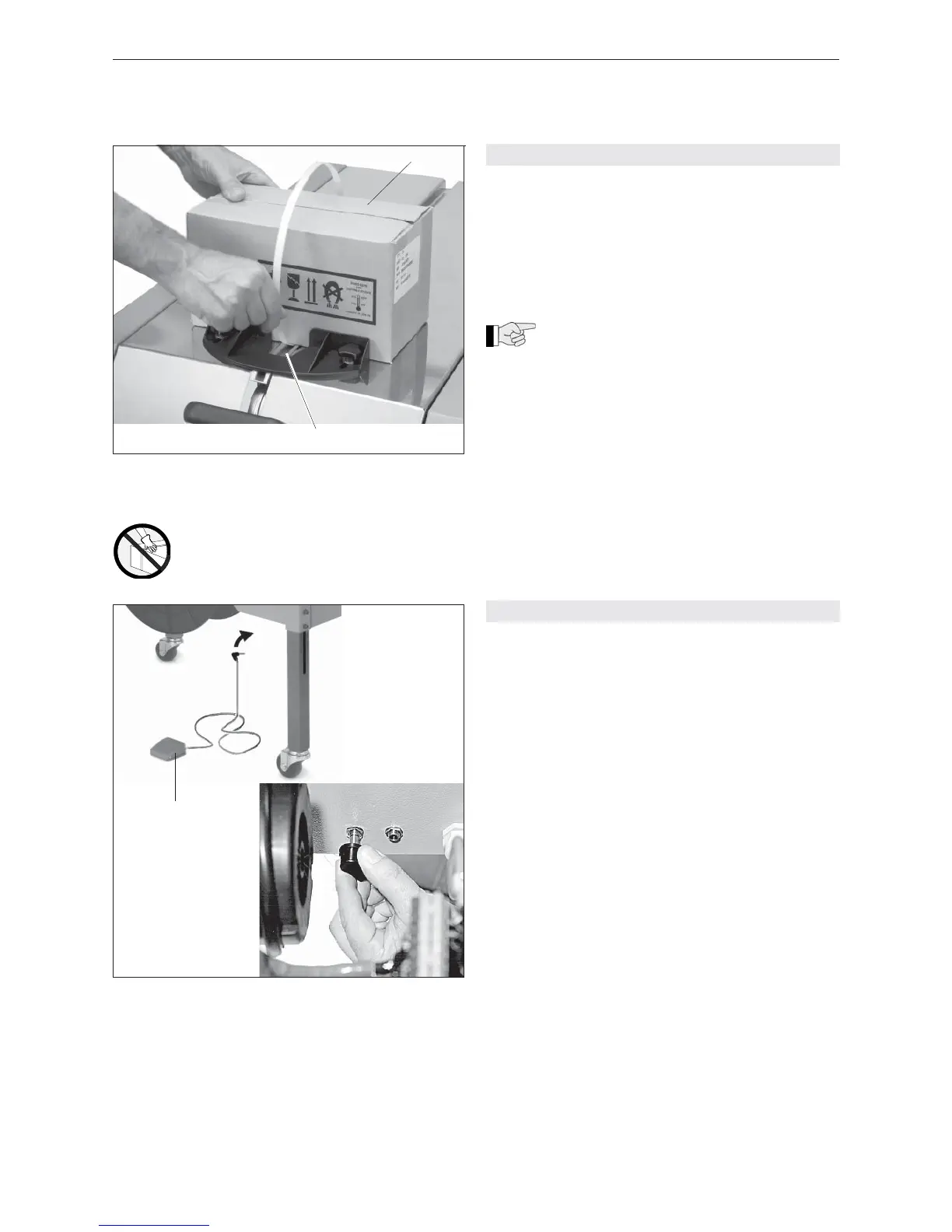
– Place strap around the package (4/1) and feed the
strap start into the strap guide (4/2) up to the stop.
The strap is clamped and the strapping cycle will be
automatically started. After the strapping has been
completed, the strap is automatically advanced by
the pre-selected amount.
– Check the seal (see chapter 6.7).
6.4 FOOT SWITCH (OPTION)
As an option a foot switch (5/1) is available. The plug
of the foot switch can be connected to the following
sockets:
– Socket A = Strap feed
– Socket B = Strap feed – strapping cycle
Socket A
– Connect plug of foot switch to socket A.
– Turn Main switch (3/1) to position „1“.
– Toggle switch (3/6) on.
– Activate foot switch until the wanted strap length is
reached.
– Place strap around the package (4/1) and feed the
strap start into the strap guide (4/2) up to the stop.
The strap is clamped and the strapping cycle will be
automatically started. After the strapping has been
completed, the strap is automatically advanced by
the pre-selected amount.
– If more strap is required, activate foot switch until
the wanted strap length is reached.
Socket B
– Connect plug of foot switch to socket B.
– Turn Main switch (3/1) to position „1“.
– Toggle switch (3/6) on.
– Activate foot switch until the wanted strap length is
reached.
– Place strap around the package (4/1) and feed the
strap start into the strap guide (4/2) up to the stop.
The strap will be clamped.
– By activating the foot switch once again, the
strapping cycle is started. After the strapping has
been completed, the strap is automatically advan-
ced by the pre-selected amount.
– If more strap is required, activate foot switch until
the wanted strap length is reached.
Fig. 4
1 Package
2 Strap guide
Fig. 5
1 Foot switch
A B
1
1
2
Caution:
Only strap packed goods!


 To Next Page