29
02.11
Strapex SMA 20
7.2 CLEAN CLAMPS, STRAP SEPARATOR
AND SLIDE PLATE
Remove
– Turn Main switch to position „1“.
– Toggle switch (3/6) on and activate push-button
„Reset“ (3/1).
– Switch off machine.
– Open table top.
Do not touch heating element!
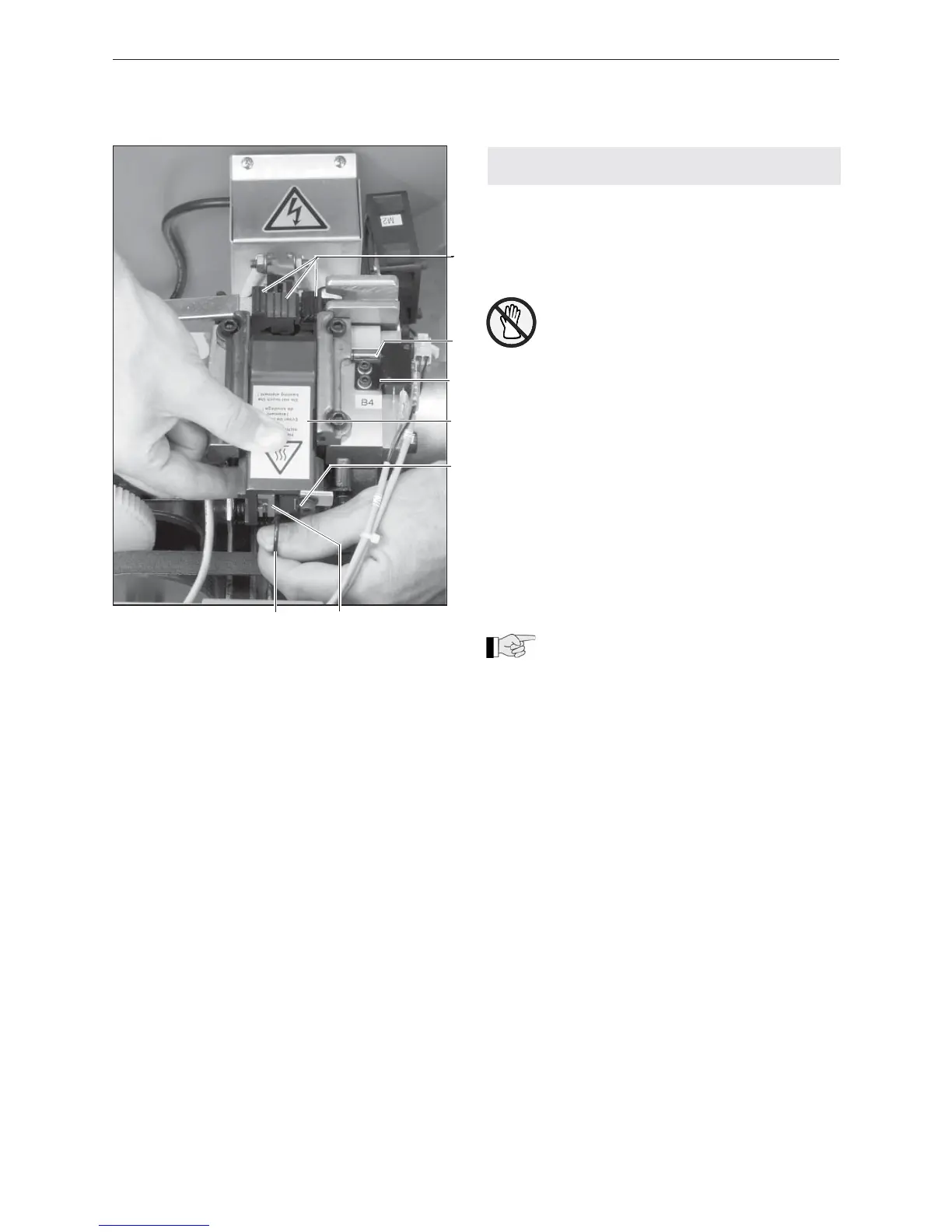
– Press torsion spring (11/7) downwards with the
thumb.
– Pull slide plate (11/4) backwards out of the sealing
unit.
– Remove strap residue and dust from sliding plate
with compressed air.
– Check easy motion of band separator (11/6) and
switch spring (11/5).
– Check easy motion of the release pin (11/2) in the
guide (11/3).
– Remove strap residue and dust from the three
clamps (11/1) with compressed air.
– Check clamps (knife) for wearing.
Install
–Install slide plate in reverse order.
Take care that the torsion spring (11/7) does
lie in the guide of the strap separator (11/6).
Fig. 11
1 Clamp
2 Release pin
3 Guide
4 Slide plate
5 Switch spring
6 Strap separator
7 Torsion spring
5
1
2
3
4
7 6


 To Next Page