81307063I
EN
45
4.3 Analog output type: data register
WiththeAnalogOutputTypeData register,anyanalogsignal,actualorcalculatedcanbeusedasa0/4-20mA
outputsignal.ByusingtheregistersdenedintheModbusmanual,youcanachievethisfunction.
Example Wewanttohavea4-20mAanalogoutputsignaltiedtostatortemperature1onpump1.Wealsowanttheoutput
signal to be 4mA at 0°C and 20mA at 150°C.
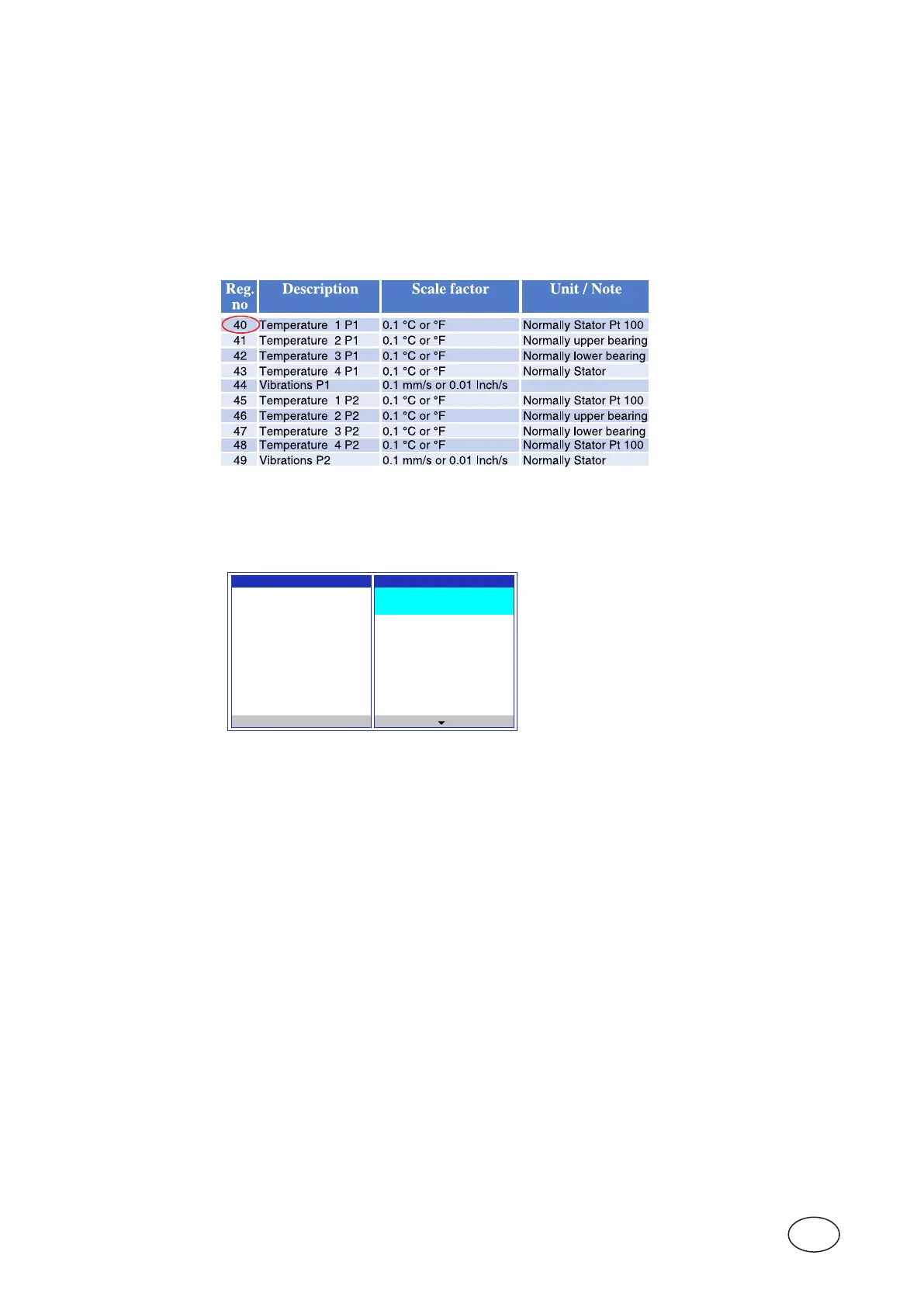
NOTE! According to Comli/Modbus reference manual(p/n81307126)wendthatthetemperaturestatorpump1isin
register 40;seegure4-3below.Wenoteaswellthatthescalefactoris0.1(i.e. the value in reg.40 is multi-
plied by 0.1 to get actual value in engineering units).
Figure 4-3 AbovetableisanextractfromtheComli/ModbusmanualforPC441–
Analog inputs/Output in engineering units
The function is to setup in the menu of the CA 511 under; Settings / Analog outputs / PC 441 Main
(or CA 781 Exp.-) Module / Analog output 2 to [Data register] according to picture below.
Analogue Output 2 Output Range
Signal Range Data Register
[4-20 mA] 40
Filter Constant Scaling 0% =
1 s 0
Output Function Scaling 100% =
[Data Register] 1500
Esc
Scaling100%shouldcorrespondtothedatavalueat20mA,inthiscase1500for150°C.
AboveisanexampleofhowtocongureaPt100Statortemperaturetransmittedoutputasa4-20mAsignal
via Analog output.
4.4 Mixer prestart
IfMixerfunctionisselectedandthePC441isactingasa[Pump controller],theMixerwillbestartedbefore
therstpumpisstarted.Thisallowsthemixertimetospeedupbeforeanypumpisstarted.
ThisistrueiftheMixerispumpstartcountcontrolled.
IftheMixeristimecontrolled,itwillstartindependentofpumpstart.
Inbothcasesminandmaxlevelformixstartmustbeperformed.
Congurethepumpstartdelayinmenu:
Settings / Pump x / Time settings/ Threshold on delay.
Youmustsetthisdelayonthepumpwiththeloweststartlevel.
4.5 Mixeranddrainpumpblocking
Thereisafunctionwhereyoucansetadigitalinputtoblockthemixerordrainpump.Itispossibletosetan
alarmwithfreealarmtextforeachinput.Whenthesignalisactivatedthemixer/drainpumpwillstopandblock.
Ifanalarmisenabled,itwillbecomeactive.
In menu Settings / Digital Inputs / Digital In x
Set Input function to [Mixer block] or [Drain pump block].Inthesamemenusetuseralarmtextandalarm
priority.



 To Next Page