81307063I
EN
48
4.7.6 Alarms
TherearemainlytwowaystohandlealarmsfromPC441;throughmodemordirectcommunication.Most
commonisaGPRS/GSMmodemsolution.ThealarmscanbetransferredtoaSCADAsystemorasaSMSto
a mobile phone.
WhenusingtheGSMfunctionalitytosendSMS,therearepossibilitiestosetupfourattemptstocallout.
Theseattemptscanbesetasparallelcalls;callmultiplenumbersinasequence.Orasbackupcall;callrst
numberintheattemptlistandthenwaitforacknowledgementbeforetryingwithsamenumberagainintotal
threetimes,andthencallnextnumberintheattemptlist.Assoonasthesubstationgetsanacknowledge-
mentofanalarmcallout;itwillterminatetheoutgoingcalls.AlarmswillbesentoutatON/OFFstateand
A-alarmsorA+B-alarmsdependingofsettings.
4.8 AquaProg
AquaProgisWindowsbasedsoftwarespeciallydesignedforsettingandmonitoringofSulzersubstations.
CommunicationwiththecontrollerisestablishedviaRS232,USBorModem(analogorGPRS)connection
between substation and computer. To communicate to PC 441 there has to be AquaProg version 4.86 or later.
Features
• ConguringsubstationPC441togetherwithCA441-443
• Checkingandacknowledgingalarms
• Checkingevents
• Collecting log data
• ShowingthedisplayandLEDofthesubstation
• Showing the status of the in- and outputs of the substation
• Collectingandsendingthecongurationdataofthesubstation
• Substation software upgrade
4.8.1 How to set up AquaProg
AdetaileddescriptionofAquaProgisoutsidethescopeofthisdocument,pleaseseeAquaProgmanual
P/N81300037onwww.sulzer.com.
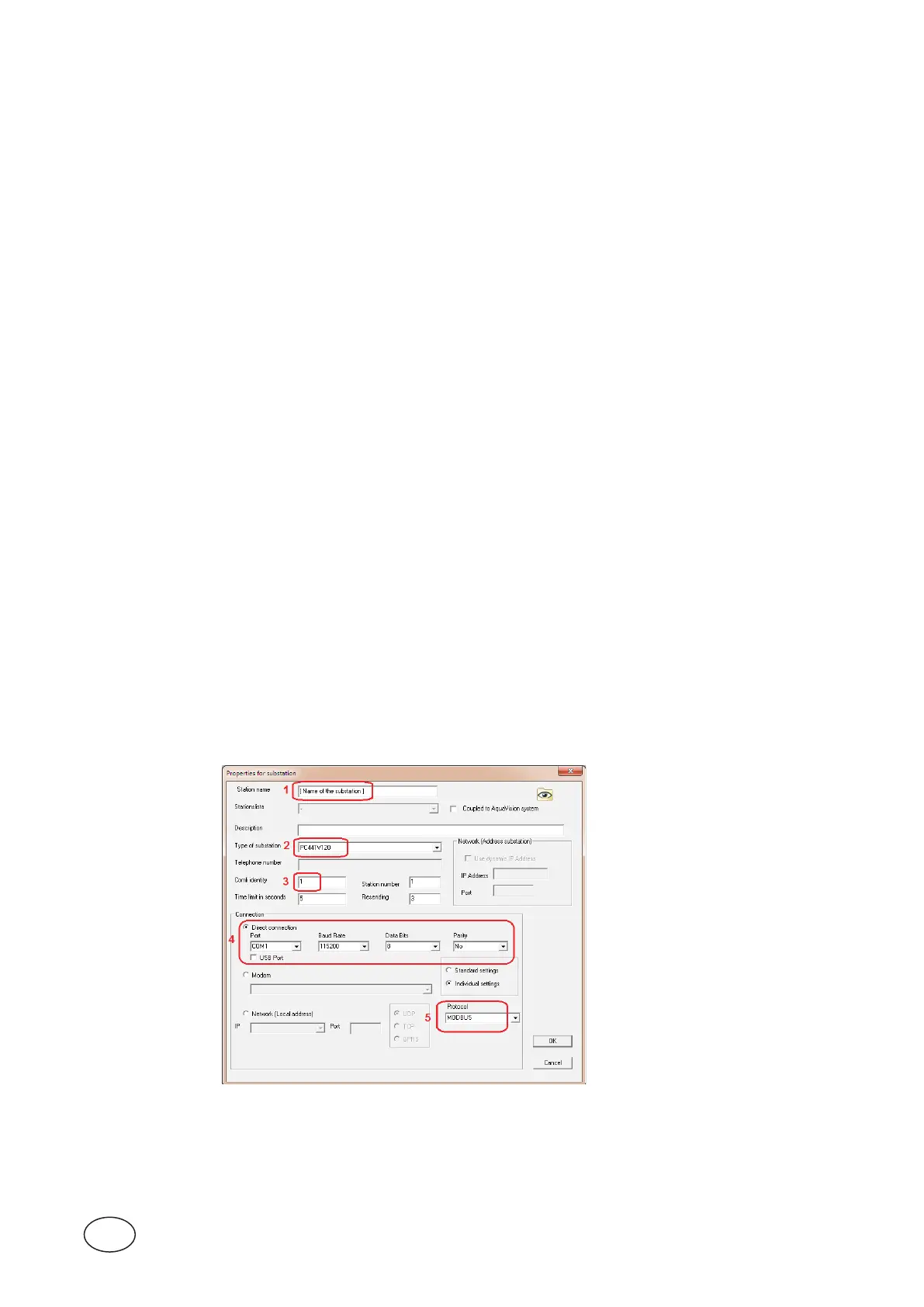
PC441communicatesbydefaultwithModbus RTU and has Comli ID 1 and Station ID 1. The baud rate is
11520 0,8 data bits and No Parity.
Tocreateanewsubstationfollowthetextbelow.
Figure 4-6 Create a new substation in AquaProg.



 To Next Page