12 Appendix III: AS/NZS 4777.2 Compliant User Manual
94
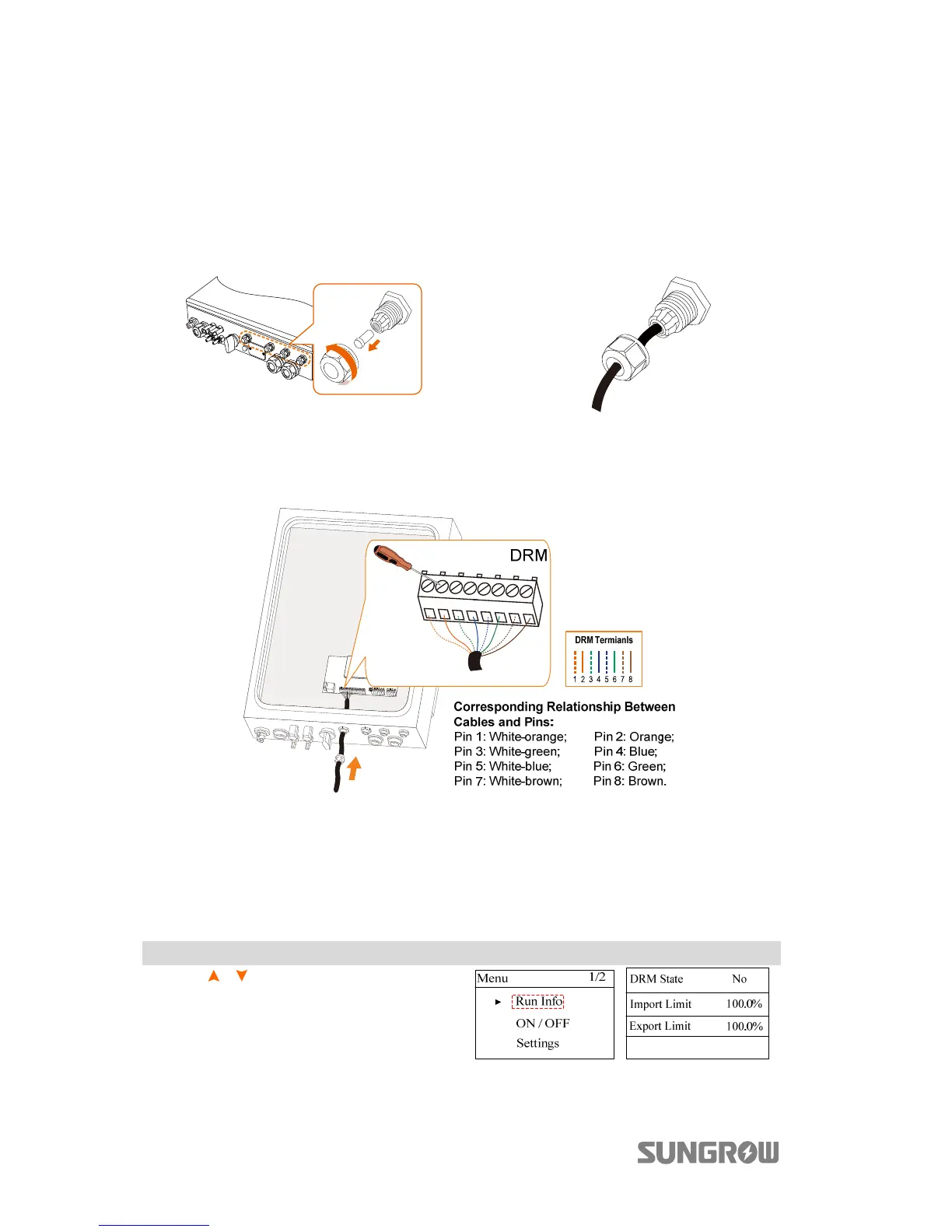
The cable for connecting to the DRED is not included in the delivery.
Use a TIA/EIA 568B standard network cable with a diameter of 3 mm
–5.3 mm.
Procedure:
2. Unscrew the swivel nut from
any Com. port.
3. Lead the cable through the
cable gland, as shown below.
4. Remove the cable jacket by 40 mm to 50 mm and strip the wire insulation
by 5 mm
–7 mm.
5. Tighten the wires to the corresponding terminals, as shown below.
6. Fasten the swivel nut and connect the other end to the DRED.
12.1.2 Viewing the DRM State via LCD Menu
When the inverter is running with the demand respond commands, the DRM which
is being performed by the inverter will be display on LCD screen.
Main Screen (Press ENT)→Menu→Run Info (Press ENT)
Press / to turn to the page
showing DRM information.



 To Next Page