6 Electrical Connection User Manual
40
Ethernet function:
y
Through the Modbus TCP/IP protocol, the EMS or the Control Box from the third
party can fully control the on/off, derating, charging and discharging of the
inverter.
y
The inverter operation information can be transferred via Ethernet port. Visit the
Webserver and you can view the information.
y
The inverter operation information can be transferred to the SolarInfo Bank
server via the router.
Wi-Fi function:
With the SolarInfo Wi-Fi module installed, visit the SolarInfo Moni APP to view the
inverter information.
6.5.1 Ethernet Connection
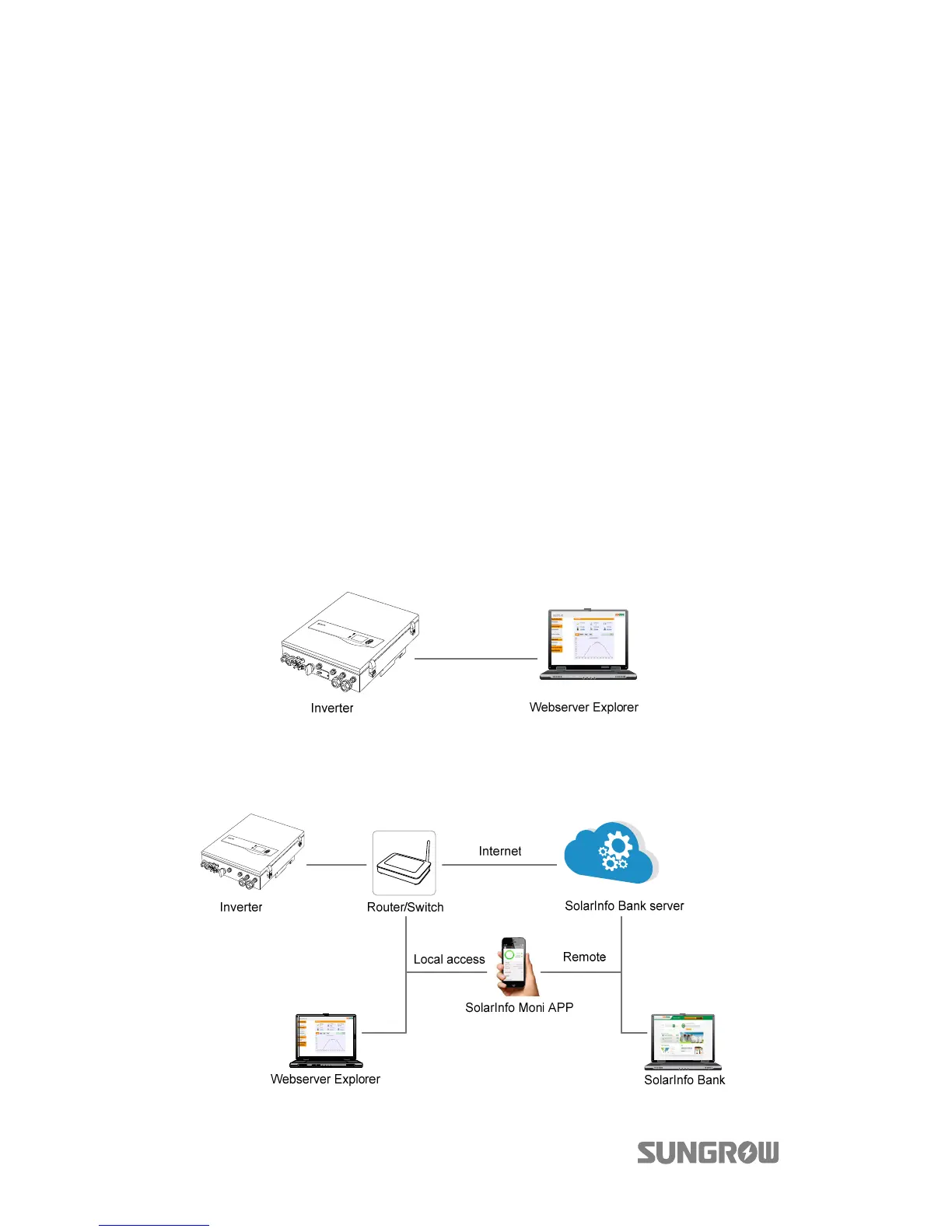
Connect the inverter to the PC through the Ethernet port to set up the Ethernet
communication. The following figure shows the Ethernet connection without a
router using the Webserver Explorer.
Fig. 6-4 Ethernet Connection without a Router
The following figure shows how the Ethernet connection may work with a router.
Fig. 6-5 Ethernet Connection with a Router



 To Next Page