User Manual 7 Commissioning
57
Tab. 7-5 State Descriptions of LED Indicators
LED Label LED State Description
“RUN”
On The inverter is running normally.
Blinking The inverter is in the process of starting.
Off
Other states except Running and Starting.
(Refer to Tab. 10-1 for state descriptions.)
“FAULT”
On Permanent fault or upgrade failure.
Blinking Other system faults or main alarms.
Off No fault occurs.
9. Visit www.solarinfobank.com or SolarInfo Moni App to view inverter
information. Get the related manuals at www.sungrowpower.com.
If the inverter commissioning fails, Press
to view the current faults. Remove the
existing malfunctions and then repeat starting up the inverter according to the
procedure detailed in this section.
In the case of commissioning failure, power off the system and wait 1
minute to commission the system again.
7.4 Result Verification
7.4.1 Meter Installation and Connection
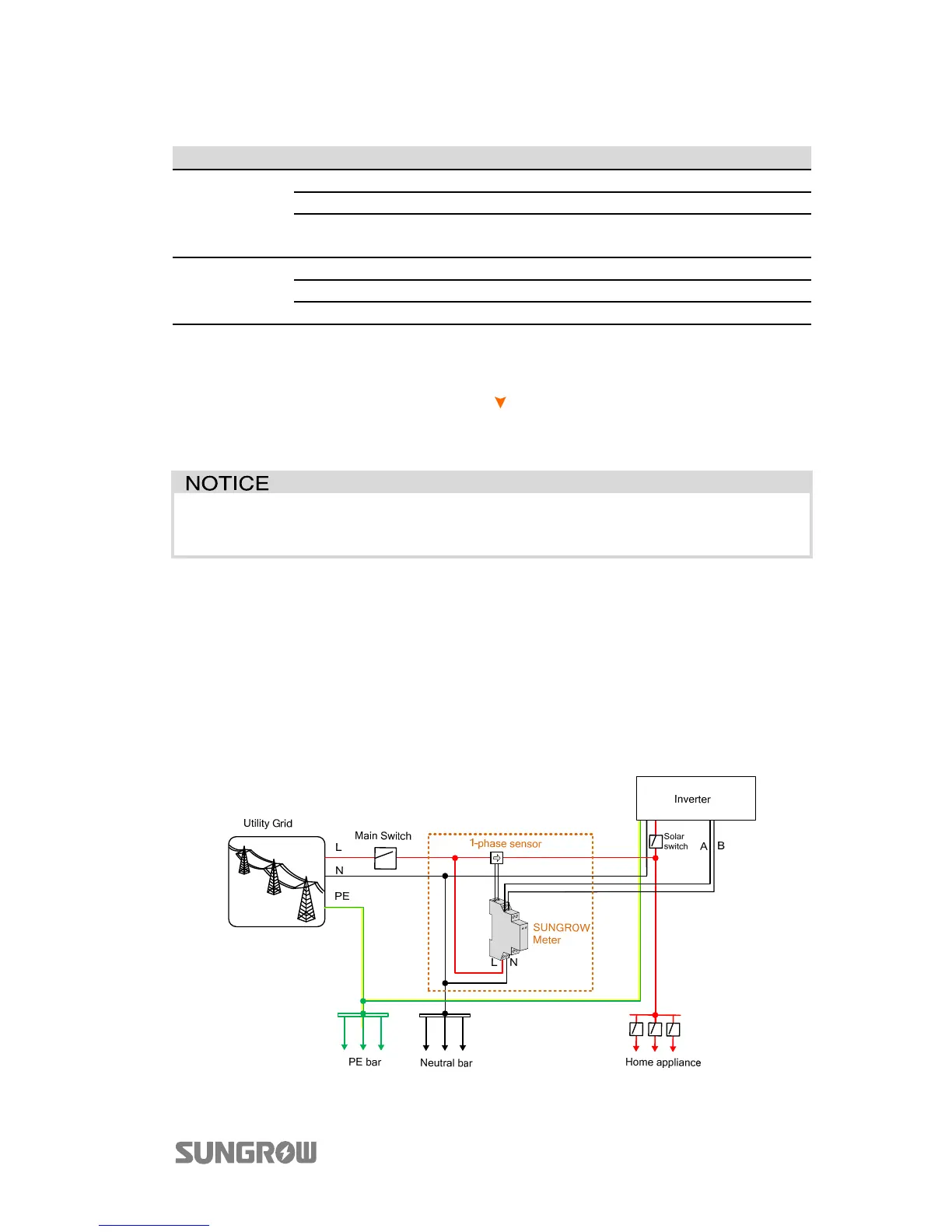
The following figure shows the correct installation and connection of the meter.
With the signal from the 1-phase sensor, the inverter determines the energy
exchange with the utility grid on one phase.
Fig. 7-3 Correct Installation and Connection of the Meter



 To Next Page