73
10 Appendix I: LCD Operation
Refer to Fig. 7-1 for button operations when setting parameters.
10.1 Main Screen
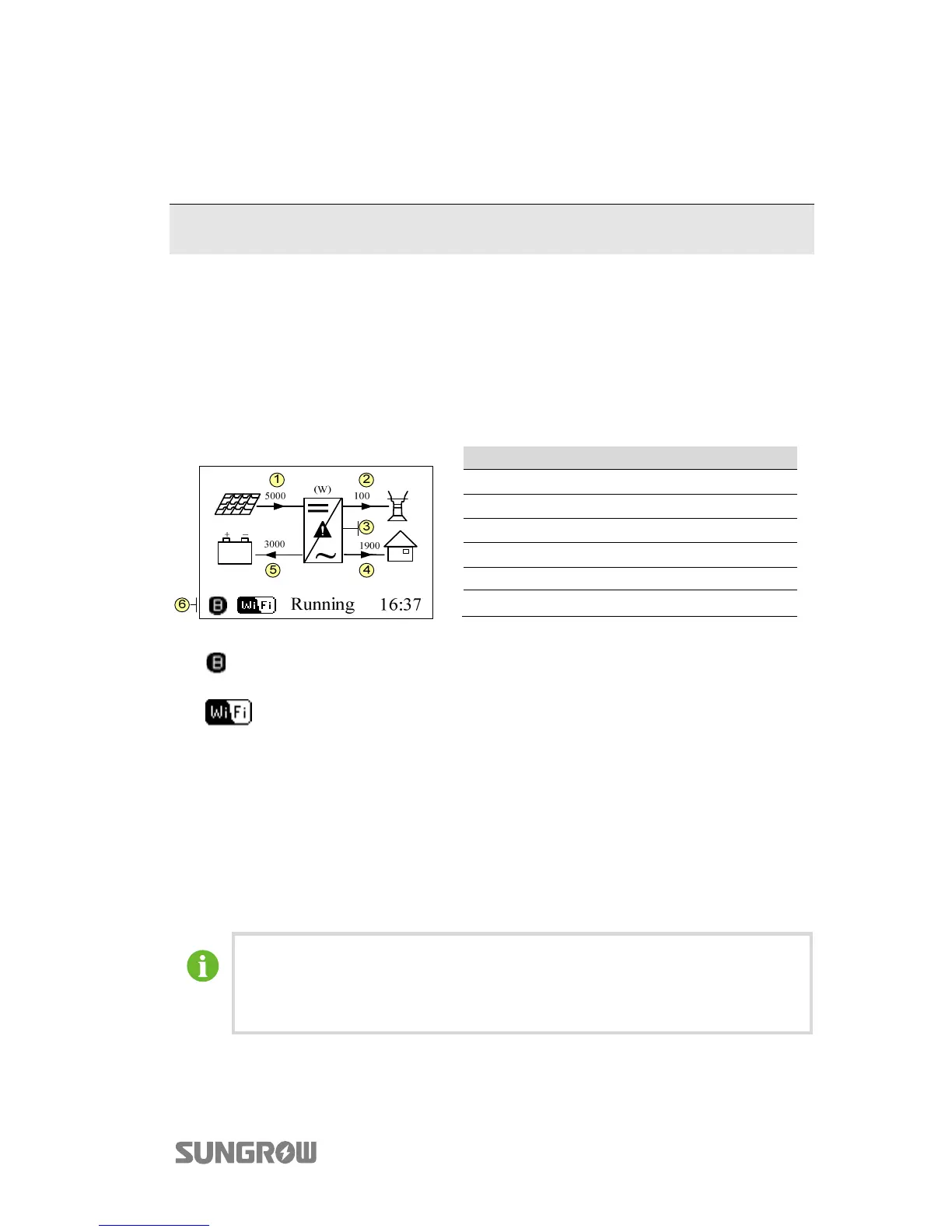
After successful commissioning, the LCD screen will enter the main screen.
No. Description
1 Current PV input power
2 Current export power
3 Warning information
4 Total load consumption
5 Battery charge/discharge power
6 System status bar
: The inverter and the SolarInfo Bank server are successfully connected.
: Blinks if the Wi-Fi is not connected to the router’s Wi-Fi network;
Steady if the Wi-Fi is successfully connected to the router’s Wi-Fi network.
Running: The inverter is in its normal running state.
16:37: Current system time.
Neither the grid power nor the load power will be displayed on the main screen in
case of no SUNGROW meter installed.
If there is no button operation for:
y 1 minute, the LCD backlight is OFF;
y 2 minutes, system returns to the default menu (main screen).



 To Next Page