User Manual 6 Electrical Connection
41
Cable Requirements
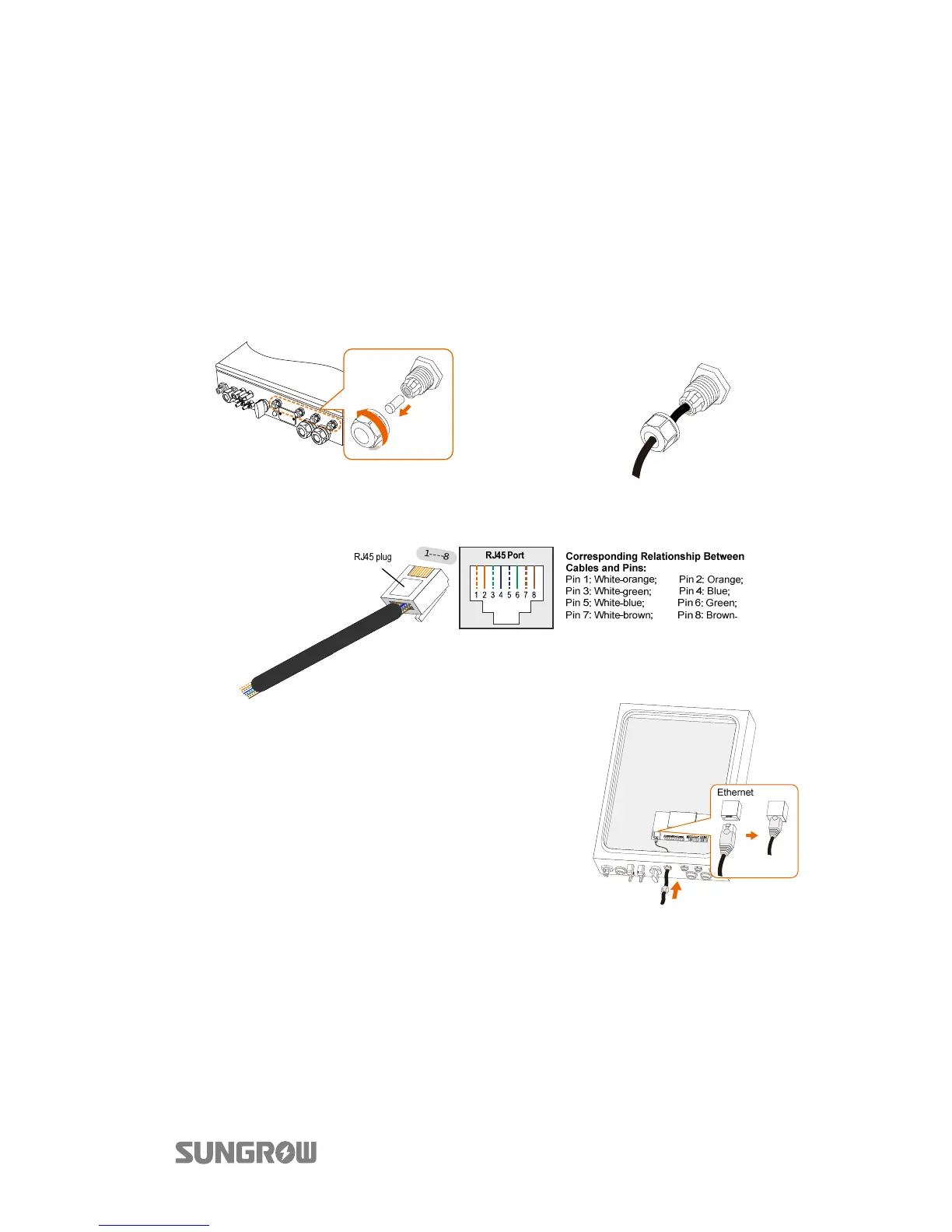
Use a TIA/EIA 568B standard network cable with a diameter of 3 mm–5.3 mm.
Refer to the switch/router’s manual for the definition of the communication port.
Procedure:
1. Unscrew the swivel nut from
any Com. port.
2. Lead the cable through the
cable gland and remove the
cable jacket by 8 mm
–15 mm.
3. Use the Ethernet crimper to crimp the cable and connect the cable to
RJ45 plug according to TIA/EIA 568B, as shown below.
4. Install the RJ45 plug to the Ethernet
port.
5. Fasten the swivel nut and connect the
other end to the socket of the switch
or the router.
6.5.2 Wi-Fi Connection
1. Unscrew the waterproof lid from the Wi-Fi terminal.
2. Install the Wi-Fi module. Slightly shake it by hand to determine whether it is
installed firmly, as shown below.
3. Refer to the Quick User Manual delivered with the Wi-Fi module to
configure the Wi-Fi.



 To Next Page