User Manual 10 Appendix I: LCD Operation
85
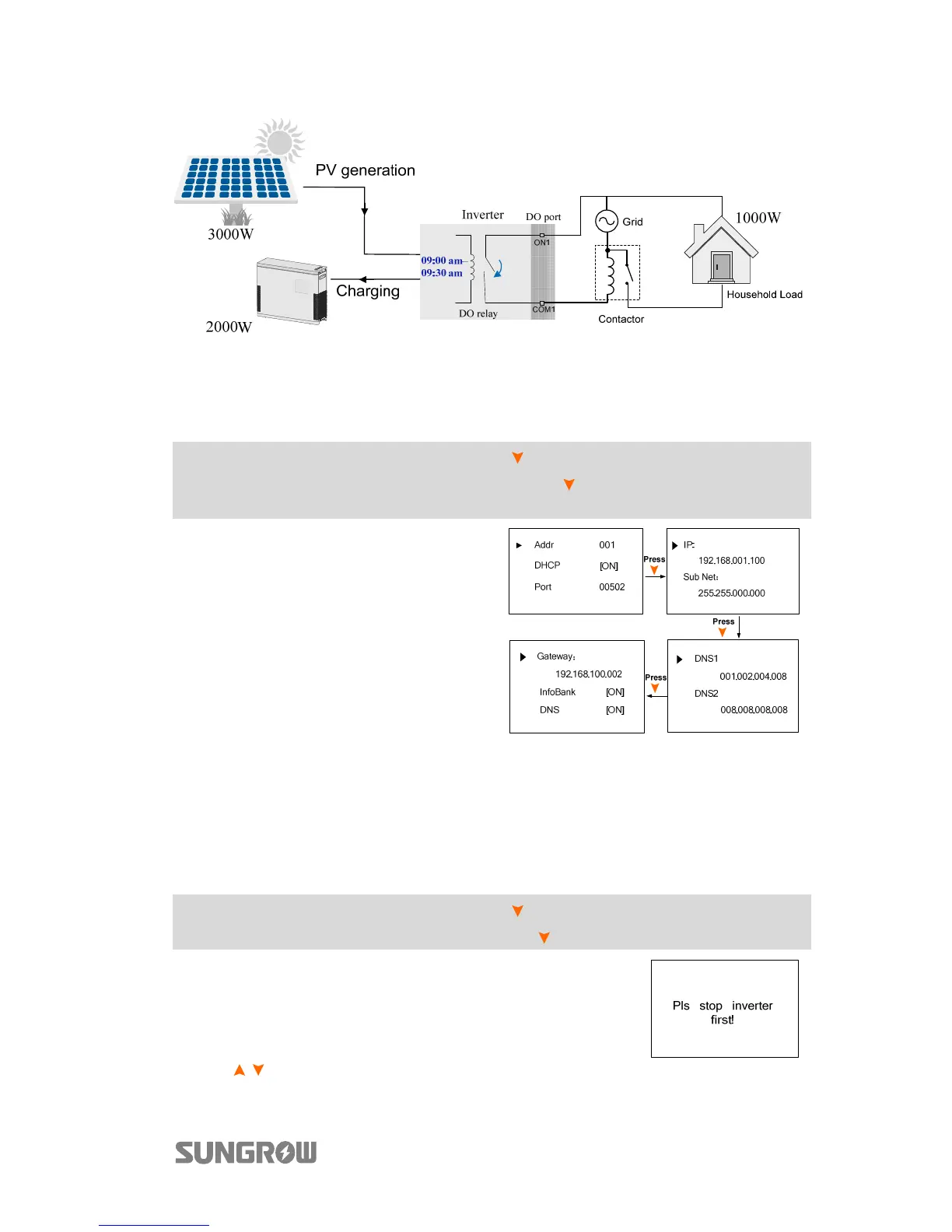
Fig. 10-4 DO Operation in Optimized Control
10.7.8 Setting the Communication Parameters
Main Screen (Press ENT)→Menu (Press ×2)→Settings (Press ENT)→Input
password 111 (Press ENT)→Settings (Press ×7)→Comm. Param (Press
ENT)
− The communication address ranges
from 1 to 247.
− The IP, sub net, gateway, DNS1 and
DNS2 can be modified only when
the DHCP is set to OFF.
− Acquire the IP, subnet mask,
gateway, DNS1 and DNS2 from the
network professional.
10.7.9 Setting the Battery Type
If the battery type or capacity setting is inconsistent with the actual, the
charge/discharge current may be less than the actual charge/discharge ability.
However, the system can operate normally. Proceed as follows to modify the
settings.
Main Screen (Press ENT)→Menu (Press ×2)→Settings (Press ENT)→Input
password 111 (Press ENT)→Settings (Press ×8)→Battery Type (Press ENT)
Refer to “10.6 Starting and Stopping the Inverter”
to stop the inverter before modifying the battery type.
Otherwise the warning screen will prompt.
Press / to select the battery type and Press ENT to confirm.



 To Next Page