User Manual 6 Electrical Connection
43
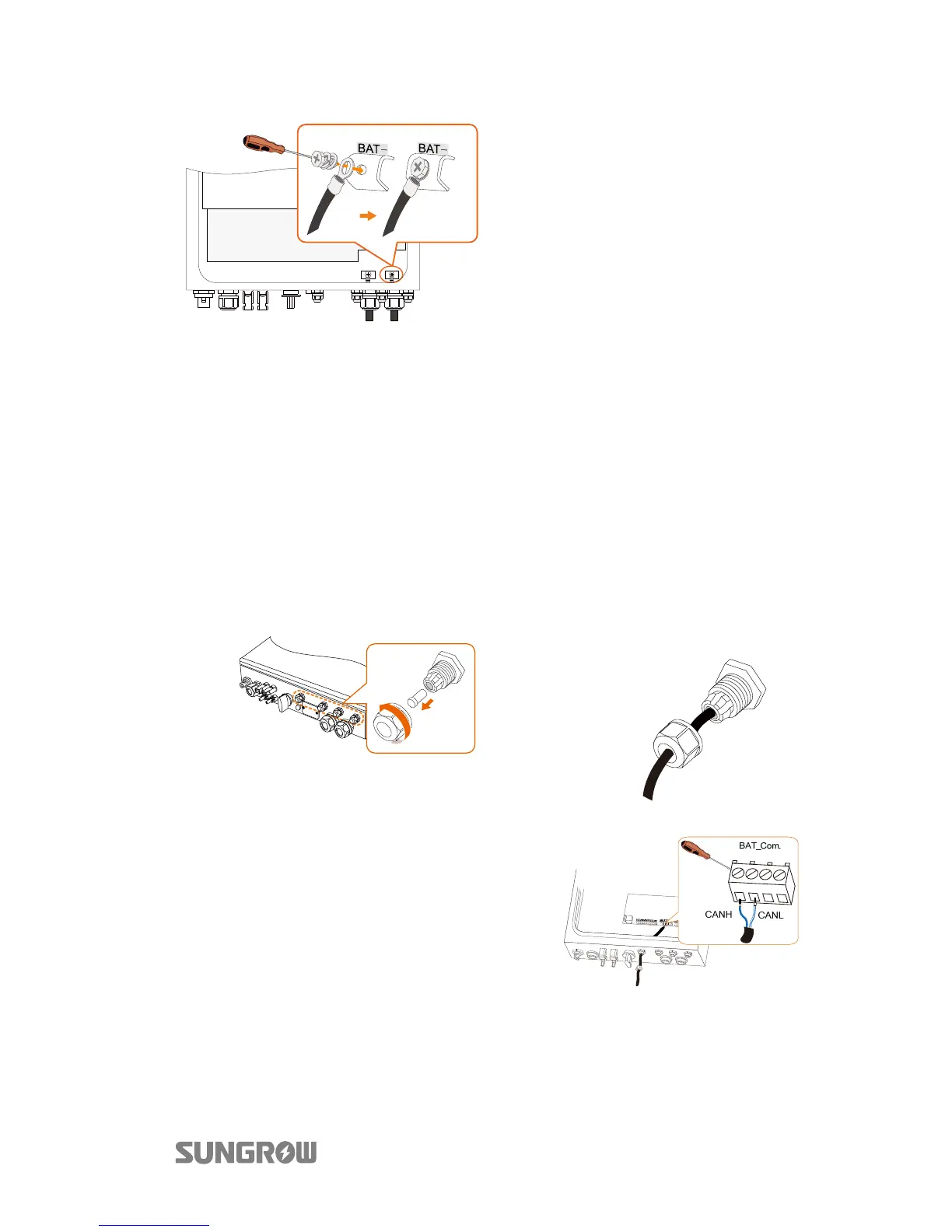
5. Loosen and remove the screw
sets on the BAT+ and BAT-
terminal blocks.
6. Fasten the cables to the
corresponding terminals (torque
2.6 Nm).
Be sure to adhere to the
following screw assembly
sequence: screw head, spring
washer, fender washer, OT
terminal.
6.6.2 Connecting the CAN Cable
The CAN cable enables the communication between the inverter and the Li-ion
battery from LG, Sungrow, GCL, Pylon (US2000B), BlueSun or BYD.
Procedure:
1. Take out the CAN cable (terminal marks CANH and CANL) from the
packaging.
2. Unscrew the swivel nut from any
Com. port.
3. Lead the cable through
the cable gland, as shown
below.
4.
ighten the wires to the
corresponding terminals according
the marks.
CANH: blue and green
CANL: white-blue and white-green
5. Fasten the swivel nut and connect the
other end to the battery.



 To Next Page