User Manual 10 Appendix I: LCD Operation
77
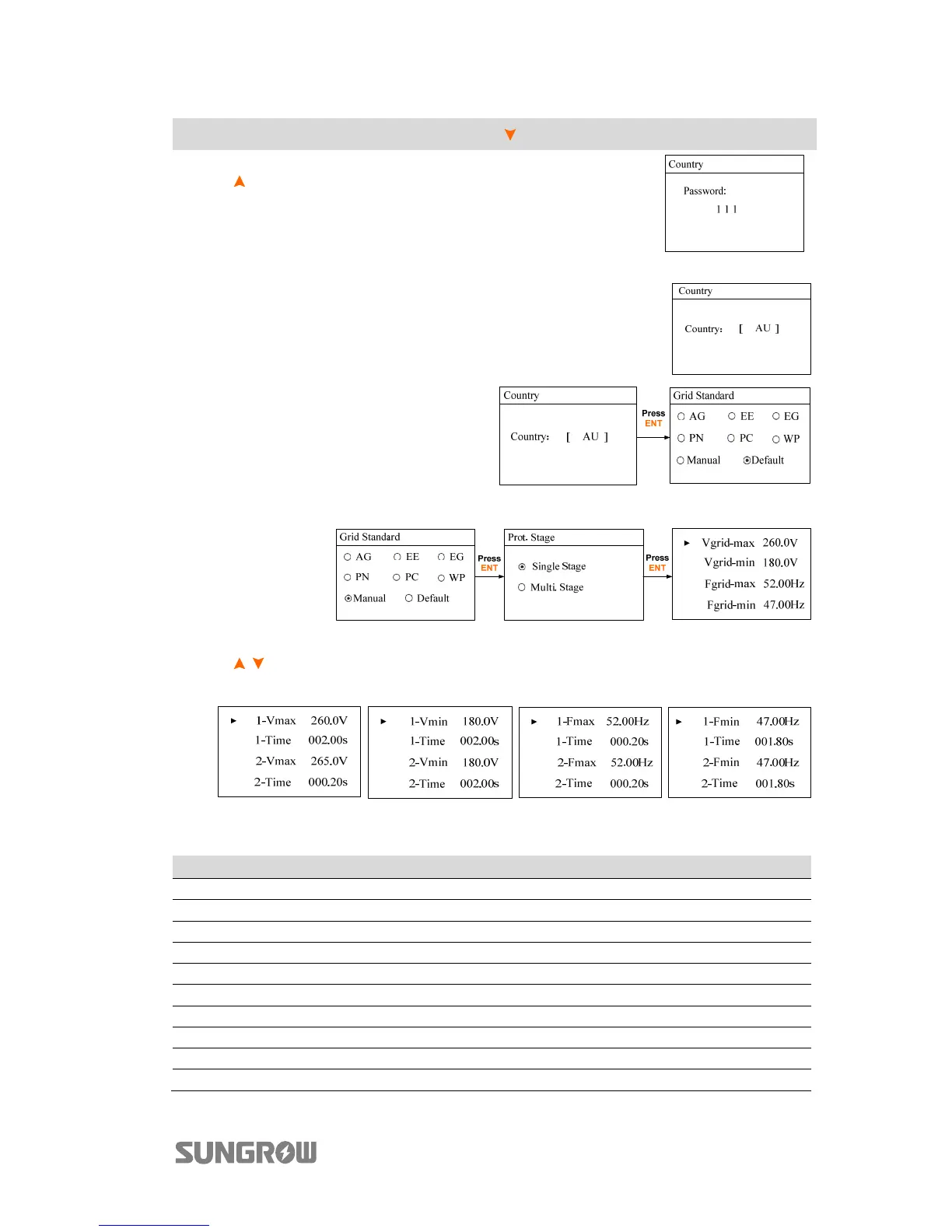
Main Screen (Press ENT)→Menu (Press ×4)→Country (Press ENT)
Press
and Press ENT to input the password 111.
Press ENT to confirm the password.
Only the codes of GB, NL, BE, CHN, SA and AU are
supported.
Select the correct grid standard for the
country code“AU”.
For parameter descriptions of other
grid standards, see Tab. 7-3.
Set the single stage protective parameters manually for “AU”.
Set the multiple stage protective parameters manually for “AU”.
Press / to turn pages.
After all the settings, Press ENT to confirm. Press ESC to discard the settings.
Tab. 10-2 Descriptions of the country codes
Country Code Full Name Language
GB Great Britain English
DE Germany German
FR France French
IT Italy Italian
ES Spain English
AT Austria German
AU Australia English
CZ Czech English
BE Belgium French
DK Denmark English



 To Next Page