Chapter 7 Usage of Various Functions
7-92
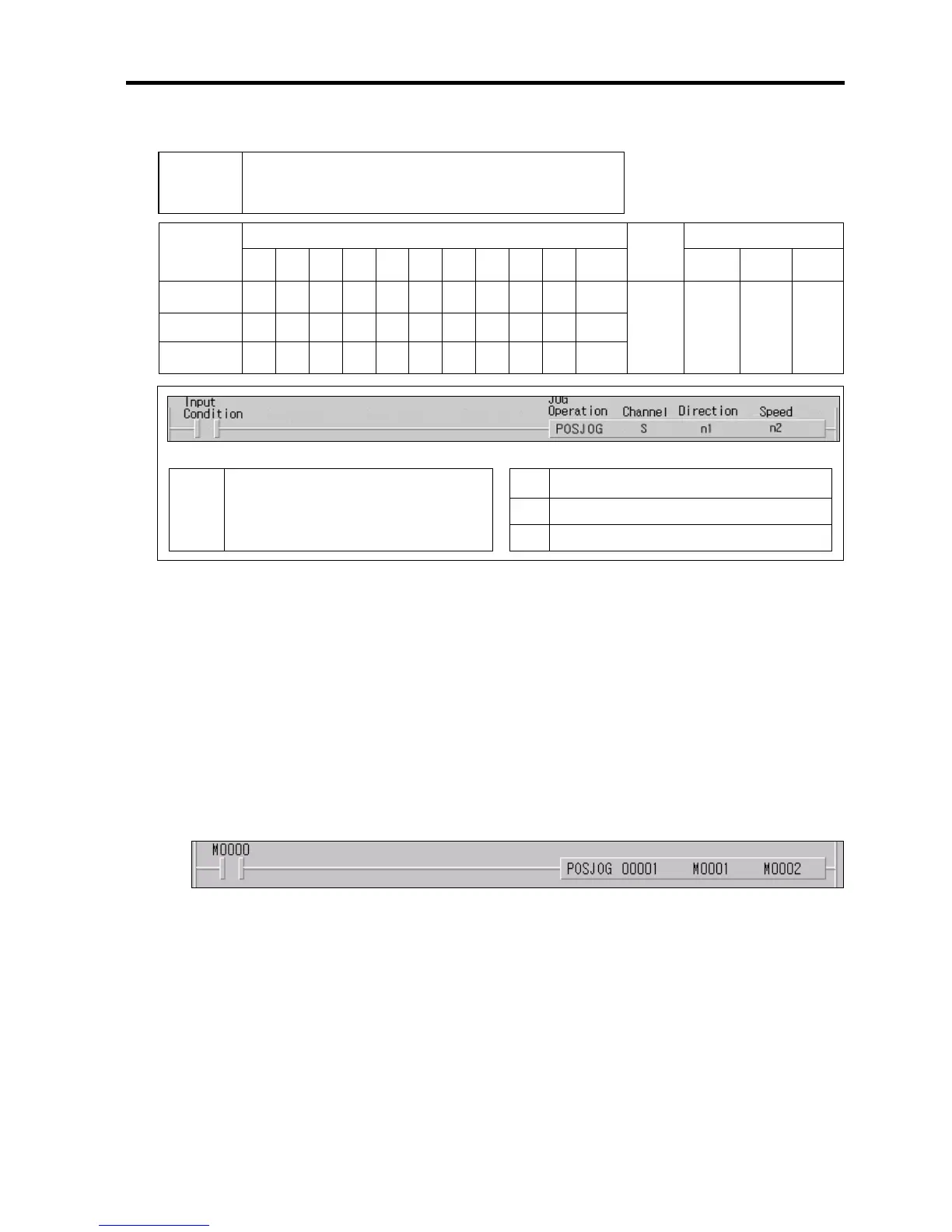
2) JOG Operation(POSJOG)
Available device
Flag
Instruction
M P K L F T C S D
#
D integer
No. of
steps
Error
(F110)
Zero
(F111)
Carry
(F112)
S ○
n1
○ ○ ○ ○ ○ ○ ○
n2
○ ○ ○ ○
○
○ ○
7
○
S
Ch. for JOG operation(0~1)
n1
Direction( 0 : Forward, 1: Backward)
Error
(F110)
Error flag turns on when designating area is over
and the instruction isn’t executed
n2
Speed (0 : Low speed,1: High speed)
■ POSJOG S n1 n2
(1) Functions
• When input condition turns on, corresponding Ch. Starts JOG operation.
• If input condition turns off, corresponding Ch stops JOG operation.
• The speed can be changed during operation but the direction can’t be changed.
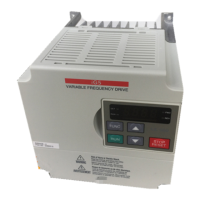
(2) Example program
• When input condition M0000 turns on, Ch.1 starts JOG operation by designated direction(M0001) and speed(M0002)
• When input condition turns off, Ch.1 stops JOG operation.
POSIST Positioning Indirect Start
Desi


 To Next Page