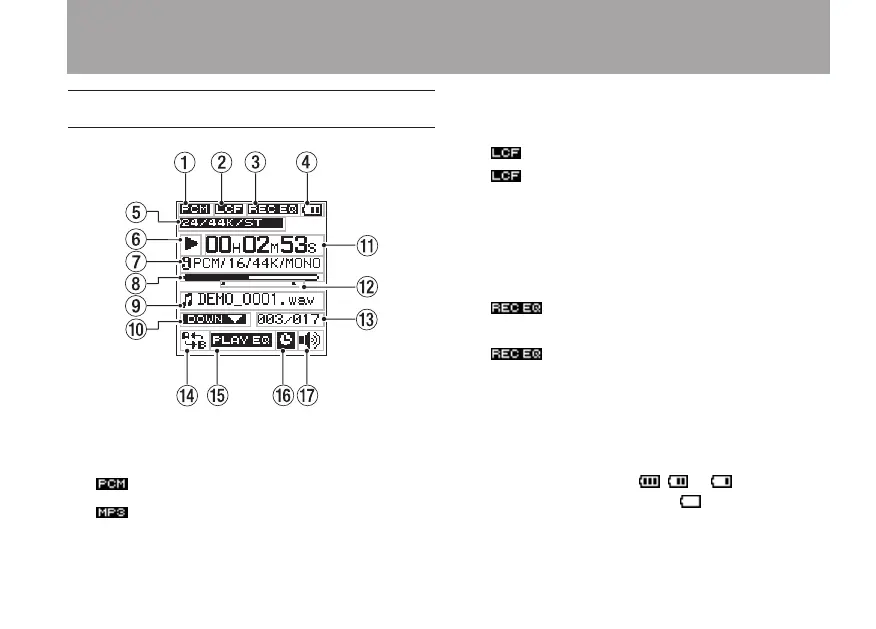
Home Screen
1 File format
This shows the recording file format.
: PCM format
: MP3 format
2 Low-cut filter status
Shows the low cut filter status is shown here.
indicator shown: Low-cut filter ON
indicator not shown: Low-cut filter OFF
3 Status of sound quality enhancement during
recording
This shows the status of the sound quality
enhancement function that can be used when
recording.
indicator shown: Sound quality
enhancement during recording is ON
indicator not shown: Sound quality
enhancement during recording is OFF
4 Power supply status
A battery icon appears when the unit is
operating on battery power. The amount of
remaining battery charge is indicated by
the number of bars ( , or ). When
there are no bars, and the icon blinks, the
batteries are almost dead and the unit’s power
will automatically change to off soon.
2 – Names and functions of parts



 To Next Page