8 When you have finished making the setting,
press the HOME key to return to the Home
Screen.
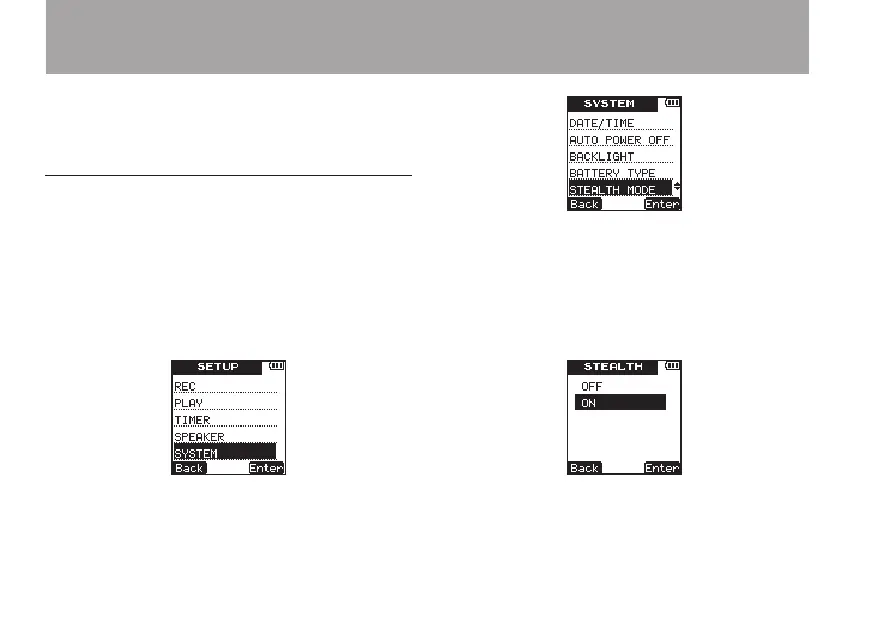
Using the stealth mode
Use the
STEALTH
MODE
item to set the backlight
and REC indicator to stay unlit at all times.
1 Press the SETUP key to open the
SETUP
menu screen.
2 Use the +/– keys to select the
SYSTEM
menu
item.
3 Press the ¯ (
Enter
) key to open the
SYS-
TEM
menu screen.
4 Use the +/– keys to select
STEALTH
MODE
.
5 Press the ¯ (
Enter
) key to open the
STEALTH
setting screen.
6 Use the +/– keys to turn the stealth mode
OFF
(default value) or
ON
.
(REC indicator and backlight disabled).
7 Press the ¯ (
Enter
) key to confirm the
setting and show a pop-up with the setting
8 – Various Settings and Information Display



 To Next Page