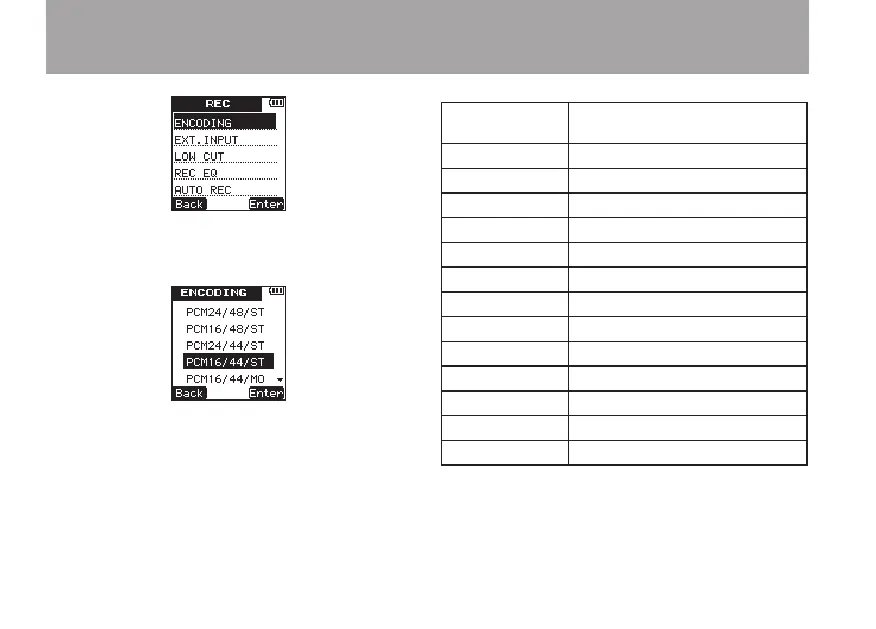
5 Press the
¯
(
Enter
) key to open the
EN-
CODING
setting screen.
6 Use the +/– keys to set the recording quality
(encoding format) to one of the following.
(The default value is
PCM16/44/ST
.)
Display Format (bit rate), sampling
frequency, number of channels
PCM24/48/ST
PCM, 24-bit, 48 kHz, stereo
PCM16/48/ST
PCM, 16-bit, 48 kHz, stereo
PCM24/44/ST
PCM, 24-bit, 44.1 kHz, stereo
PCM16/44/ST
PCM, 16-bit, 44.1 kHz, stereo
PCM16/44/MO
PCM, 16-bit, 44.1 kHz, monaural
MP3/320/ST
MP3, 320 kbps, stereo
MP3/192/ST
MP3, 192 kbps, stereo
MP3/128/ST
MP3, 128 kbps, stereo
MP3/64/ST
MP3, 64 kbps, stereo
MP3/160/MO
MP3, 160 kbps, monaural
MP3/96/MO
MP3, 96 kbps, monaural
MP3/64/MO
MP3, 64 kbps, monaural
MP3/32/MO
MP3, 32 kbps, monaural
7 Press the
¯
(
Enter
) key to confirm the
setting and show a pop-up with the setting
briefly, and then return to the
ENCODING
menu screen.
4 – Recording



 To Next Page