VTx button is not working
When the Unify32 detects a signal on the SmartAudio Signal-in pad, it will disable the button. To change
the VTx to CRSF or SA, you can unsolder the wire or force your crossfire rx to not output any signal.
● Set the output of the Crossfire Rx to CH X (PWM) for the pin where the VTx is connected to
● Shut down the Crossfire Tx and Rx
● Power up just the drone with the Crossfire Rx and the Unify32
● Change the Unify32 settings by the button
● Turn the transmitter back on
● Set the output map back to CRSF or SmartAudio
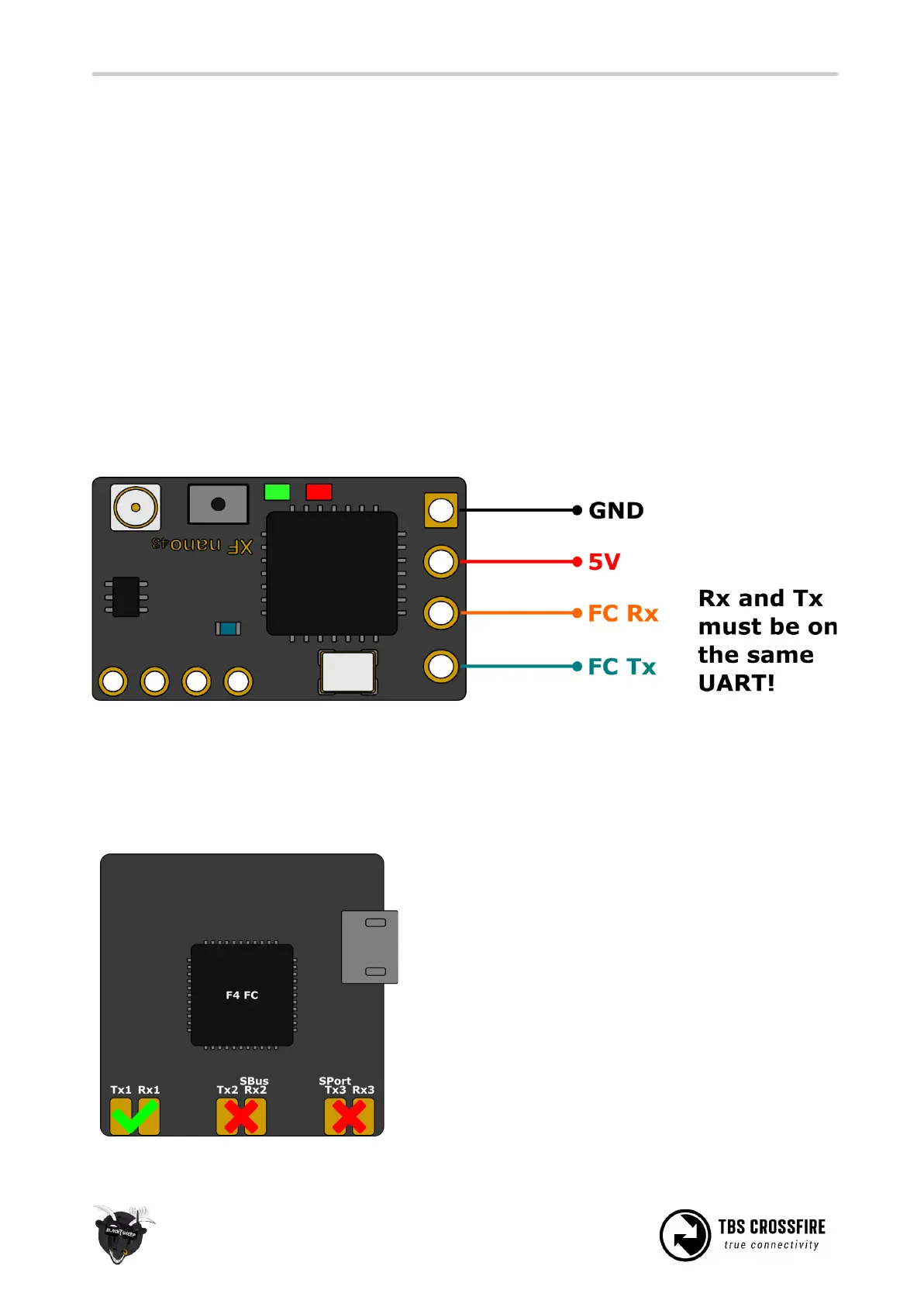
Connection to an FC
General wiring
If you use SBus or any other protocol beside CRSF or MAVLink, you only need to connect the receivers Tx
line to your FC. Use CRSF whenever possible to get the best experience with your Crossfire.
If you use a F4 FC, make sure you don’t use UART’s
with labels with
SBUS
or
S-PORT
. Those UART’s got
a hardware-inverter installed which does not work
with CRSF.



 To Next Page