Wireless configuration with ArduPilot/ PX4 by WiFi
Over the built-in WiFi module you can get MAVLink data to your pc or mobile device for live telemetry as
well as full MAVLink data transmission (as with the bluetooth module).
You need to set up your wifi module for that to work before.
You can connect to your Crossfire in two ways:
● Both are in the same WiFi network
● Straight connection to the Crossfire access point
When you are connected, you need to use the following settings:
● Connection type: UDP
● Port: 8888
The port can be changed in the settings of the WiFI module, if you need to.
With WiFi FW 1.17 you can enable or disable the MAVLink data. To change this, navigate to and set
MAVLink
to
on
.
Make sure your Crossfire is in RF mode
dynamic
or
forced 150Hz.
Note: in 1.17 there is a bug which turns the Mavlink option off everytime time you shut your transmitter
down
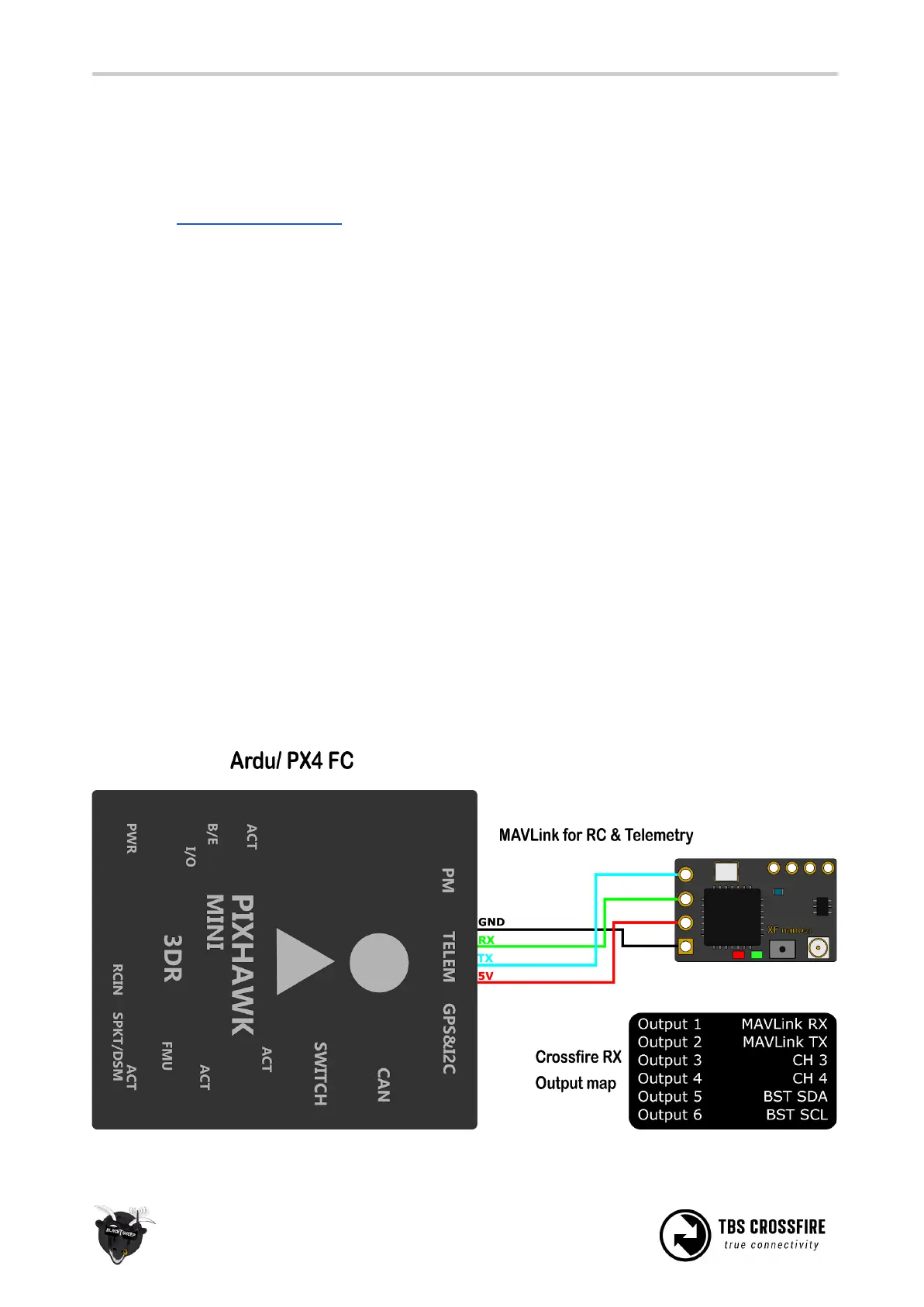
Wiring diagram



 To Next Page