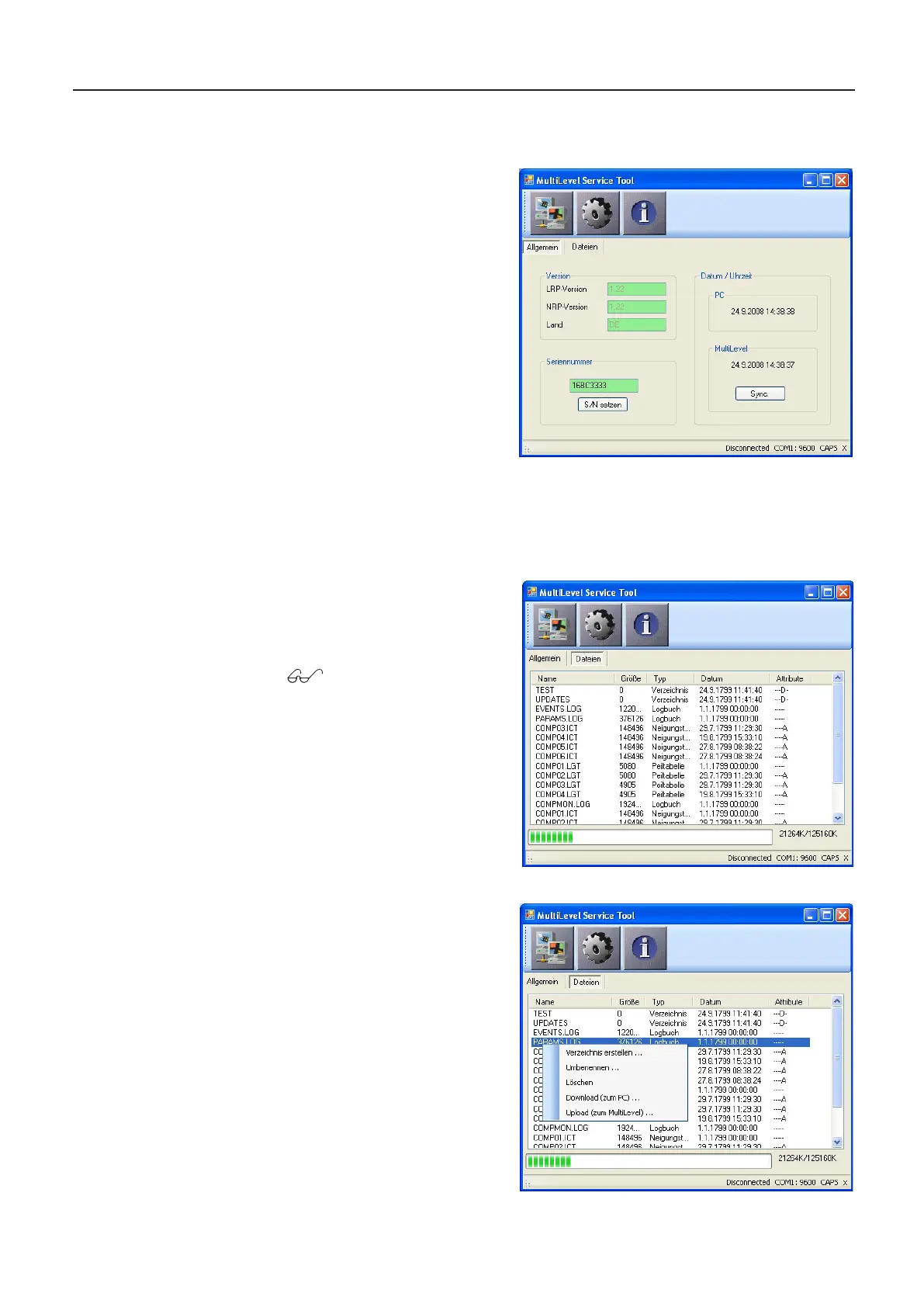
The general information is displayed in the window:
Version:
LRP version: Software version of the
program section requiring calibration
NRP version: Software version of
the program section not requiring
calibration
Country: Country code of the software:
DE: Germany
GB: United Kingdom
BE: Belgium
Serial number: The serial number of
the MultiLevel is displayed here. This
can be changed and transmitted back
to the MultiLevel by means of the ‘Set
S/N’ button.
Date / time: The date/time of both the PC and the MultiLevel connected to it are displayed
here. The date/time of the MultiLevel are synchronized to the PC by means of the ‘Sync.’
button.
Main Window – Files
If the ‘Files’ tab is clicked, the file
window opens and the program then
loads the file list from the MultiLevel‘s
SD card:
as the subdirectories are
displayed in a table. A bar
below the table shows the
amount of card memory
used; next to the bar the
extent of memory usage
(used/total) is displayed
in text form.
A context menu is opened by double-
clicking or right-clicking a file:
Create directory:
Creates a new
subdirectory in the
current directory
Rename: Renames the
Delete: Deletes the
Download: Transfers the
MultiLevel to the PC
Upload:
(still to be selected) from
the PC to the MultiLevel
MultiLevel Instruction Manual Other Information











 To Next Page