MultiLevel Instruction Manual Modules
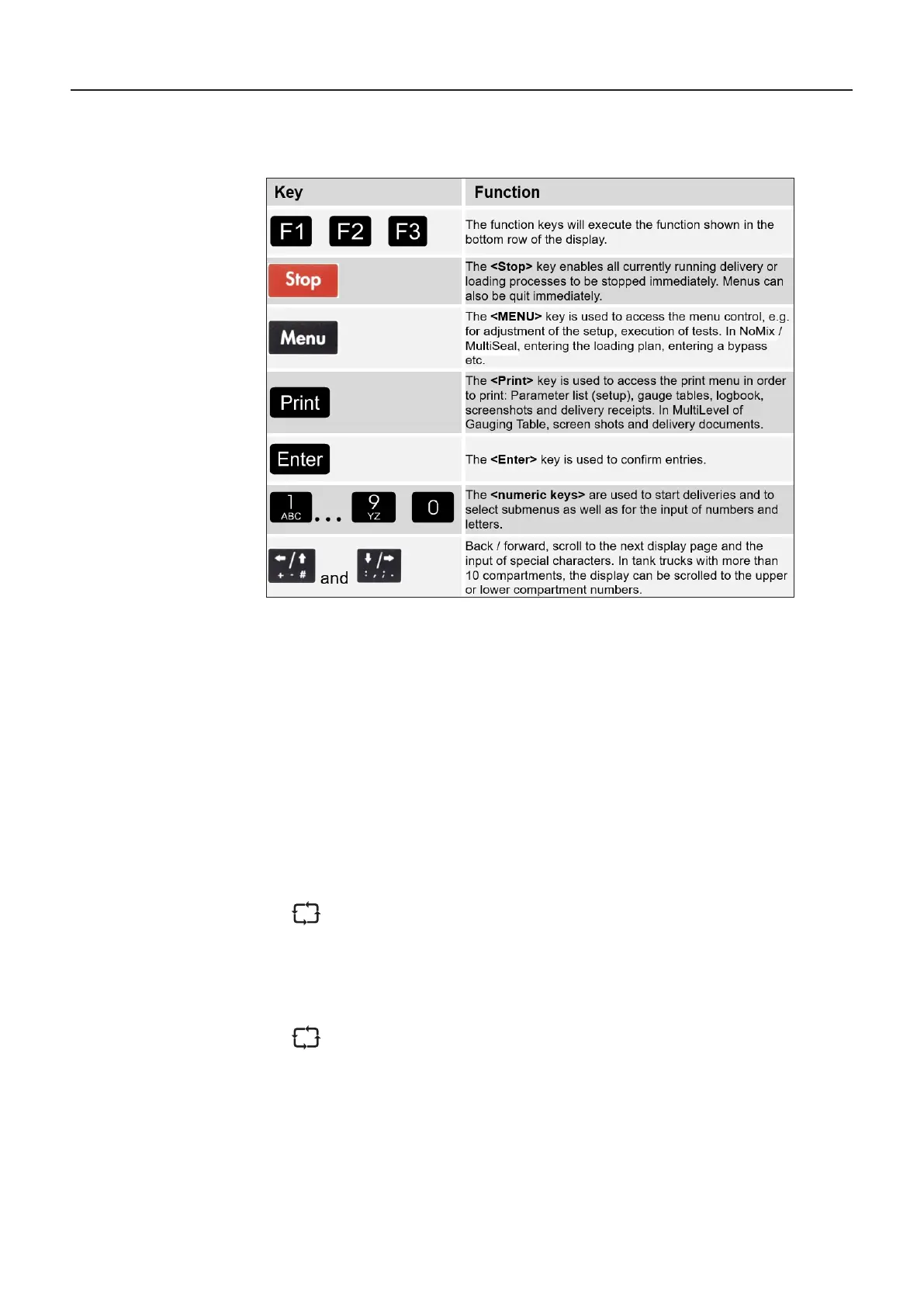
7.1.3. Display Interface – Keyboard Functions Definition of Symbols and
Key Functions
Table 1: Key functions
Important functions and inputs
• Entering the parameters / SETUP (adaptation of the MultiLevel system to different tank
truck variants)
• Execution of tests during commissioning and troubleshooting
• Printout of the MultiLevel delivery receipts
• Printout of: parameter list (setup), gauge tables, logbook, screenshots
• Starting/stopping the delivery
• Display of detailed error messages
The sealing status is displayed permanently in the transport display in the status
line (top line), such as:
• SEALED
• UNSEALED
• EMPTY
Furthermore, the product quality, the compartment status EMPTY (E) or FULL
(F) and the compartment sealing status are displayed for each compartment:
• SEAL
• 2B-SEAL (manual / second seal during loading)
• 2A-SEAL (manual / second seal during delivery)











 To Next Page