MX32v2
ANALOG AND DIGITAL CONTROLLER
USER MANUAL
Revision D.0
7.2 Navigation Key Functions
Vertical displacement in the selected menu block.
Horizontal displacement between two menu blocks.
Validation of the selected line.
Return to previous screen.
Table 10: Function of the navigation keys
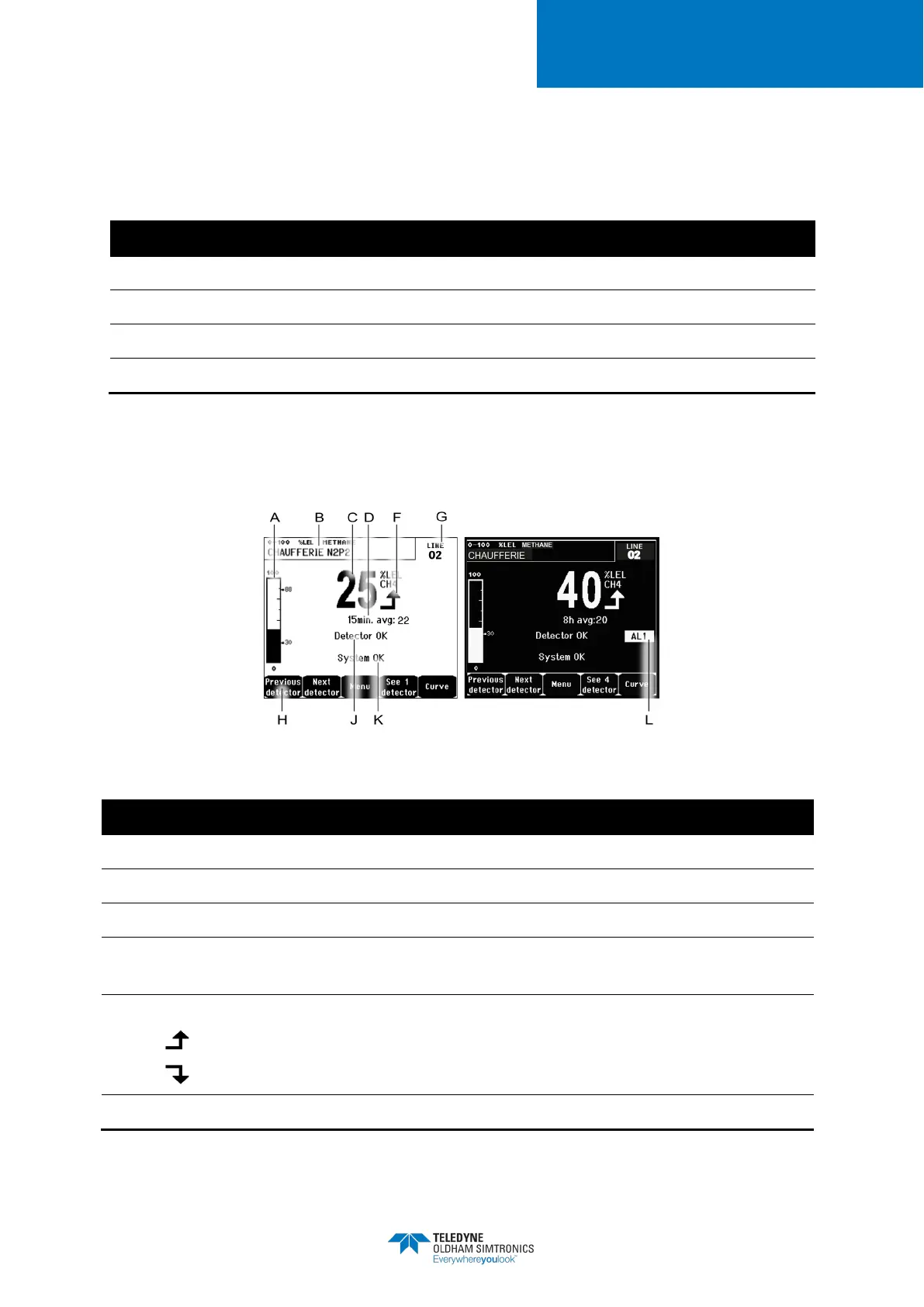
7.3 Display in normal modeMeasurement Display
Figure 35: Example of the measurement display in normal mode and in grayscale mode
Barograph with an indication of alarm limits.
Measurement range, gas detected, and detector language.
C.
Value of the current measurement with the unit and gas detected.
D.
Value of the average measurement if this function has been activated via the
COM 32
application and depending on the display settings (see
Display Settings
, on page 44).
Indicator of measurement trend
Ascending tendency
Descending tendency
G.
Address of digital detector on a digital line or channel number for a analog detector


 To Next Page