MX32v2
ANALOG AND DIGITAL CONTROLLER
USER MANUAL
Revision D.0
H.
Function keys.
Previous detector: Display of measurements of previous detector;
scanning of all the detectors on all
the lines.
: Display of
measurements of next detector; scanning of all the
detectors on all
the lines.
: Display of main menu See paragraph "Main menu" on page 44.
: Display of a group of 4 detectors (detector tag, barograph with
indication of alarms, value of current measurement with unit and gas detected). Use
the
or
keys
to display all of the next 4 detectors; passage to the
next zone is automatic.
: Display of a group of 8 detectors (detector tag, value of current
measurement with unit and gas detected). Other buttons similar to the selection.
detectors
.
: Display in normal mode (Figure 35).
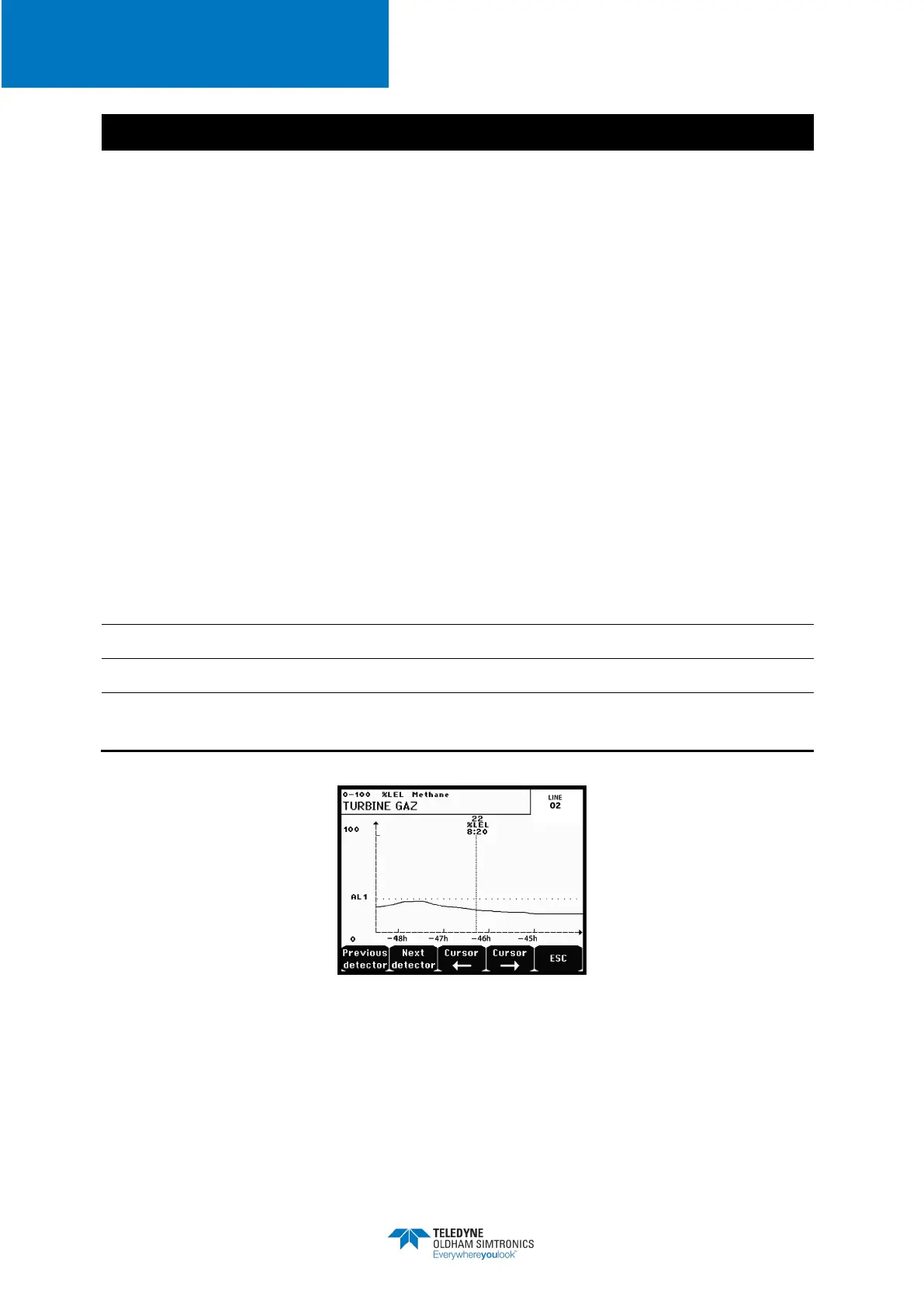
: Display of the measurement curves of the last 10 days (Figure 36). The
and
keys allow cursor displacement through the time scale. The vertical dotted line
displays the concentration and time stamp of the point being considered. Escape:
return to display of values.
J.
Information on the detector status.
K.
Information on the
MX32v2
status.
L.
Zone of indication of activated alarms with blinking threshold display.
changes to inverse video (Figure 35).
Figure 36: Example of a curve display screen


 To Next Page