BRAVO – Wireless Alarm Control Panel
31
BRAVO GPRS
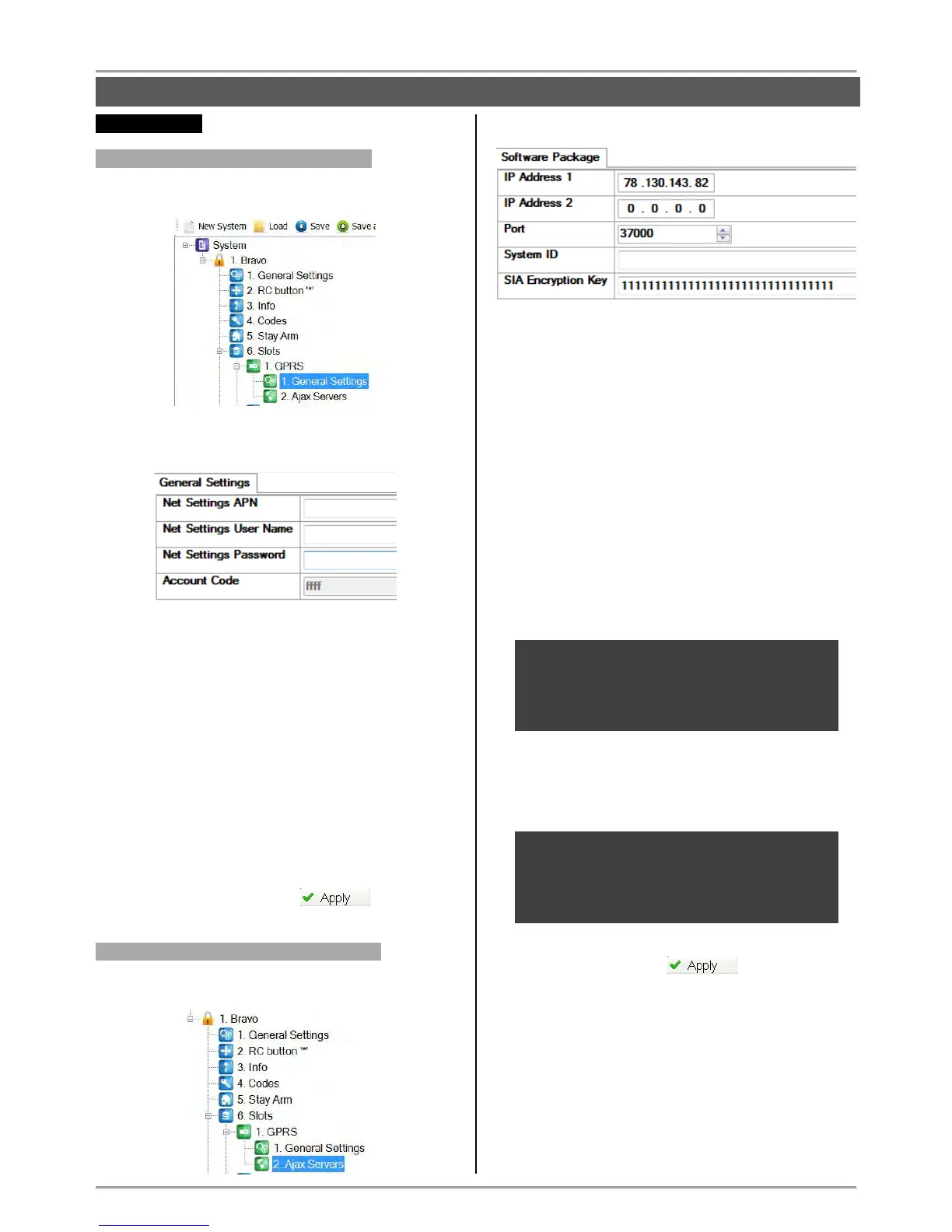
GPRS Settings “1. General Settings”
Select the “1. General Settings” submenu from main
menu “1. GPRS”:
At the right side of the screen are displayed the
following fields.
Net Settings APN
Net Settings User Name
Net Settings Password
Some specific GPRS settings are entered in the first
three fields. They are different for the different mobile
service providers.
Ask you mobile service provider if there is specific
information you have to fill in!
Account Code – Enter here the same account code
from the general “General Settings” menu. This
account code will be used for communication with
the monitoring server.
After setting all parameters in “1. General Settings”,
save the new configuration with button.
GPRS Settings “2. Software Package”
Select the “2. Ajax Servers” submenu from main menu
“1. GPRS”:
At the right side of the screen are available the following
settings:
IP Address 1 – Enter the IP-address of the PC,
where the Ajax SP PROFESSIONAL is installed.
IP Address 2 – Enter the IP-address of back-up Ajax
SP PROFESSIONAL.
Port – Enter number of port for communication.
Communication is established via UDP and TCP/IP
protocols.
The entered port number MUST be open
(available) for communication!
System ID – Enter a unique name (up to 15 symbols
- digits, letters or combination) for identification
between module and user in Ajax SP
PROFESSIONAL. It is possible for one user to be
associated to several modules, and the opposite -
several users to be associated to one module.
ATTENTION: The password in the field “SIA
Encryption Key” is used when registering the
module with Ajax SP PROFESSIONAL!
The password needs to be the same, in order for
the module to work correctly!



 To Next Page