BRAVO – Wireless Alarm Control Panel
32
BRAVO PSTN and PSTN VD
These are submenus for setting the parameters of the
connected to the panel PSTN communication modules.
The modules can transmit messages up to 4 telephone
numbers.
PSTN VD is a communication module with voice guiding
and remote control of the panel.
General Settings
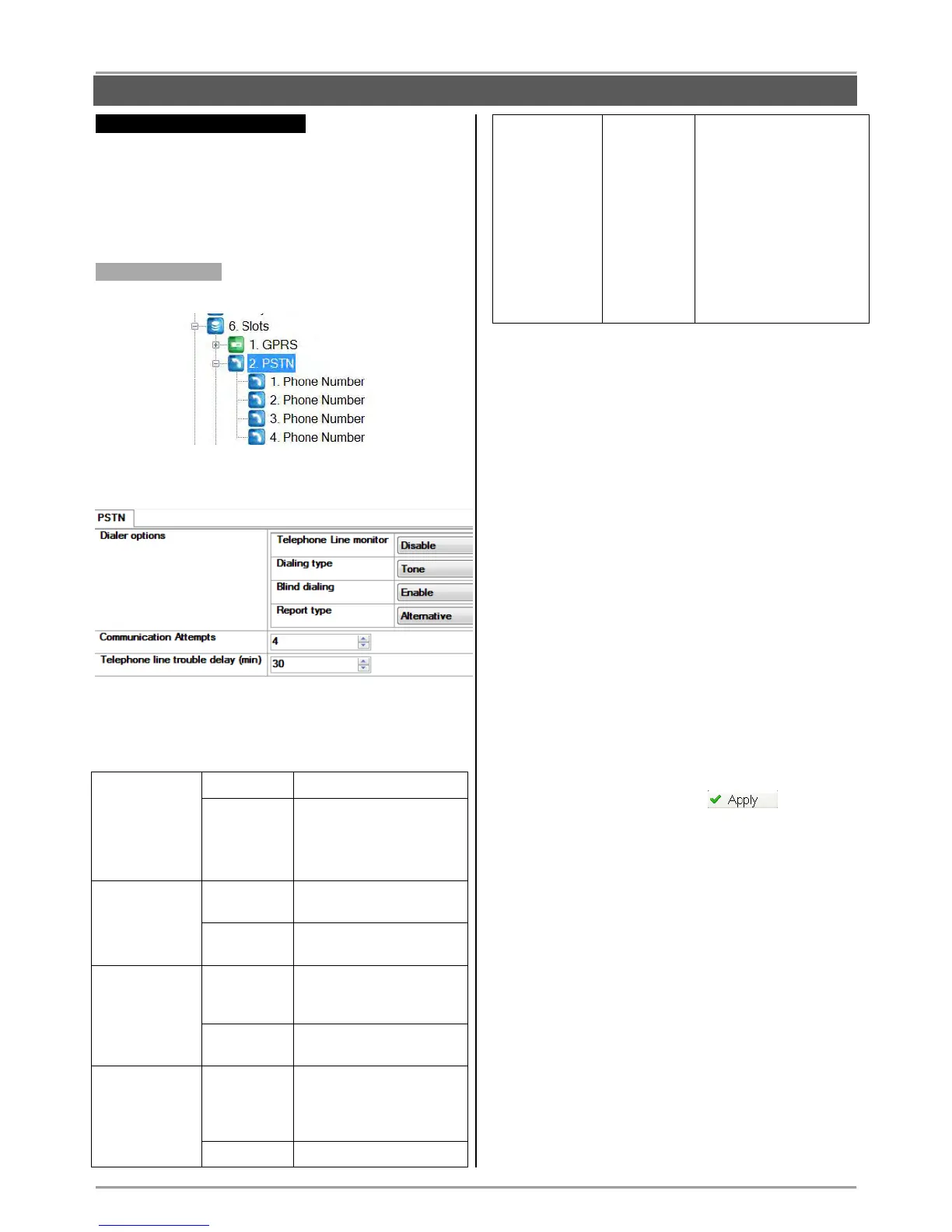
Select the submenu “2. PSTN”.
At the right side of the screen are displayed the
following parameters for programming:
Dialer options – Settings for communication PSTN
module. For every parameter can be set only one
option, which is selected from a drop-down menu.
The options has the following meaning:
* Note: If the alarm events are assigned to different
telephone numbers, the setting of this option does not
matter. In that case independent message report to
different telephone numbers is realized - “SPLIT
Report”.
Communication Attempts – Number of attempts for
communication with monitoring station. Enter a
number from 1 to 5.
The entered parameter represents the number of
attempts to be made for each of the telephone
numbers. If the value 4 is set and there are two
telephone numbers, the total number of attempts for
transmitting messages will be 8 - by 4 for every of
the phone numbers.
After the assigned number of attempts for
communication is reached, the attempts to transmit
messages will be terminated. The attempts to
transmit will be renewed to the central station first,
when the next transmission event occurs.
Telephone line trouble delay (min) – Setting a
delay in minutes in case of telephone line monitor
fault.
A delay from 1 to 255 minutes is set prior to
indication of a telephone line failure.
Save the new configuration with button.
Additional settings for communication module BRAVO
PSTN VD.
VD Options.
You can set more than one option for the voice dialer
operation. The option is enabled when the field next
to it is enabled:
- Report – Sending of report for event to user
through the programmed telephone numbers.
- Management – Management and control through
PSTN telephone line.
- Modem - Playing of audio file at successful
connection with a modem.
- Skip site name – The recording for the name of
the site will not be played at the beginning of the
message.



 To Next Page