NOTES, RESOURCES, ADDITIONAL INFORMATION | 57
To Capture, press and hold the Help key on Element’s Navigation Module for 5 seconds,
until CAPTURE appears in the source name displays. On the phone module, you will see
the assigned ID number in the upper left line icon position. You can change this by
pushing the adjacent line button. End Capture Mode by pressing the Enter key on the
Navigation Module.
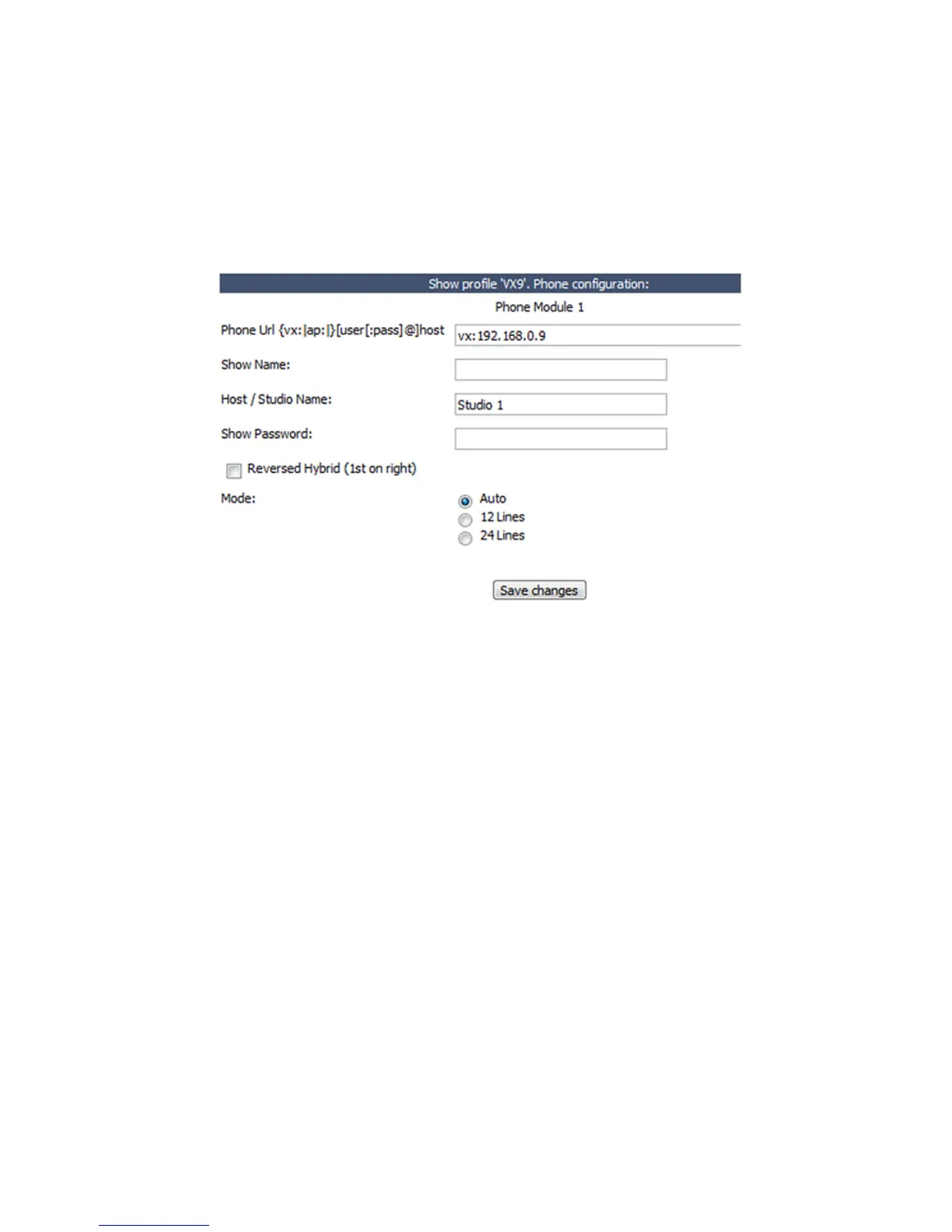
Enter your VX’s IP address. Use your Web browser to navigate to Element’s Sources and
Profiles -> Configuration -> Show Profiles web page. Select the Element Show Profile
you wish to configure, and click on Phone. In the Phone URL field, enter the IP address of
your VX. In the screenshot above, a VX IP address is shown as vx:192.168.0.9 where
192.168.0.9 is the IP of a VX Engine. You can also specify a username and password if
needed. (If you use the default settings, where the username is “user” and the password
is empty, you don’t need to enter anything.)
2. Configure your VX Studio and Shows. In the same screen where you entered VX IP num-
ber, you can enter a VX Studio name. In the Host /Studio Name: field, simply enter the
studio name you used in your VX’s configuration. In the example above, the VX Studio
name is “Studio 1.”If you wish to change a VX Show using an Element Show Profile,
simply specify the name of the VX Show you wish to load in the Show Name field. If you
leave it empty, no VX Show will be changed, and whichever show is currently loaded
will continue to be used. Leave the Show Password field empty. There are no passwords
for Shows in the Telos VX, so none are needed from the Element.
Configure other options. Element’s Call Controller module uses the left row of telephone
line selection buttons to control Hybrid 1, the right row to control Hybrid 2. If you wish to
use the right row of Call Controller buttons to control Hybrid 1 and the left row to control
Hybrid 2, click the Reversed Hybrid box.VX can be used in either 12 or 24 line mode. You
can select either Auto, 12 Lines or 24 Lines with the Mode Selection radio buttons. In 12
line mode, 12 lines are displayed on both columns of the Call Controller module; the left
key bank answers lines on Hybrid 1, the right keys answer lines on Hybrid2. In 24 line
mode, both left and right key banks will answer lines using Hybrid 1. To answer lines
on any other hybrid, operators will use the module’s SET key to choose which hybrid
to use. Selecting “Auto” uses the configuration of the VX Show to dynamically set the
number of lines used.



 To Next Page