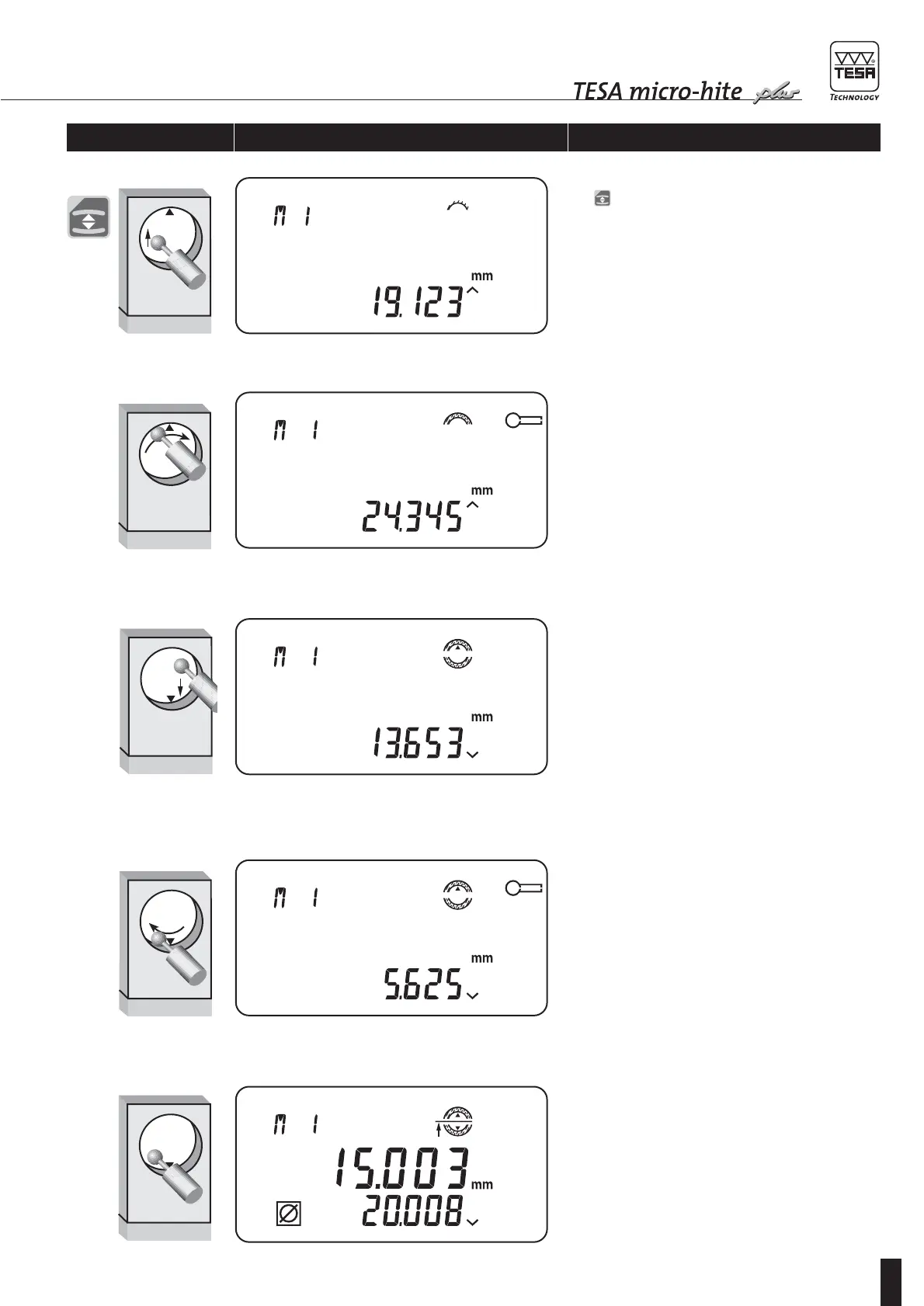
2 Release measurement cycle by pressing function
key or shortly rotating the power control twice in
the direction you wish probe contact to be started.
Starting probing operation
As probe insert is moving, display shows its dis-
placement continuously. Probe symbol appears as
soon as the insert has stabilised after contacting
the workpiece feature. Move the workpiece (or the
vertical column) sideways for automatic detection
of the culmination point, which is signalled by a
beep sound while relevant probe symbol is being
highlighted. This point must be probed once
(default setting). But, you may also choose to travel
past the culmination point twice by pressing
ENTER. If the difference between both points is
exceeding 10 µm, a beep warns you to restart prob-
ing procedure. Selected option remains stored for
all subsequent measurements taken with detection
of the culmination point. To return to the default
option, press ENTER again or switch your height
gauge off.
3
4
Once first measurement cycle has been completed,
displays shows probe insert moving down, contin-
uously. Probe displacement can be accelerated by
rotating the power control.
5 Proceed in the same way to carry out second meas-
urement cycle.
6 Probing procedure is ended. Measured values are
normally displayed.
Enabling keys/gauge Displaying Explanation









 To Next Page