14
4.2
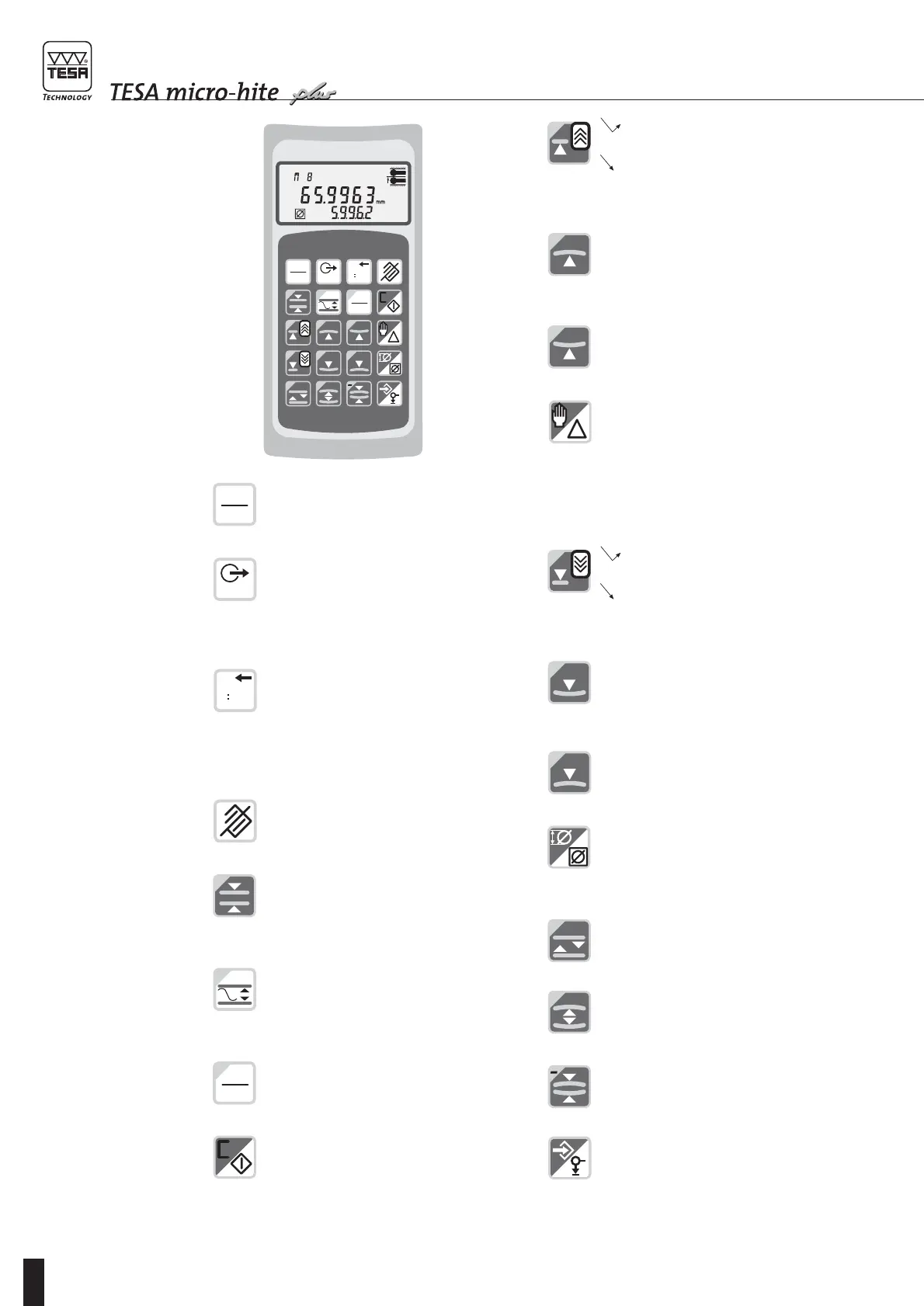
1D control panel
with function keys
(N° 00760216)
Press this key to turn the height gauge on
or off and keep pressing (> 0.6 s) to get
confirmation.
Press shortly (< 0.6 s) to transfer the value
from main display to a peripheral device.
Keep pressing this key (> 0.6 s) to transfer
full table contents (including up to 99
numbered values) to a peripheral device.
Press to reset counter to zero. This key
also allows headings to be printed provid-
ing the relevant dip switches are appropri-
ately set to enable language selection.
Note: Press CANCEL key to restore earlier
version of the measurement table.
Press to cancel last function or probing
operation.
Press to measure the centre, then the
width of a rib.
Press to measure parallelism or run-out
errors.
Press to switch over from a unit system to
another. Whenever the gauge height is
turned off, selected unit remains stored.
Press to cancel captured reference and
return to menu St1/2 for taking a new one
along with probe constant if you wish to.
This key also allows you to return to ST1/2
from any menu.
Press shortly (< 6 s) to probe up.
Keep pressing this key (>0,6 s) to move
the probe up quickly (30 mm/s). Probe will
stop moving as soon as you release it.
Press to probe up with detection of the
highest culmination point.
Press to probe up with detection of the
lowest culmination point.
Press Delta to enable the difference
between the last two probe contacts to be
calculated and further displayed.
Pressing the hand allows manual input of
numbered values for delta based calcula-
tion. The value that refers to the master
piece can also be changed in this way.
Press shortly (<0,6 s) to probe down.
Keep pressing this key (>0,6 s) to move
the probe down quickly (30 mm/s). Probe
will stop moving as soon as you release it.
Press to probe down with detection of the
lowest culmination point
Press to probe down with detection of the
highest culmination point.
Press for temporary or continuous dis-
playing of the bore or shaft diameter or the
width of a groove or a rib (difference
between two probe contacts).
Press to measure the centre, then the
width of a groove.
Press to measure both the centre and
diameter of a bore.
Press to measure both the centre and
diameter of a shaft.
Press to acknowledge any operation or
input a PRESET value.
The ENTER key permits to validate the
measured value if stabilisation is not yet
completed or preset time is infinite (dip
switch 3 set on ON).









 To Next Page