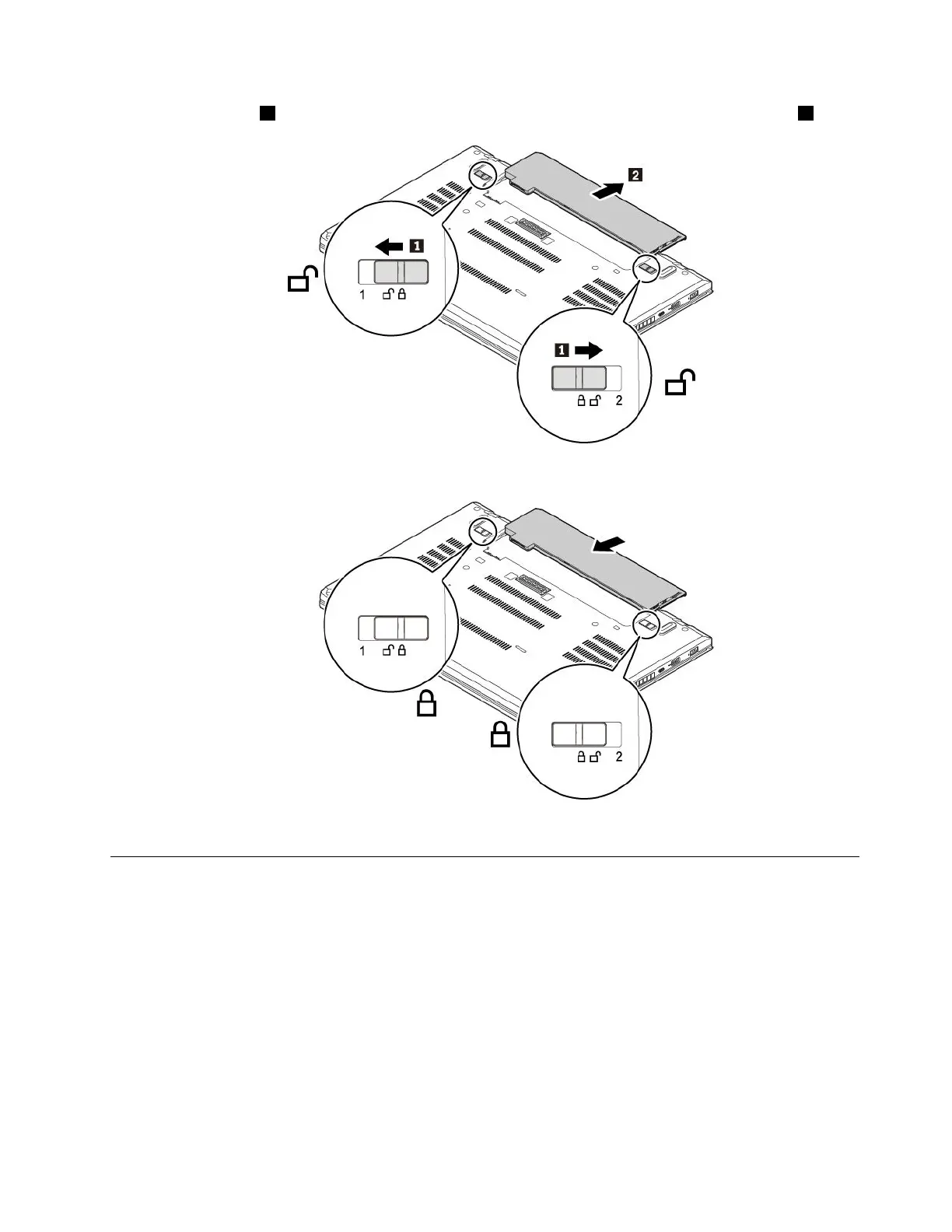
4.Slidethelatches1totheunlockedpositionandholdthemthere,andthenremovethebattery2.
5.Insertanewbatteryuntilitclicksintoplace.Ensurethatthelatchesareinthelockedpositions.
6.Turnthecomputerover.Connecttheacpoweradapterandallcablestothecomputer.
ReplacingthemicroSIMcard
Beforeyoustart,read“Importantsafetyinformation”onpagevandprintthefollowinginstructions.
MicroSIMcardisasmallplasticcardwithanIntegratedCircuit(IC)chipmountedononesideofthecard.
ToreplacethemicroSIMcard,dothefollowing:
1.Disablethebuilt-inbattery.See“Disablingthebuilt-inbattery”onpage107.
2.Closethecomputerdisplayandturnthecomputerover.
3.Removetheremovablebattery.See“Replacingtheremovablebattery”onpage108.
Chapter9.Replacingdevices109



 To Next Page