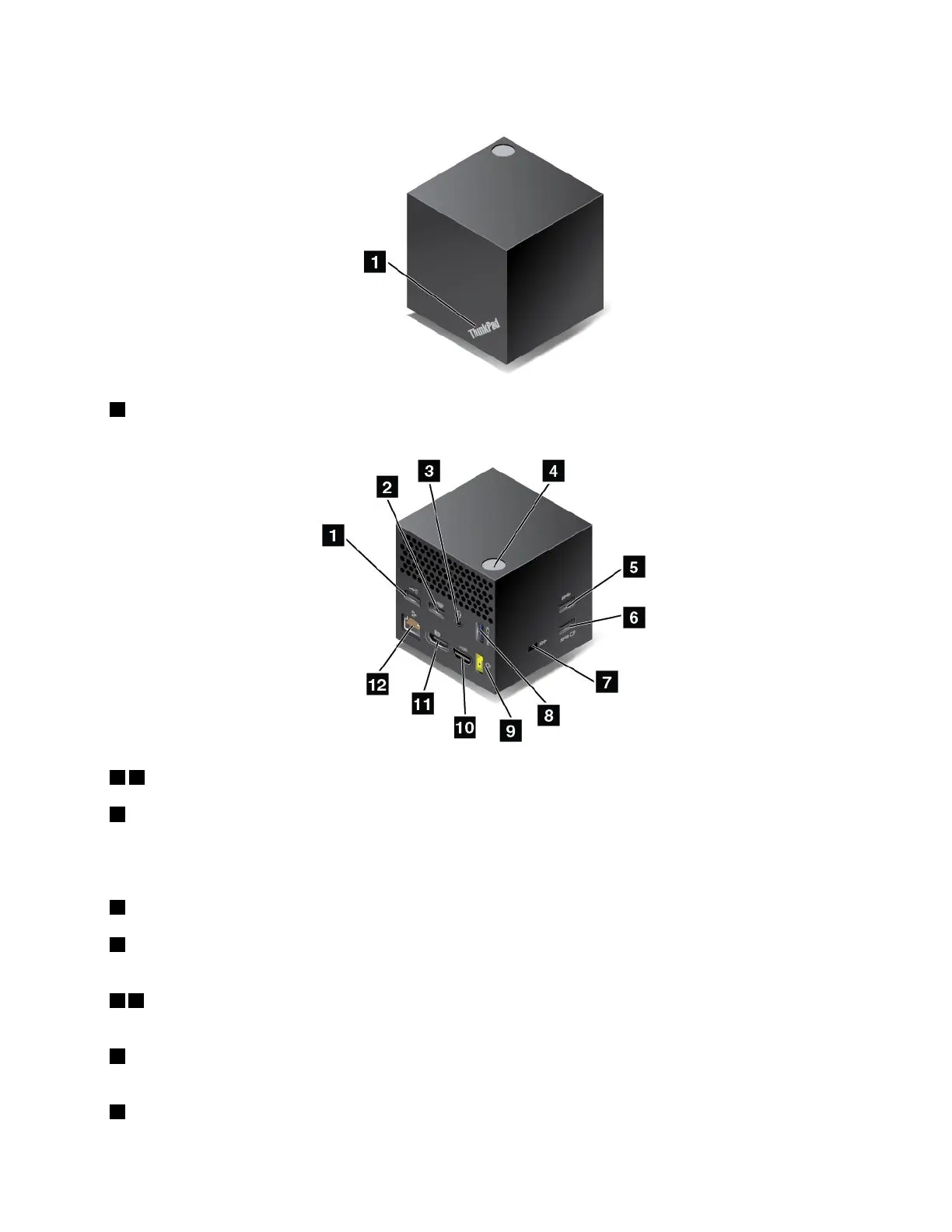
ThinkPadWiGigDockoverview
1Statusindicator:TheindicatorintheThinkPadlogoshowsthestatusofthedock.Theindicatorissolid
onwhenthedockison(innormalmode).
12USB2.0connectors
5USB3.0connector
ConnectUSB-compatibledevices,suchasaUSBkeyboard,aUSBmouse,aUSBstoragedevice,ora
USBprinter.
3Audioconnector:Connectheadphonesoraheadsetwitha3.5-mm(0.14-inch),4-poleplug.
4Power/Connectionbutton:Turnonorturnoffthedock.Youcanalsopressthebuttontoconfirm
theconnection.
68AlwaysOnUSB3.0connector:ConnectUSB-compatibledevicesorchargesomemobiledigital
devicesandsmartphones.
7Security-lockslot:Toprotectyourdockfromtheft,lockyourdocktoadesk,table,orother
non-permanentfixture.Useasecuritycablelockthatfitsthissecurity-lockslot.
9acpowerconnector:Connecttheacpoweradapter.
Chapter3.Enhancingyourcomputer47



 To Next Page