Replacingawireless-WANcard
Thefollowinginformationisonlyappliestocomputermodelswithuser-installablemodules.
Beforeyoustart,read“Importantsafetyinformation”onpagev
andprintthefollowinginstructions.
DANGER
Duringelectricalstorms,donotperformanyreplacementanddonotconnectordisconnectthe
telephonecablefromthetelephoneoutletonthewall.
Attention:Beforeyoustartinstallingawireless-WANcard,touchametaltableoragroundedmetalobject.
Thisactionreducesanystaticelectricityfromyourbody.Staticelectricitycoulddamagethecard.
Somecomputersmightcomewithawireless-WANcard.Toreplacethewireless-WANcard,dothefollowing:
1.Disablethebuilt-inbattery.See“Disablingthebuilt-inbattery”onpage107.
2.Ensurethatthecomputeristurnedoffanddisconnectedfromacpowerandallcables.
3.Closethecomputerdisplayandturnthecomputerover.
4.Removetheremovablebattery.See“Replacingtheremovablebattery”onpage108.
5.Removethebasecoverassembly.See“Replacingthebasecoverassembly”onpage110.
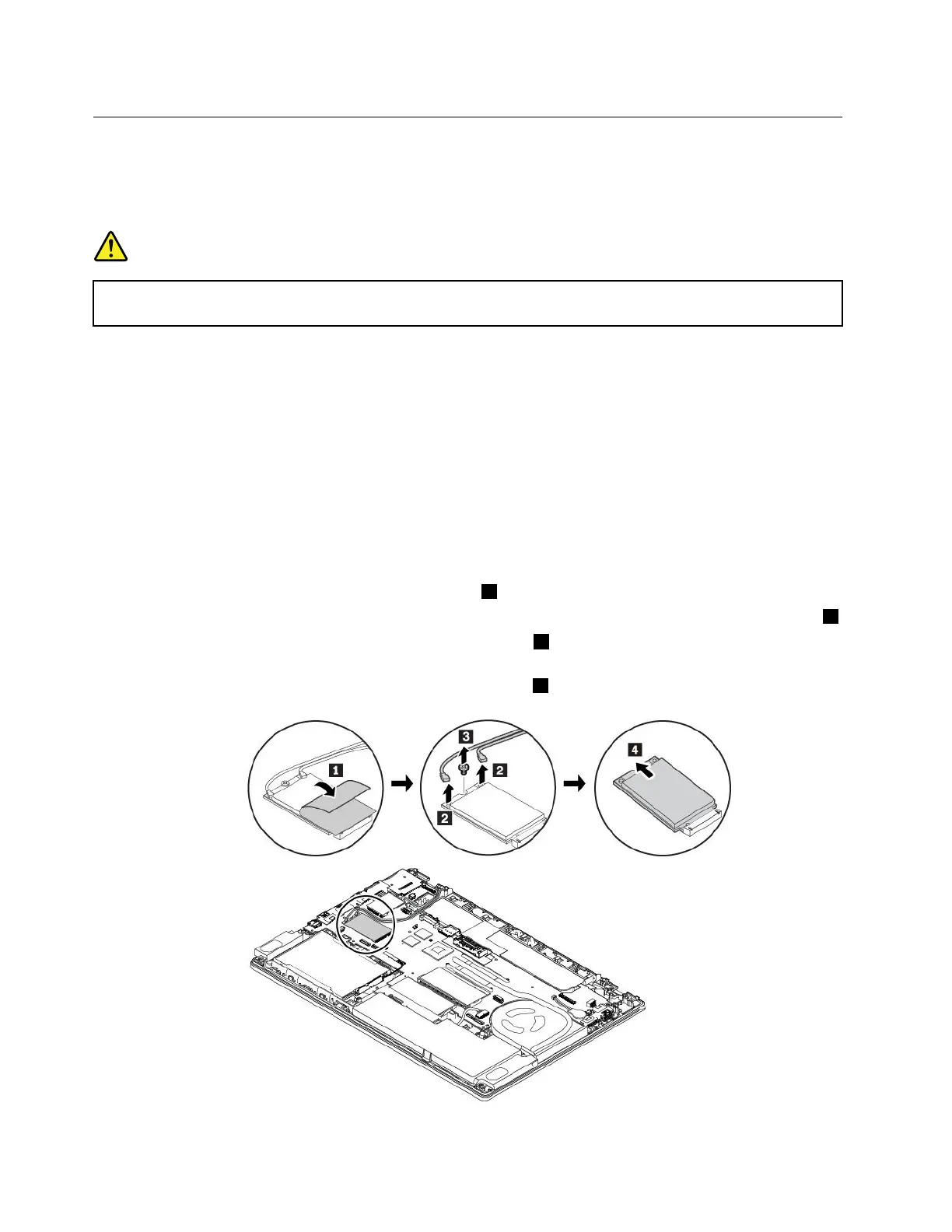
6.Toremovethewireless-WANcard,dothefollowing:
a.Openthefilmtoaccessthewireless-WANcard1.
b.Holdthecableconnectorwithyourfingersandgentlydisconnecteachcablefromthefailingcard2.
c.Removethescrewthatsecuresthewireless-WANcard3.Thecardisreleasedfromthesecured
positionandpivotsupward.
d.Carefullyremovethewireless-WANcardoutoftheslot4.
122T470UserGuide



 To Next Page