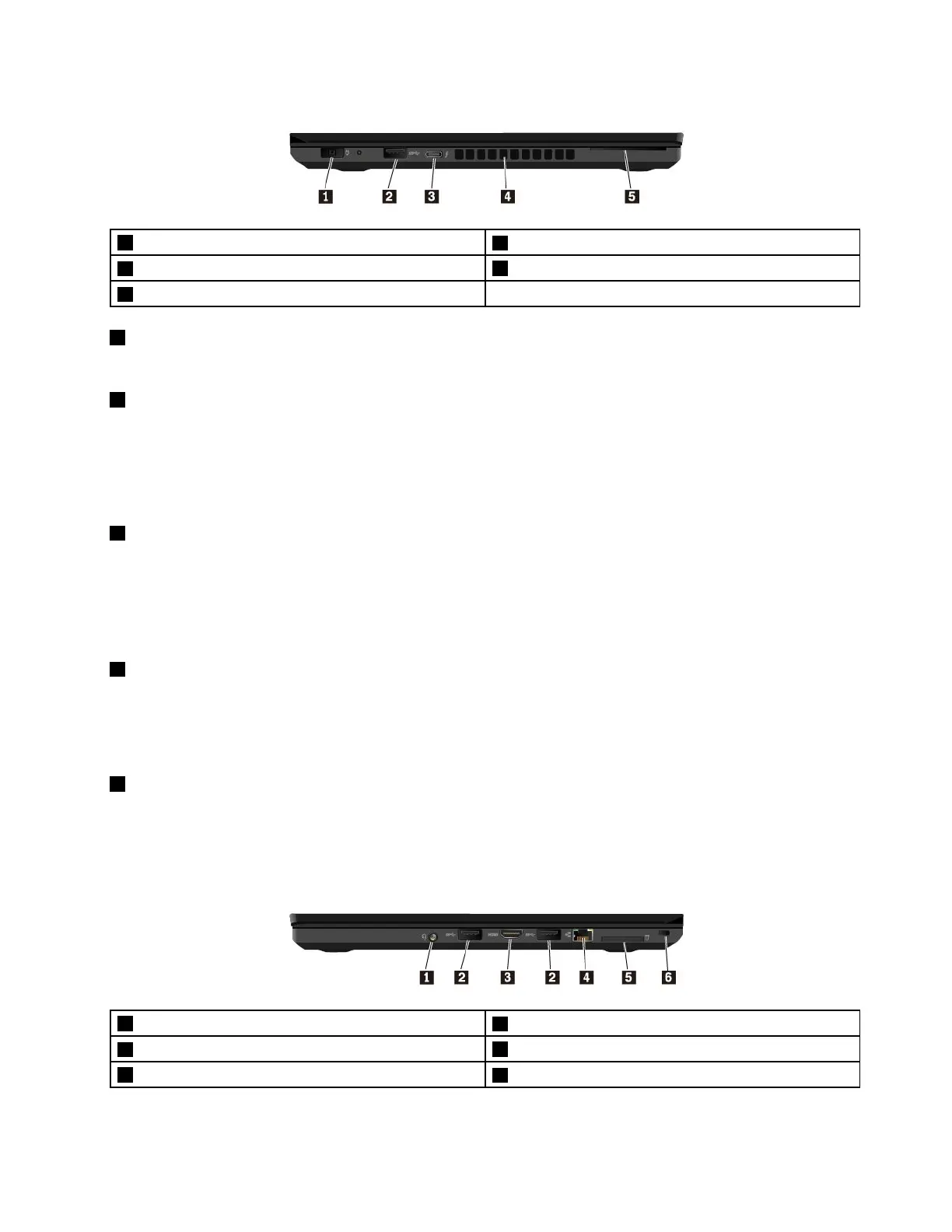
Left-sideview
1Powerconnector
2USB3.0connector
3USB-Cconnector(Thunderbolt™3compatible)
4Fanlouvers
5Smart-cardslot(availableonsomemodels)
1Powerconnector
Thepowerconnectorenablesyoutoconnectthecomputertoacpower.
2USB3.0connector
YoucanusetheUSB3.0connectorstoconnectUSB-compatibledevices,suchasaUSBkeyboard,USB
mouse,USBstoragedevice,orUSBprinter.
Attention:WhenyouattachaUSBcabletothisconnector,ensurethattheUSBmarkisfacingupward.
Otherwisetheconnectormightgetdamaged.
3USB-Cconnector(Thunderbolt™3compatible)
TheUSB-CconnectoriscompatiblewiththeUSBType-Cstandardthatsupportspowerdelivery,data
transfer,videooutput,andsoon.ThisconnectoralsosupportstheThunderbolt3protocol.
LenovoprovidesvariousUSB-Caccessoriestohelpyouexpandyourcomputerfunctionality,suchasa
USB-CtoVGAAdapter.Formoreinformation,gotohttp://www.lenovo.com/essentials.
4Fanlouvers
Thefanlouversandinternalfanenableairtocirculateinthecomputertoensurepropercooling,especially
thecoolingofthemicroprocessor.
Note:Toensureproperairflow,donotplaceanyobstaclesinfrontofthefanlouvers.
5Smart-cardslot(availableonsomemodels)
Youcanusesmartcardsforauthentication,datastorage,andapplicationprocessing.Withinlarge
organizations,youmightalsousesmartcardsforstrongsecurityauthenticationofsinglesign-on(SSO).For
moreinformation,see“UsinganExpressCard,amediacard,orasmartcard”onpage34.
Right-sideview
1Audioconnector
2USB3.0connectors
3HDMI™connector
4Ethernetconnector
5Media-cardslot
6Security-lockslot
Chapter1.Productoverview3



 To Next Page