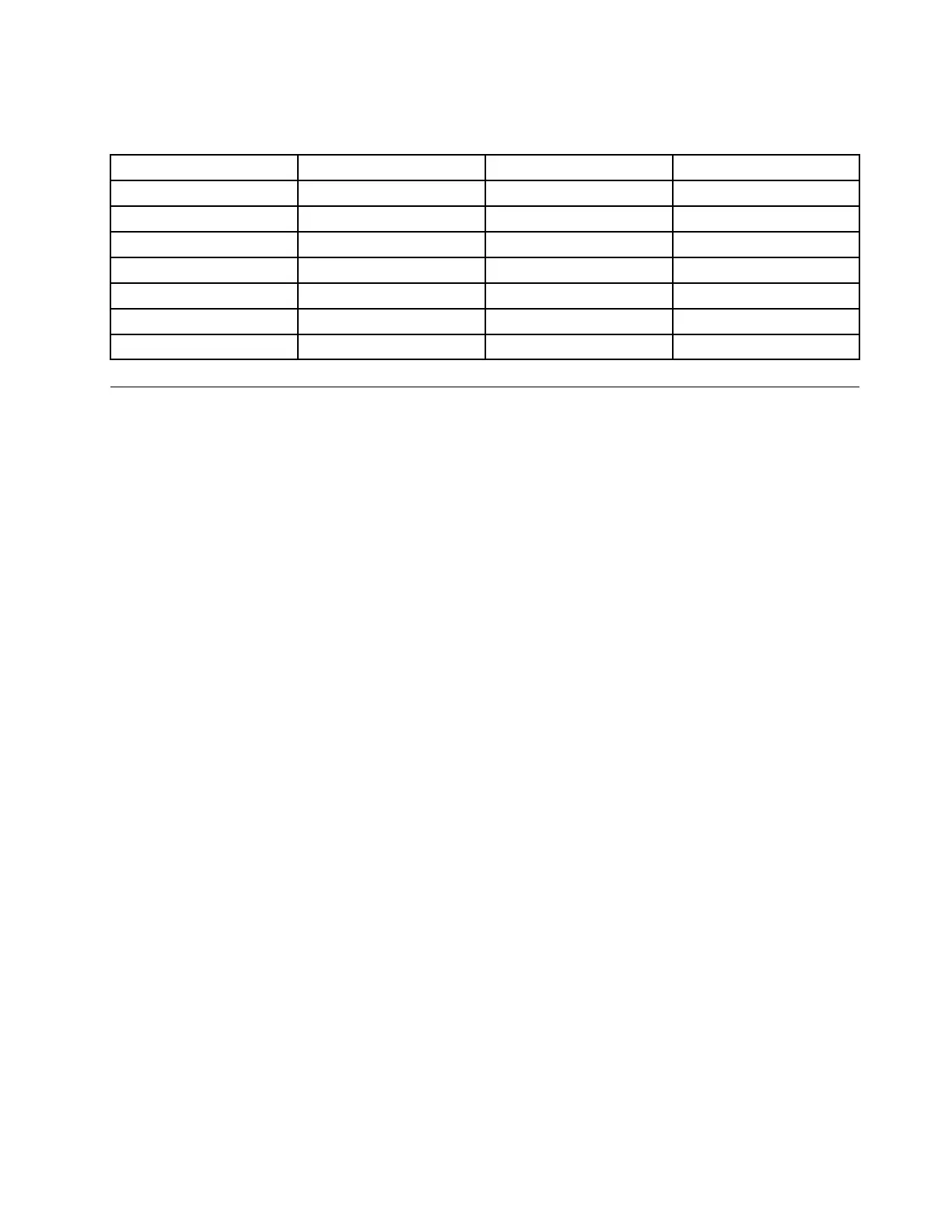
WhenyouinstalltheWindows10operatingsystem,youmightneedoneofthefollowingcountryorregion
codes:
CountryorregionCodeCountryorregionCode
ChinaSC
NetherlandsNL
DenmarkDKNorway
NO
FinlandFI
SpainSP
FranceFR
SwedenSV
GermanyGR
TaiwanandHongKong
TC
ItalyIT
UnitedStatesUS
JapanJP
Installingdevicedrivers
Devicedriversareprogramsthatcontaininstructionsfortheoperatingsystemabouthowtooperateor
“drive”acertainpieceofhardware.Eachhardwarecomponentonyourcomputerhasitsownspecific
driver.Ifyouaddacomponent,theoperatingsystemmustbeinstructedonhowtooperatethatpieceof
hardware.Afteryouinstallthedriver,theoperatingsystemcanrecognizethehardwarecomponentand
understandhowtouseit.
Note:Becausedriversareprograms,likeanyotherfileonyourcomputer,theyaresusceptibletocorruption
andmightnotperformproperlyifcorruptionoccurs.
Itisnotalwaysnecessarytodownloadthelatestdrivers.However,youshoulddownloadthelatestdriverfor
acomponentwhenyounoticepoorperformancefromthatcomponentorwhenyouaddedacomponent.
Thisactionmighteliminatethedriverasthepotentialcauseofaproblem.
GettingthelatestdriversfromtheWebsite
YoucandownloadandinstallupdateddevicedriversfromtheLenovoSupportWebsitebydoingthe
following:
1.Gotohttp://www.lenovo.com/support.
2.Selecttheentryforyourcomputerandthenfollowtheinstructionsonthescreentodownloadand
installnecessarysoftware.
Gettingthelatestdriversusingpreinstalledprograms
ThinkPadnotebookcomputersprovidethefollowingpreinstalledprogramsthatyoucanusetodownload
andinstallupdateddevicedrivers.
•ForWindows7:SystemUpdate
•ForWindows10:LenovoCompanion
ThesystemupdatefunctionofSystemUpdateorLenovoCompanionhelpsyoukeepthesoftwareonyour
computerup-to-date.UpdatepackagesarestoredonLenovoserversandcanbedownloadedfromthe
LenovoSupportWebsite.Updatepackagescancontainapplications,devicedrivers,UEFIBIOSflashes,
orsoftwareupdates.WhenSystemUpdateorLenovoCompanionconnectstotheLenovoSupportWeb
site,theprogramautomaticallyrecognizesthefollowinginformationanddetermineswhatupdatesare
availableforyourcomputer:
•Machinetypeandmodelofyourcomputer
•Installedoperatingsystem
•Languageoftheoperatingsystem
Chapter6.Advancedconfiguration69



 To Next Page