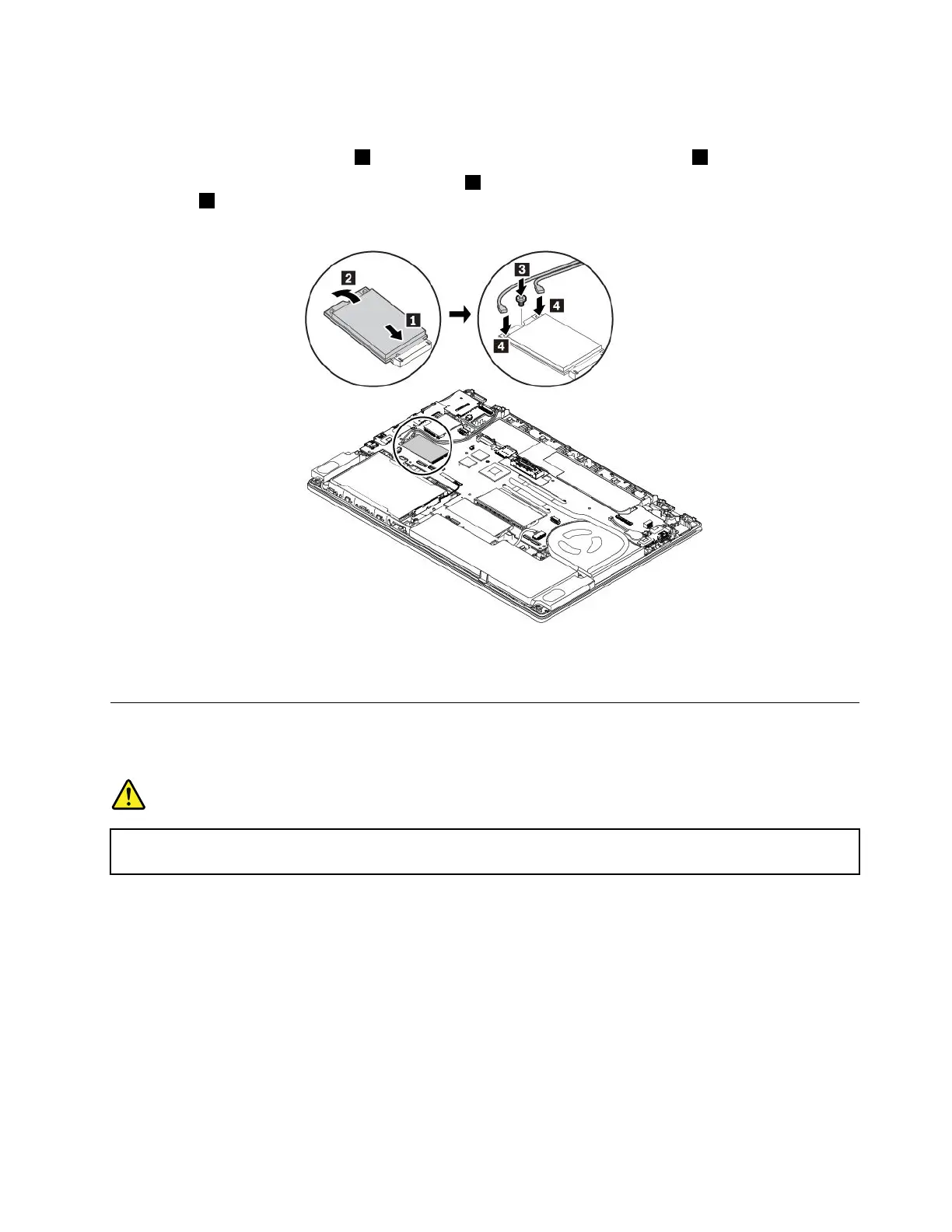
7.Toinstallanewwireless-WANcard,dothefollowing:
a.Alignthenotchededgeofthenewwireless-WANcardwiththeslotkeyintheslot.Thencarefully
insertthecardintotheslot1.Pivotthenewwireless-WANcarddownward2.
b.Installthescrewtosecurethecardinplace3.Connecttheantennacablestothenewwireless-WAN
card
4.Ensurethatyouconnecttheorangecabletothemainconnectoronthecard,andtheblue
cabletotheauxiliaryconnectoronthecard.
8.Reinstallthebasecoverassemblyandtheremovablebattery.
9.Turnthecomputerover.Connecttheacpoweradapterandallcablestothecomputer.
ReplacinganM.2solid-statedriveinthewireless-WAN-cardslot
Beforeyoustart,read“Importantsafetyinformation”onpagevandprintthefollowinginstructions.
DANGER
Duringelectricalstorms,donotperformanyreplacementanddonotconnectordisconnectthe
telephonecablefromthetelephoneoutletonthewall.
Attention:BeforeyoustartinstallinganM.2solid-statedrive,touchametaltableoragroundedmetal
object.Thisactionreducesanystaticelectricityfromyourbody.Staticelectricitycoulddamagethedrive.
SomecomputersmightcomewithanM.2solid-statedriveinthewireless-WAN-cardslot.Toreplacethe
M.2solid-statedrive,dothefollowing:
1.Disablethebuilt-inbattery.See“Disablingthebuilt-inbattery”onpage107.
2.Ensurethatthecomputeristurnedoffanddisconnectedfromacpowerandallcables.
3.Closethecomputerdisplayandturnthecomputerover.
4.Removetheremovablebattery.See“Replacingtheremovablebattery”onpage108.
5.Removethebasecoverassembly.See“Replacingthebasecoverassembly”onpage110.
Chapter9.Replacingdevices123



 To Next Page