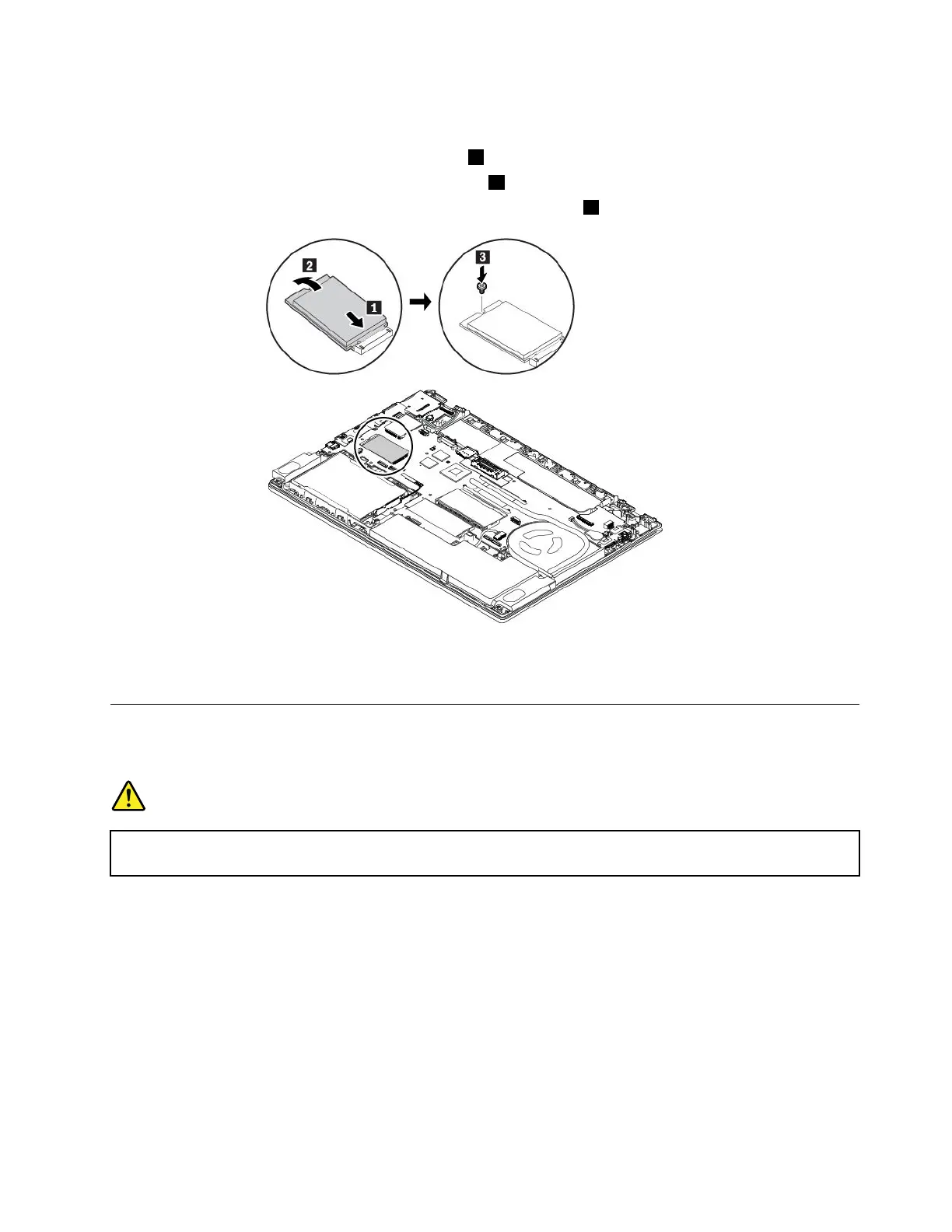
7.ToinstallanewM.2solid-statedrive,dothefollowing:
a.AlignthenotchededgeofthenewM.2solid-statedrivewiththeslotkeyintheslot.Thencarefully
inserttheM.2solid-statedriveintotheslot1.
b.PivotthenewM.2solid-statedrivedownward2.
c.InstallthescrewtosecuretheM.2solid-statedriveinplace3.
8.Reinstallthebasecoverassemblyandtheremovablebattery.
9.Turnthecomputerover.Connecttheacpoweradapterandallcablestothecomputer.
Replacingthekeyboard
Beforeyoustart,read“Importantsafetyinformation”onpagevandprintthefollowinginstructions.
DANGER
Duringelectricalstorms,donotperformanyreplacementanddonotconnectordisconnectthe
telephonecablefromthetelephoneoutletonthewall.
Toremovethekeyboard,dothefollowing:
1.Disablethebuilt-inbattery.See“Disablingthebuilt-inbattery”onpage107.
2.Ensurethatthecomputeristurnedoffanddisconnectedfromacpowerandallcables.
3.Closethecomputerdisplayandturnthecomputerover.
4.Removetheremovablebattery.See“Replacingtheremovablebattery”onpage108.
Chapter9.Replacingdevices125



 To Next Page