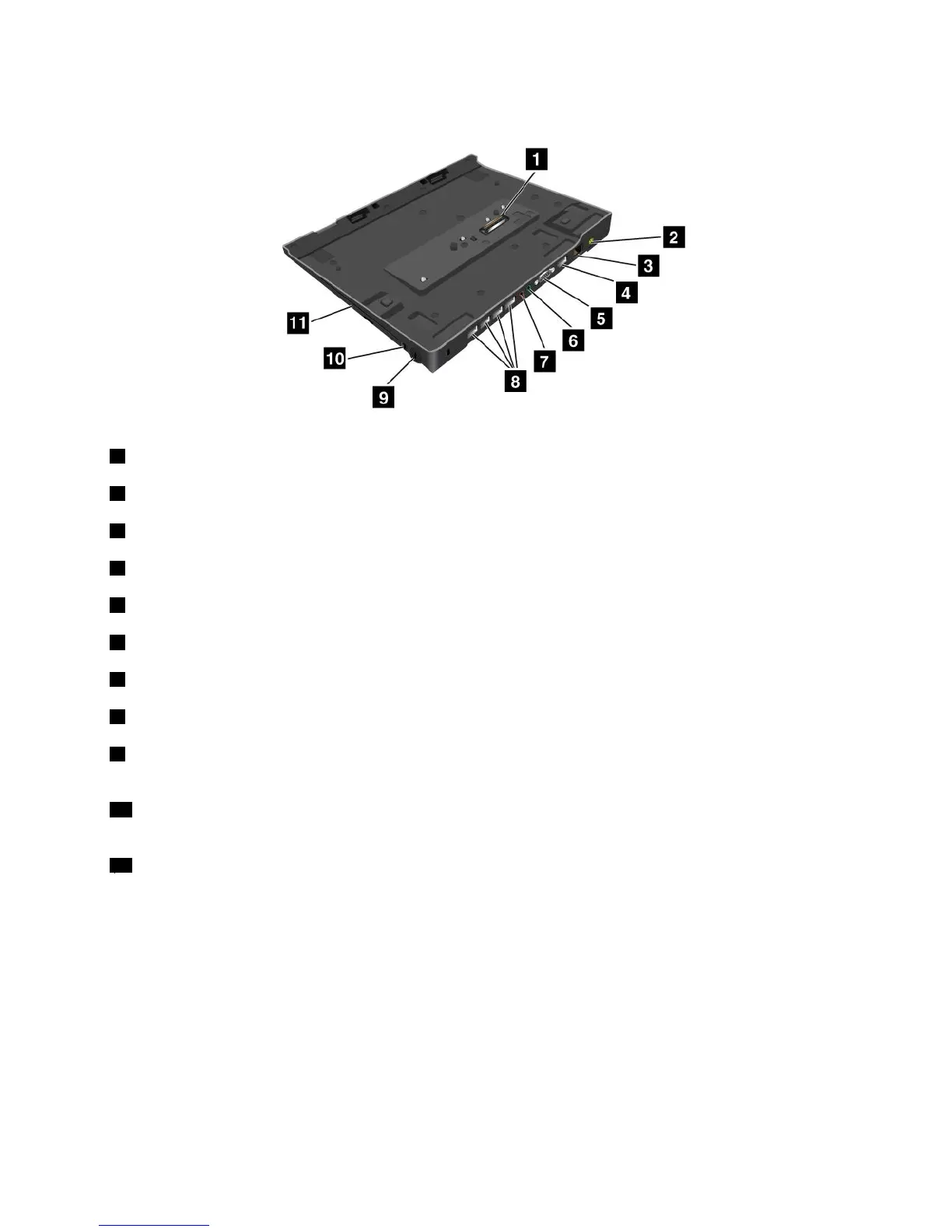
Topview
1Dockingstationconnector:Thisiswhereyouattachyourcomputer.
2Powerjack:Connecttheacpoweradapter.
3Ethernetconnector:ConnecttheThinkPadUltraBaseSeries3toanEthernetLAN.
4DisplayPortconnector:Connectadisplaydevice.
5Monitorconnector:Connectanexternalmonitororprojector.
6Headphonejack:1/8inch(3.5mm)indiameter.Useittoconnectanexternalheadphone.
7Microphonejack:1/8inch(3.5mm)indiameter.Useittoconnectanexternalmicrophone.
8USB2.0connectors:ConnectUSB2.0compatibledevices.
9Securitykeyhole:UseasecuritycablelockthattsthiskeyholetolockyourThinkPadUltraBaseSeries3
toastationaryobjecttoprotectitfromtheft.
10Systemlockkey:Usethesystemlockkeytolocktheejectbutton.Whentheejectbuttonislocked,you
cannotattachorremoveyourcomputer.
11Drivebay:Installanopticaldrive(DVD-ROMdrive)orasecondharddiskdrive.
Chapter7.Enhancingyourcomputer93



 To Next Page