Securityfeature
UsethesecuritykeyholeontheThinkPadportreplicatorordockingstationtoattachamechanicallock.By
attachingamechanicallock,youcansecuretheportreplicatorordockingstationtoastationaryobject,
suchasadesk,toprotectyourportreplicatorordockingstationfromtheft.Mechanicallocksindifferent
sizesareavailablefromLenovoasoptions.
Note:Youareresponsibleforevaluating,selecting,andimplementingthelockingdeviceandsecurity
feature.Lenovomakesnocomments,judgments,orwarrantiesaboutthefunction,quality,orperformance
ofthelockingdeviceorsecurityfeature.
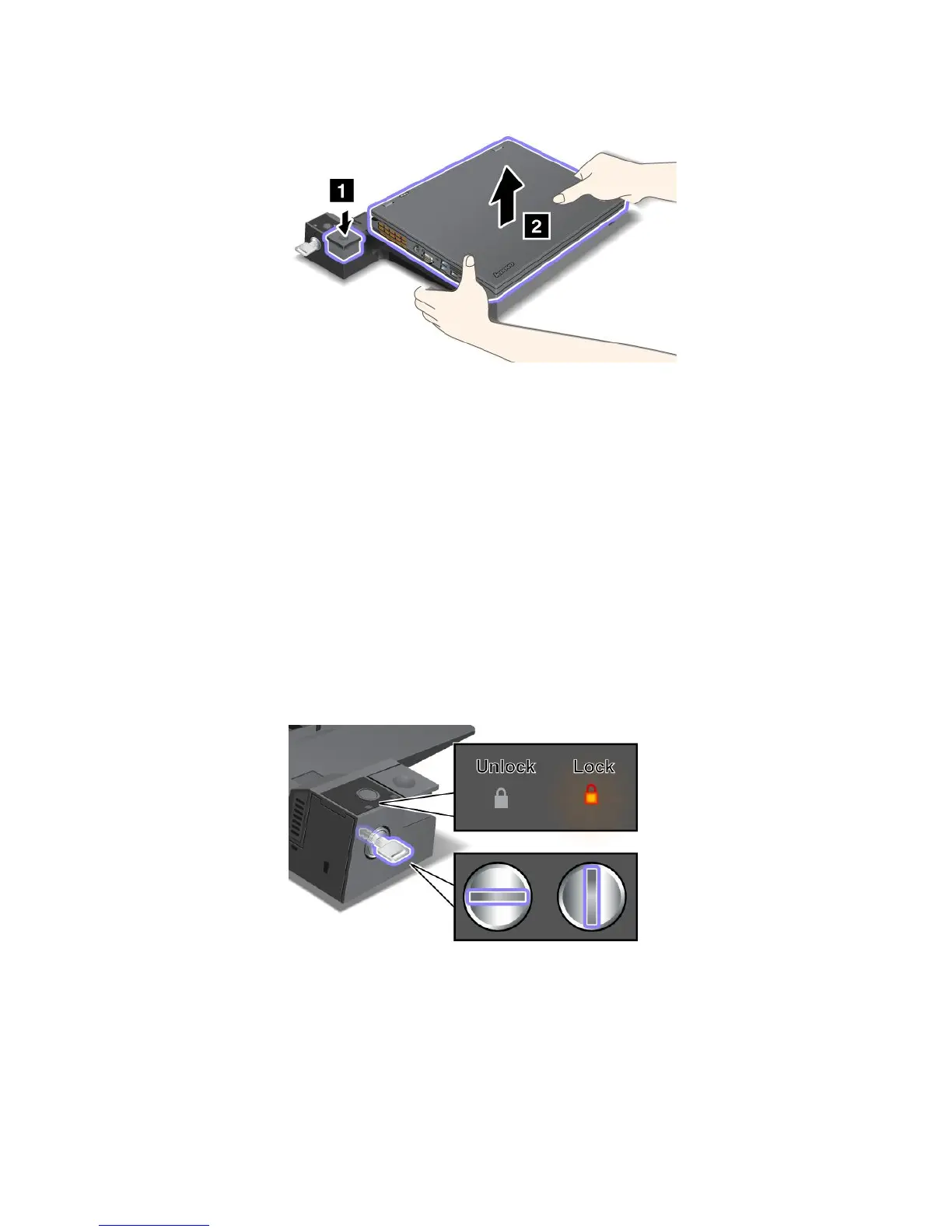
FortheThinkPaddockingstations,inadditiontoattachingamechanicallocktothedockingstation,youalso
canusethesystemlockkeytolocktheejectbutton.Whentheejectbuttonislocked,thecomputercannot
bedetachedfromthedockingstation.Formoreinformation,see“Usingthesystemlockkey”onpage106.
Usingthesystemlockkey
Thesystemlockkeyhastwopositions,unlockedandlocked.
Whenthekeyisinthelockedposition,theejectbuttonofthedockingstationislocked,andyoucannot
removeyourcomputer.Thekeylockindicatorlightswhentheejectbuttonislocked.
106UserGuide



 To Next Page