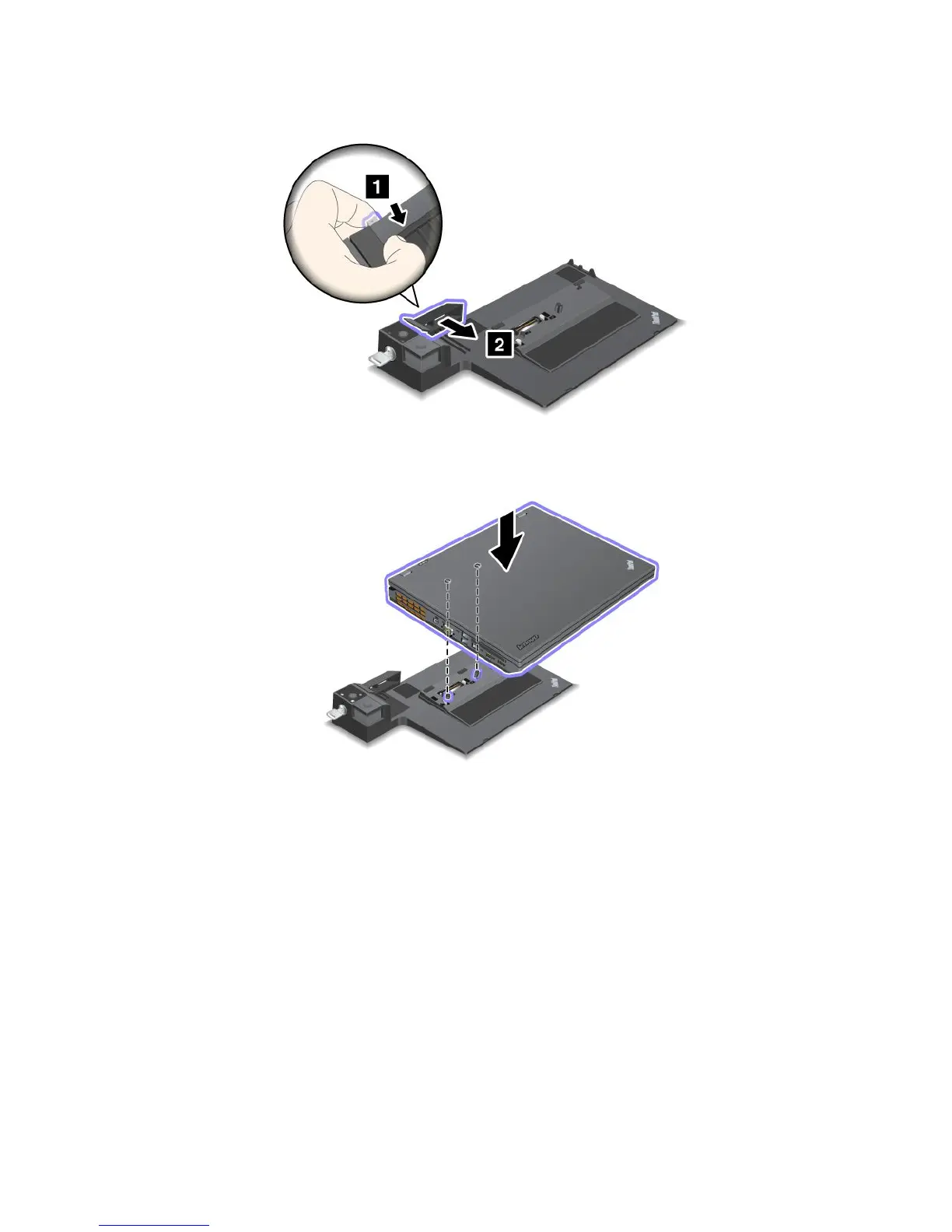
2.Pressandpulltheslidingadjusterasshown.
3.Putyourcomputerontheplatformofthedockingstation,makingsurethatthetop-leftcornerofthe
computerisalignedtotheguideplate.
4.Insertyourcomputerintothedockingstationuntilyouhearaclick.Thecomputerisattachedtothe
dockingstation.
Note:Ifthedockingstatusindicatorisnotlightedafteryouattachthedockingstation,yourcomputer
isnotcorrectlyconnected.Checktheacpoweradapterofthedockingstation,ordisconnectand
re-attachtheacpoweradapter.Thenattachyourcomputertothedockingstation.
Notes:
•Ifyouattachtheportreplicatorordockingstationtoyourcomputer,butdonotconnecttheacpower
adapterofthatattachmenttothepowerjack,yourcomputergoesintobatterymode.
•Ifyourcomputerandtheportreplicatorordockingstationareconnectedtoseparateacpoweradapters,
yourcomputergoesintobatterymoderst,andthenshiftsintoacpowermode.
•Ifineitheroftheabovetwoprecedingsituationsthebatteryofyourcomputerisdetached,orhasno
batterycharge,yourcomputershutsdown.
104UserGuide



 To Next Page