20
[Making microphone announcements by activating control inputs]
Perform the following settings in advance using the setting software:
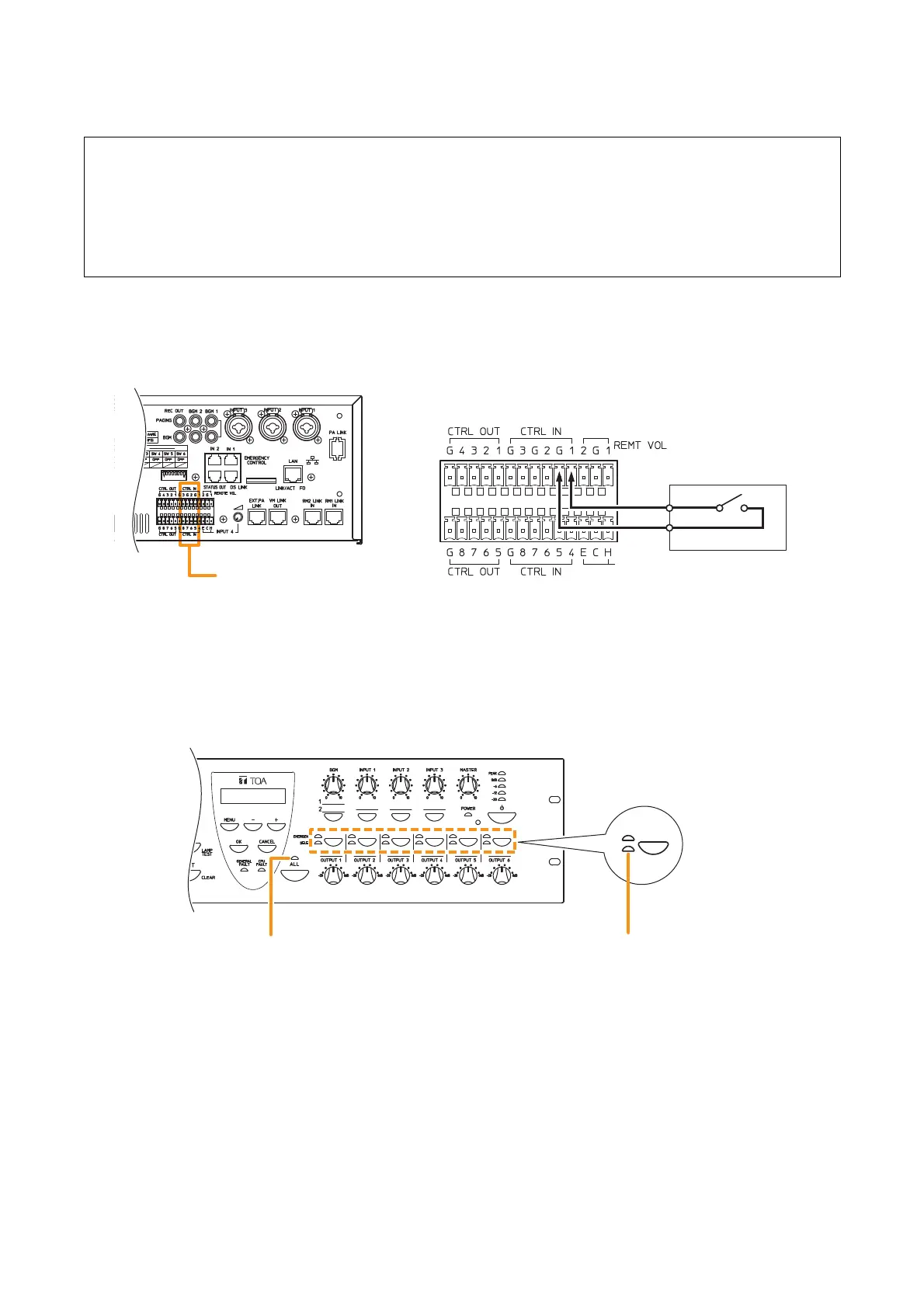
Step 1. Close ("Make") the Control Input terminals on the rear panel of the VM-3240VA.
Step 2. Make a microphone announcement using the microphone connected to the audio input terminal on
the rear panel.
Step 3. To terminate the microphone announcement, open ("break") the Control Input terminals.
The corresponding indicator goes out, terminating the microphone announcement.
The corresponding all-zone call or output indicator lights green, allowing microphone announcements
to be broadcast from the corresponding speaker line.
All-zone call indicator Output indicator
[VM-3240VA]
Microphone talk switch
[Example]
Setting microphone announcement activation for Control
Input Terminal 1.
Control Input terminals
[VM-3240VA]
•
Set the priority level of the audio input terminal to which the microphone is connected to any of "1" – "6".
(Refer to "General Broadcast Priorities" on page 31 for priority levels, and to "Priority Settings" in the
separate software manual for how to set priorities.)
•
Perform settings so that a microphone announcement is broadcast over designated broadcast zones
when the control input terminal is activated. (For more information, refer to "General Control Input
Settings" in "Event Settings" in the separate software instruction manual.)



 To Next Page