18
5. MAKING GENERAL BROADCASTS
5.1. Making Broadcasts from the VM-3240VA
5.1.1. BGM broadcasts
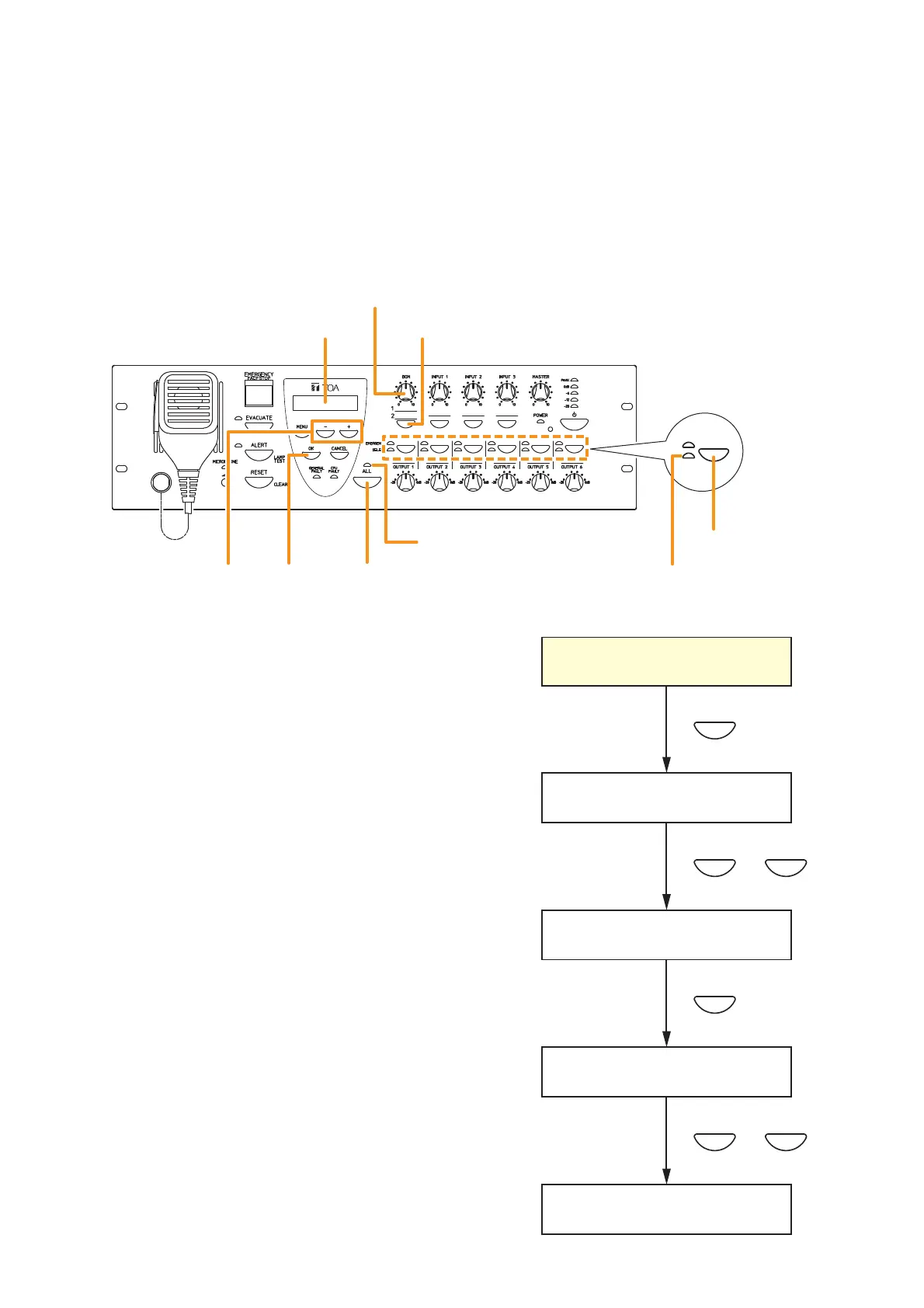
Broadcast musical programs from the BGM sound source connected to BGM input terminals 1 or 2 located on
the rear panel of the VM-3240VA. Adjust the BGM volume control and the volume control of the designated
speakers to an appropriate sound level in advance.
Step 1. Press the BGM selection key. The "Select BGM"
screen will be displayed on the LCD.
Step 2. Select either BGM 1 or BGM 2 with the [+] or [–] key.
Step 3. Press the [OK] key to confirm the selected BGM
program.
Step 4. Press the all-zone call key or output selector key to
select the broadcast zone, then begin the BGM
broadcast.
•
Pressing the all-zone call key causes the all-zone
call indicator to light green, enabling BGM
broadcasts over an entire area.
•
Pressing an output selector key causes the
selected output’s indicator to light green, allowing
the BGM program to be broadcast over the
corresponding zone.
Step 5. To terminate the BGM broadcast, press either the
all-zone call key or output selector key again. The
indicator goes out and the BGM broadcast is
terminated.



 To Next Page