28
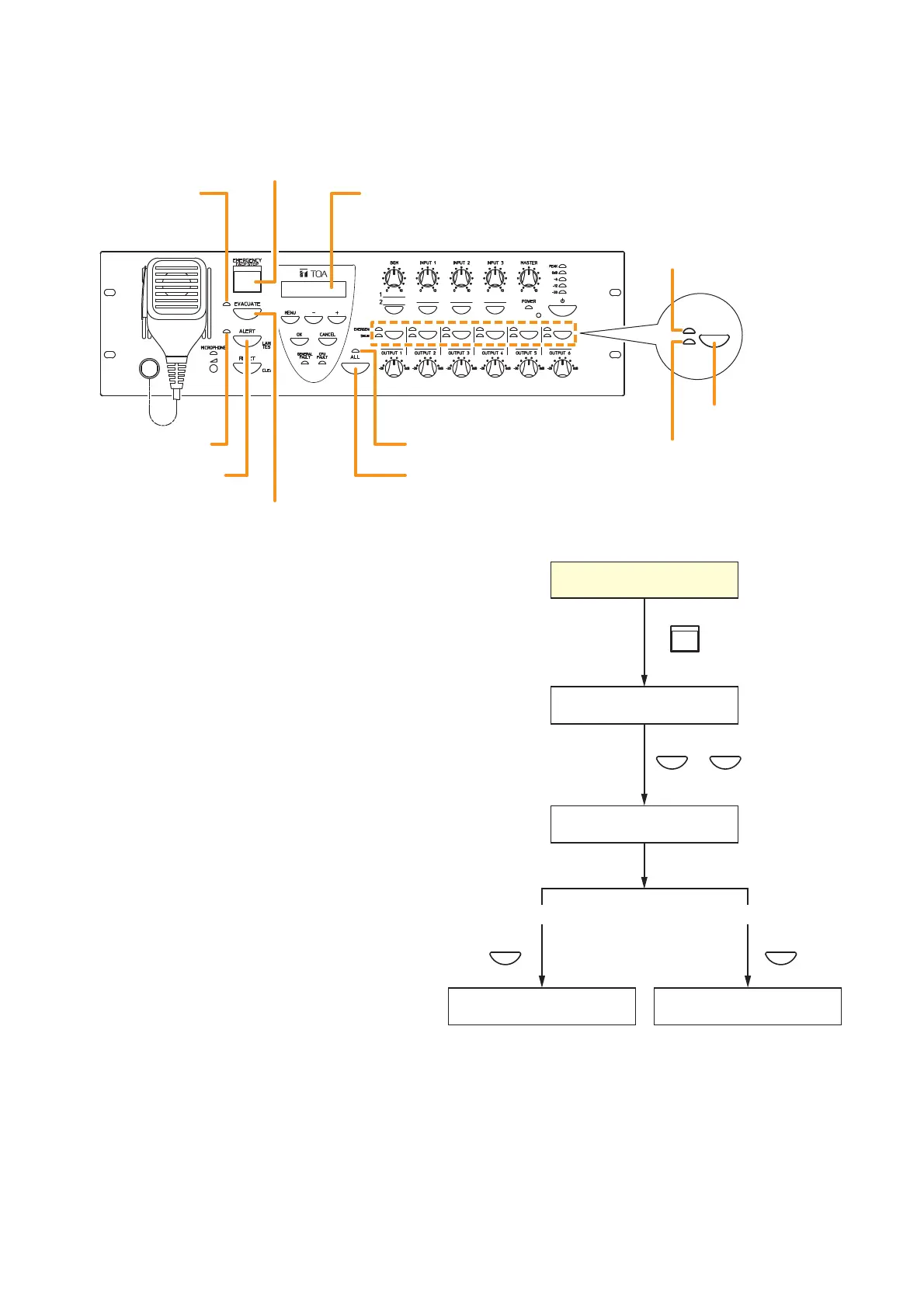
Step 1. Press the Emergency Activation switch.
The Emergency indicator (Emergency
Activation switch) lights red and VM-
3240VA is placed in emergency broadcast
mode. The indication requesting broadcast
output selection is displayed on the LCD.
Step 2. Press the All-Zone Call Selector key or
Output Selector key to select the broadcast
zones.
•
Pressing the All-Zone Call Selector key
causes the All-Zone Call indicator to light
green, allowing emergency broadcasts to
be made over all broadcast zones.
•
Pressing the Output Selector key causes
the selected Output indicators to light
green, allowing emergency broadcasts to
be made over the corresponding
broadcast zone(s).
Note
Skipping Step 2 allows emergency
broadcasts to be made over all zones, as
if the All-Zone Call Selector key was
pressed.
Step 3. Press either the Alert or Evacuation Announcement Start key.
The Alert Announcement indicator or Evacuation Announcement indicator and the Emergency Output
indicator both light red, broadcasting the Alert or Evacuation announcement over the selected
broadcast zone(s).
Note
Holding down the Alert Announcement Start key during Alert announcements or the Evacuation Start
key during Evacuation announcements for 3 seconds or more causes the announcement to be
terminated and the indicator to go out.



 To Next Page