Configuring the Receiver
LoadingNewFirmware
44
P/N:1001608‐01
4. Selecttheappropriatefile,andclickOpen(Figure 20).
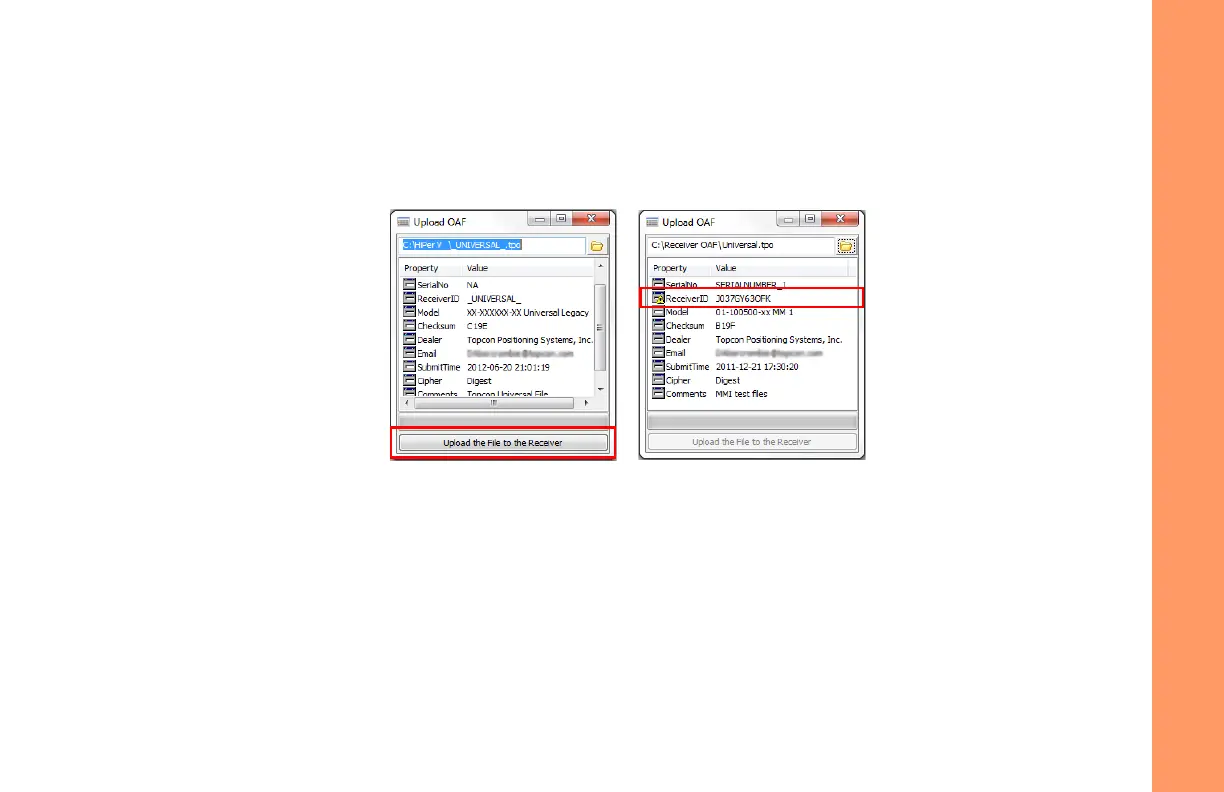
Topcon’s TRUinitiallycheckstoseeiftheselectedfileiscompatiblewiththecurrentlyconnectedreceiver.Ifyou
choseafilenotintendedforthisreceiver,theUploadOAFwindowdisplaysanerroriconnexttotheReceiverIDand
disablesthe
UploadtheFiletotheReceiverbu tton.
Figure21:OAFCompatibilityCheck
5. PressUploadtheFiletotheReceiver(Figure 21)tostartloadingthefile.
IfanOAFfileisuploadedtothereceiver,TRUwilloffertoresetthereceivertoputnewauthorizationoptionsinto
operation(Figure 22).


 To Next Page