EasyManua.ls Logo

Torbal AD60 - Chapter 14: Restoring Default Factory Settings ()

Torbal AD60
64 pages
Print Icon
To Next Page IconTo Next Page
To Previous Page IconTo Previous Page
Loading...
36
Instruction Manual AD Series
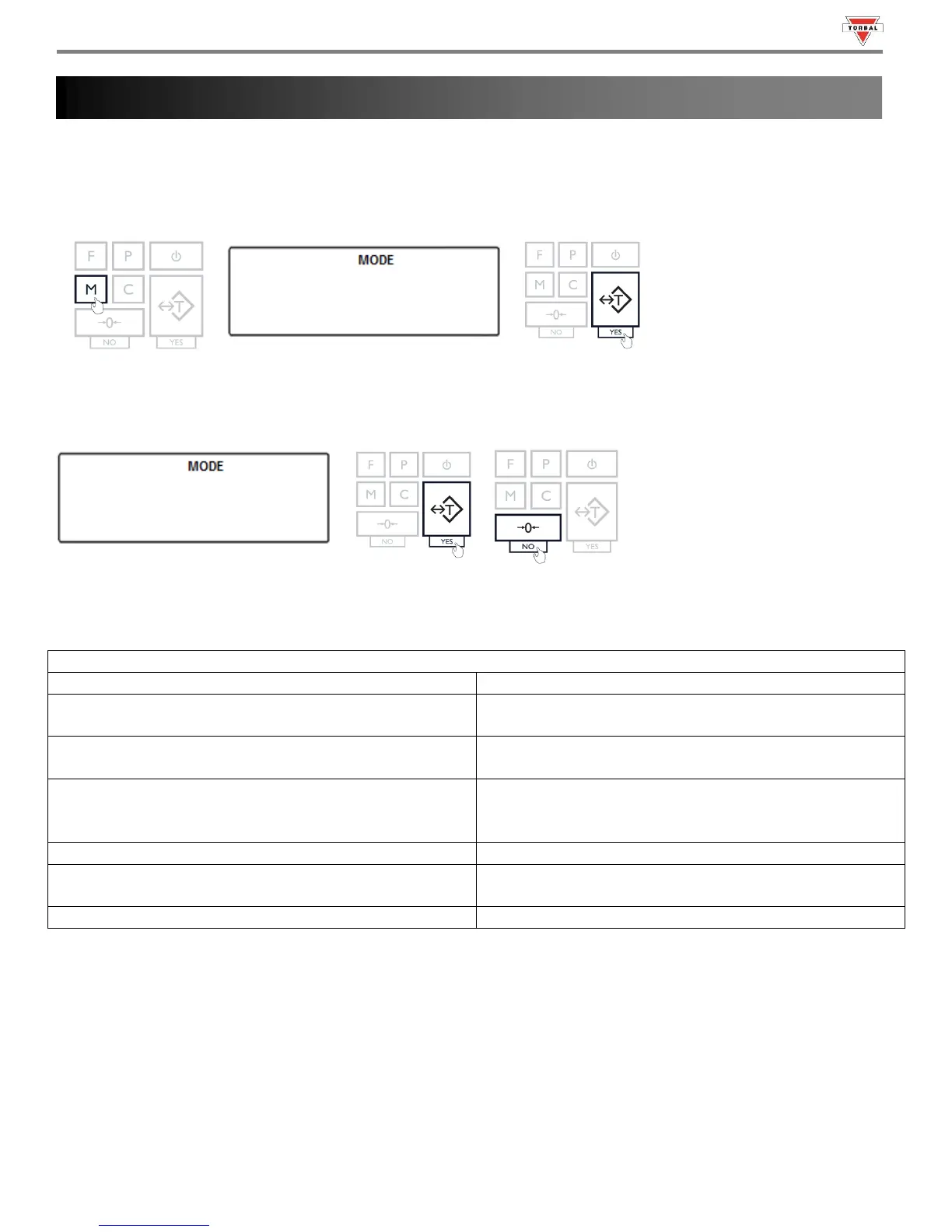
The Reset function resets all modes and applications as well as restores default factory settings. To restore default
factory settings follow the steps below.
1. Press the “M” key. Select “” by pressing the “T” key.
1
2. ” will appear on the screen. To confirm and initialize the reset function, press the “T” (YES) key. To cancel
and abort the reset press the 0 (NO) key.
Warning: Resetting the scale will restore the default factory setting. Stored values will be lost and all functions will be
disabled.

Table 14.1: Factory Default Settings
Weighing
Function: Always enabled
Animal Weighing
Function: Disabled
Filtering Time: t-3 (3 seconds)
Parts Counting
Function: Disabled
Sample Size: 10 pieces
Check Weighing
Function: Disabled
Under Value: 0.000g
Over Value: 0.000g
Display Hold
Function: Disabled
Percent Weighing
Function: Disabled
Percent Reference Sample: 0.000g
Totalizing
Function: Disabled
Chapter 14: Restoring Default Factory Settings ()



Table of Contents

Related product manuals