© Copyright 2018 TRENDnet. All Rights Reserved.
AP utility
Installation
1. Download the latest version of the utility by navigating to
http://www.trendnet.com/support and selecting model TEW-826DAP within
the Product Download drop-down list.
2. Extract the contents of the .zip file and run the .exe installer to install the
utility.
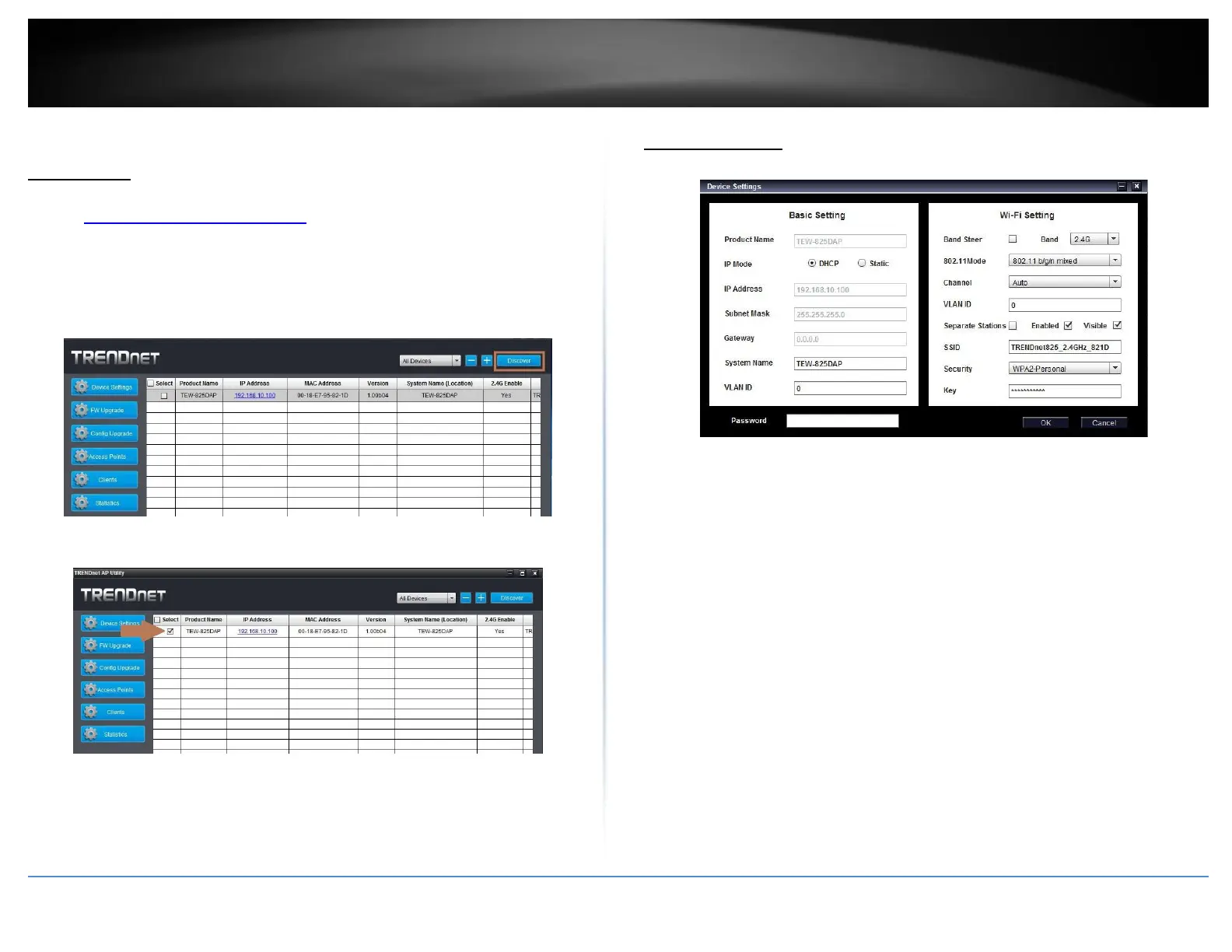
3. Once the utility is installed click on Discover to refresh the list of access points.
(Product specifics in example images may not be the same product)
4. Select the access point you want to configure.
5. Click on Device settings to configure the access point.
Device Settings
Product Name: Displays the device model
IP Mode: Select the IP mode to apply on the device
o DHCP: Select this option to allow the device to receive IP address
from your DHCP server
o Static: Select this option to manually set the IP address of the
device
- IP Address: Enter the IP address to assign to the device
- Subnet Mask: Enter the subnet mask to assign to the
device
- Gateway: Enter the gateway IP address to assign to the
device
System Name: Assign name of the device to help distinguish between
similar devices
VLAN ID: Assigns the VLAN ID for the Ethernet port.
Band Steer: Select this to enable/disable band steering
Band: Select on the pull-down menu the wireless interface to configure
802.11 Mode: Select the 802.11 mode of the selected wireless interface
Channel: Select the wireless channel of the selected wireless interface
VLAN ID: Assigns the VLAN ID for the primary SSID.
interface











 To Next Page