Enkapsis & EnerSure Platform Installation Guide Rev07.2
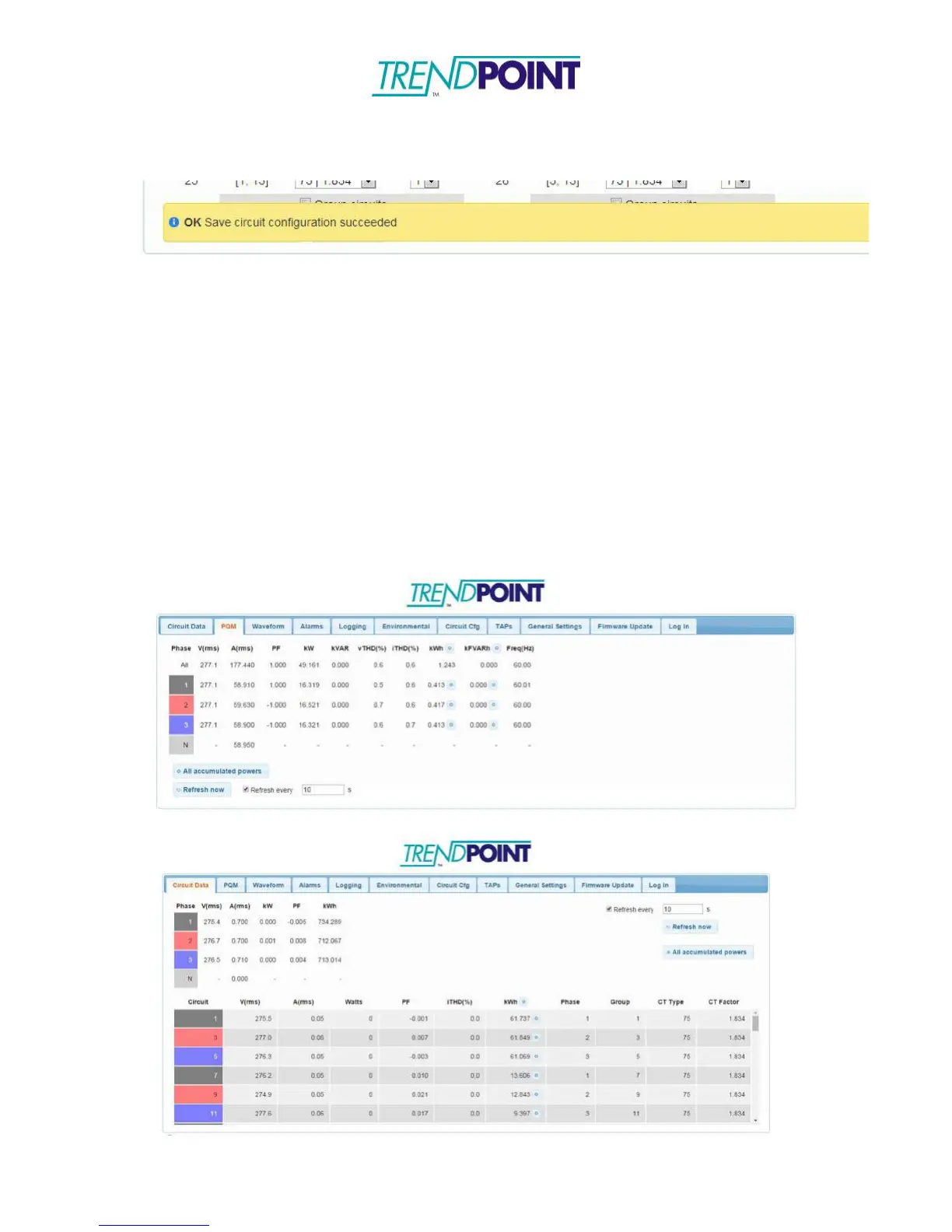
*Note: After clicking Save Configuration, wait for the system say OK Save circuit
configuration succeeded.
Sampling Live Data with Web Interface
o
After setting up the EnerSure metering parameters it is always good to run
some samples of the data in order to confirm the installation was done
properly and your system is operating correctly.
o
To sample live data:
o
Click on the PQM tab to view data from the Enkapsis PQM
o
Click on the Circuit Data tab to view data from any attached BCPM
2.0, iBCPM, or EnerSure Bus cards.
*Note: To view a summation of all connected EnerSure Bus cards,
make sure the Circuits option under Phase Summary in the General
Settings tab is selected.
o
Clicking Refresh Now will refresh the data.
Above – Data from Enkapsis PQM; Below – Data from connected BCPM 2.0


 To Next Page