Enkapsis & EnerSure Platform Installation Guide Rev07.2
Hardware Installation and Wiring
Electrical Wiring Instructions 3- Phase
Your Enkapsis PQM has 3 separate electrical components that you will need to
connect in order to use the system- Voltage Reference, Power Supply, and
Current Transformers.
All wiring terminals on the Enkapsis PQM can support copper wiring 24-12AWG.
The terminal screws should be tightened to 4.5 lb – inch of torque.
1)
Connect the 24VDC output from the Power Supply to the 2 terminal input
on the Enkapsis.
2)
Connect the 120/208 OR 277/480 VAC input, depending on your system
being monitored, to the Power Supply.
3)
The Enkapsis meter supports the measurement of all of the following
types of voltage (The connection requirements are shown below as well):
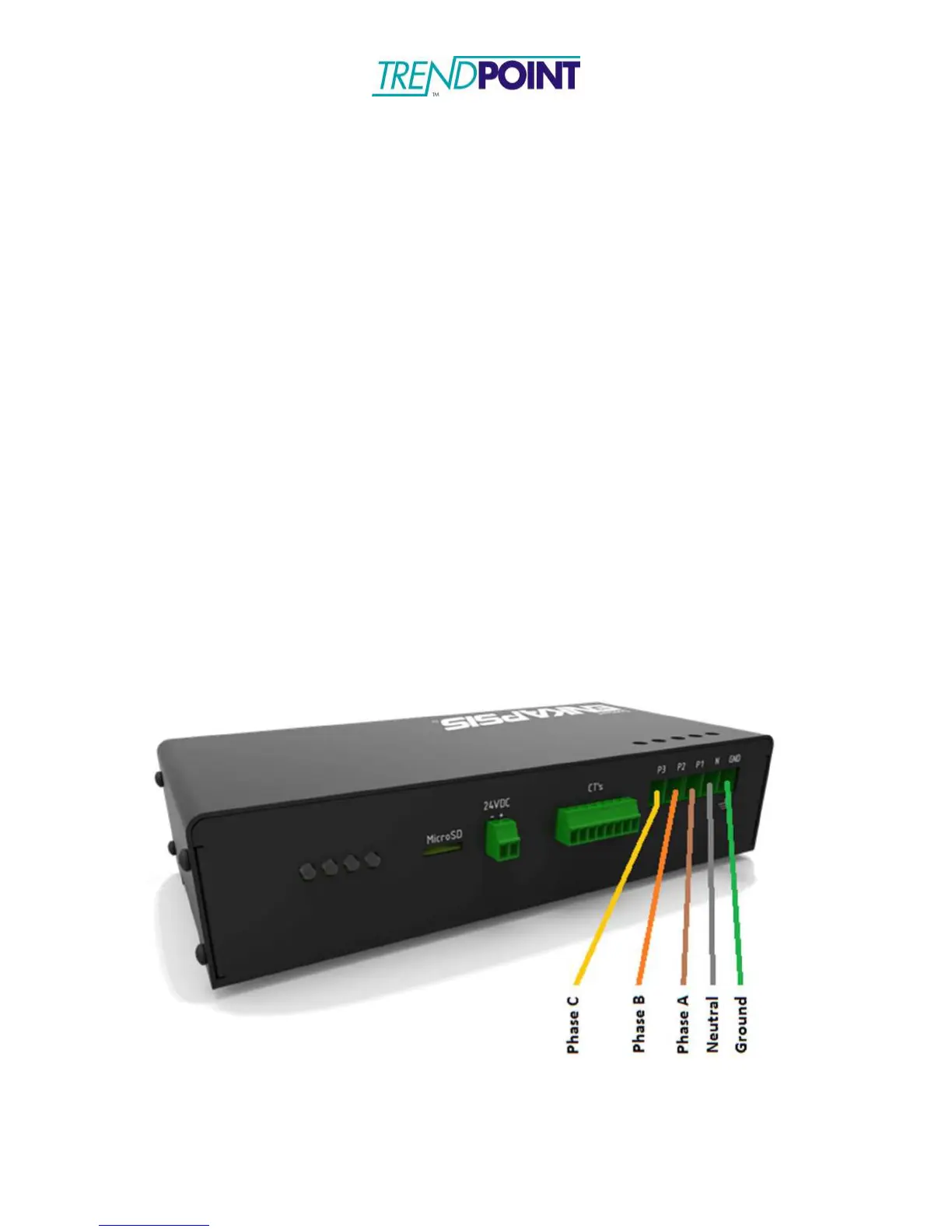
a. Three Phase Wye Power (Also known as 5 wire with Phase A,
Phase B, Phase C, Neutral and Ground - Also See Figure 4 for an
example):
i.
Connect the three phases to a 3-Phase Common-Trip
Breaker of no greater that 15A overcurrent protection located
near the Enkapsis meter (UL listed for Voltages up to 480V
RMS).
ii.
Connect the outputs of the 3-Phase Common-Trip Breaker
to the Voltage Reference connection points on the Enkapsis
meter as shown in the picture below.


 To Next Page