Enkapsis & EnerSure Platform Installation Guide Rev07.2
o
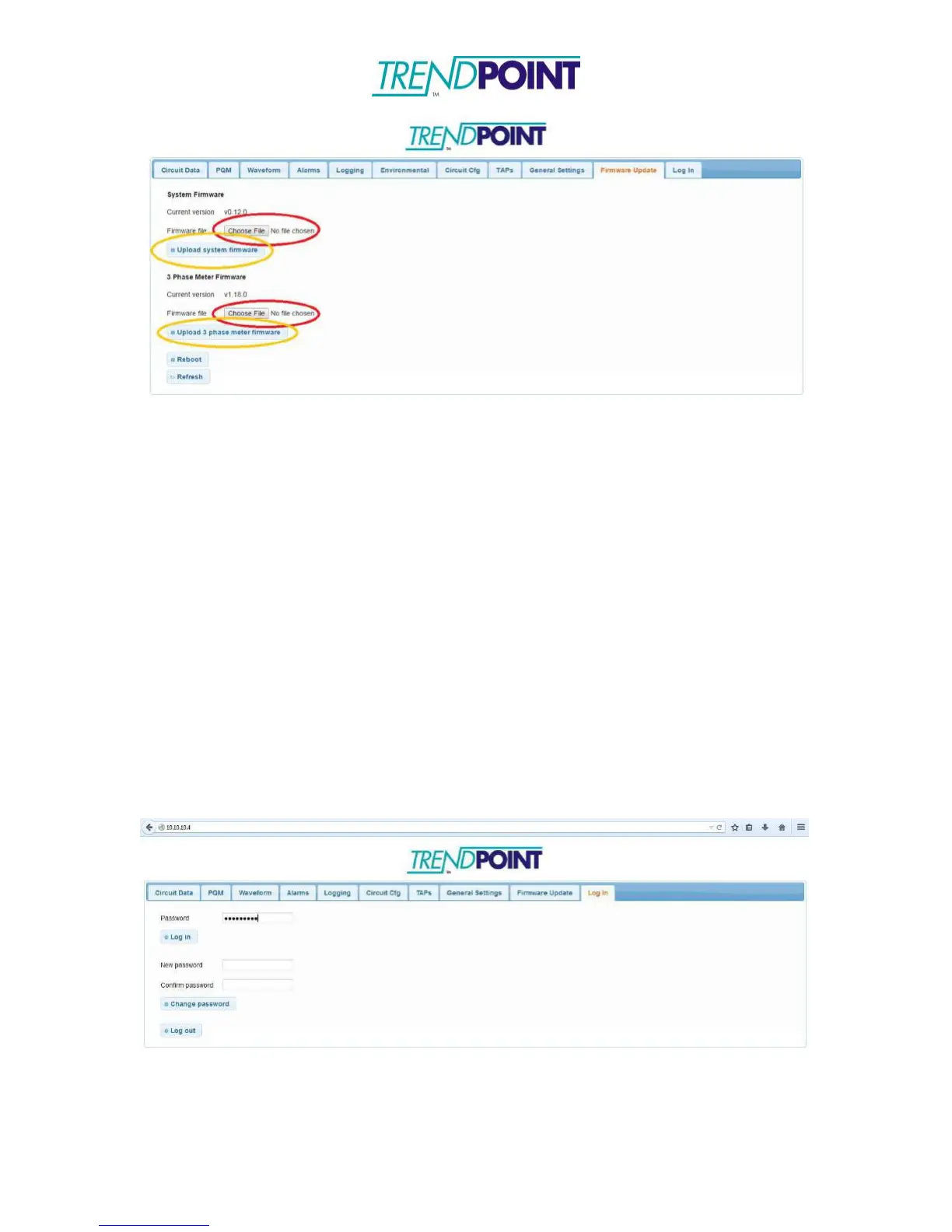
Click the Choose File button (red circles) under the system you want to
load a new firmware. Locate the correct firmware from the firmware
update package and click OK. Click Upload firmware (orange circles) to
upload the firmware to the board.
Waveform Capture
Your Enkapsis unit has waveform capture ability. To enable waveform capture,
follow the below steps:
*Note: To use waveform capture, an SD card must be inserted into the Enkapsis
unit.
o
Open your web browser of choice and enter the IP address of the meter
into the URL bar and click Enter.
o
You will be brought to the web interface and prompted to enter a
password (Default: adminpass). Enter the password and click Log in.
o
Click on the Waveform tab, from here you can set the thresholds and
channels to capture. After entering the desired settings, click Set
waveform capture thresholds to start waveform capture.


 To Next Page