30
General Information
Changing Units (Imperial, US or
Metric)
Units has four selectable display modes as
described below:
• mpg - Imperial gallons;
• mpg US - US gallons;
• L/100 km - Metric;
•km/L - Metric.
Each display provides the following
information:
mpg (Imperial gallons)
The speedometer and odometer will read in
miles. The fuel consumption will be
measured in imperial gallons.
mpg US (US gallons)
The speedometer and odometer will read in
miles. The fuel consumption will be
measured in US gallons.
L/100 km (Metric)
The speedometer and odometer will read in
kilometers. The fuel consumption will be
measured in liters of fuel per 100 km.
km/L (Metric)
The speedometer and odometer will read in
kilometers. The fuel consumption will be
measured in kilometers per liter of fuel.
To access the units display; with the
motorcycle stationary and in neutral, turn the
ignition to the ON position.
Press and release the set button on the left
hand switch cube until 'SEtUP' is visible in the
display screen.
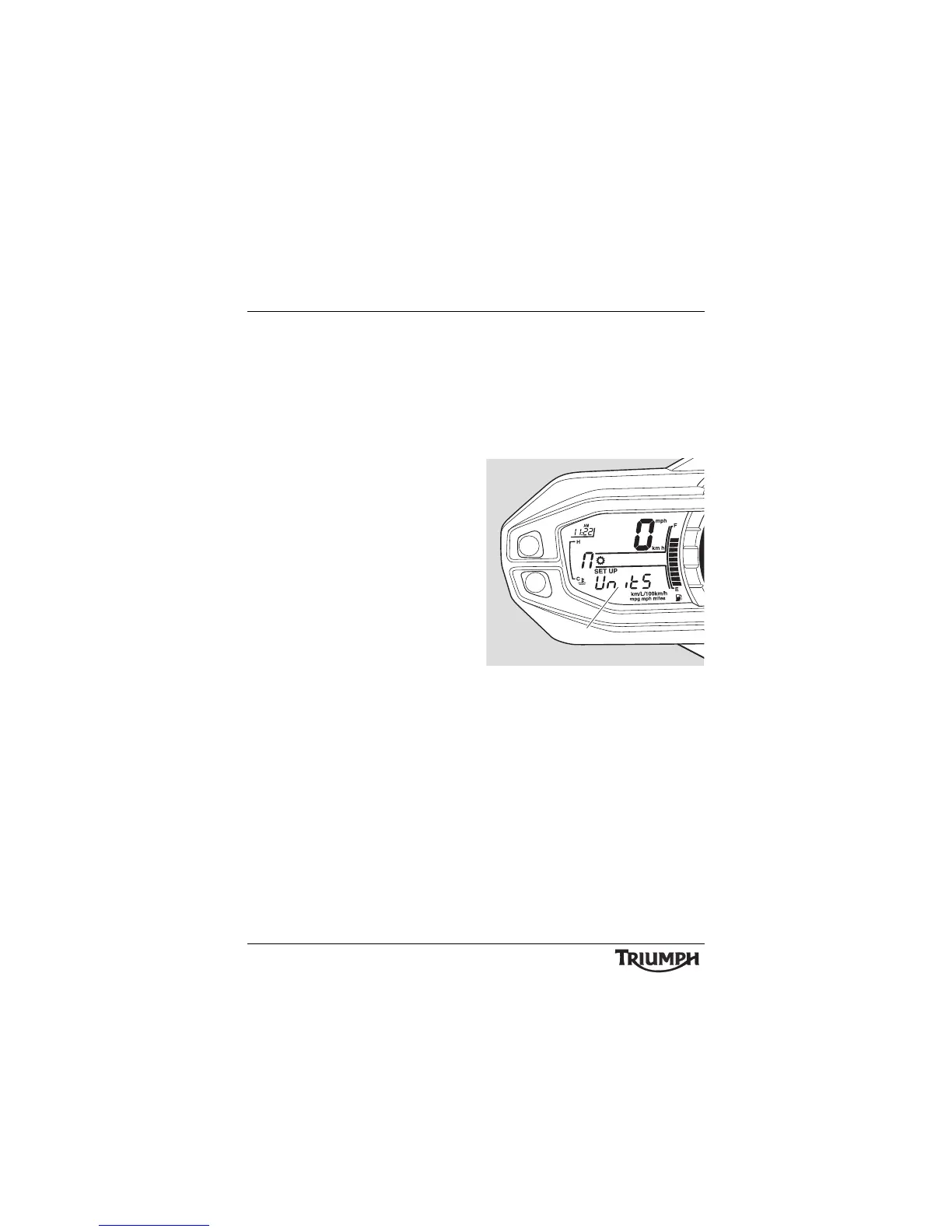
Press and release scroll button until UnitS is
visible then press the set button.
1. Display screen
Press and release the scroll button until the
desired display is visible. The display will scroll
through in the following order when pressing
the up part of the scroll button (it will scroll
through in the reverse order if down on the
button is pressed):
• mpg - Imperial gallons;
•km/L - Metric;
• L/100 km - Metric;
• mpg US - US gallons.






 To Next Page