3-1
CHAPTER 3
Flow Analyzer Setup
G e t t i n g S t a r t e d
Power On/Off
Press the power button on the 4089 Interface Module once to turn the instrument on. With the device
powered on, press the power button once to begin the controlled shutdown procedure. The controlled
shutdown will count down for 15 seconds before shutting the instrument down. During the countdown
procedure, buttons are displayed to provide the options to either shut down the instrument immediately
or to cancel the shutdown.
Initialization and Warm-Up
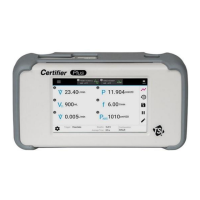
Upon pressing the power button, the Plus Interface Module will display a TSI
®
splash
screen and progress bar during the bootup process. The initialization process takes approximately
40 to 45 seconds to complete. Wait for 1 minute after initialization has completed to allow for the
pressure transducers and flow sensor to warm-up.
I n s t r u m e n t S e t u p
Connect/Disconnect Flow Modules
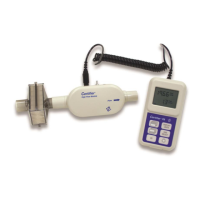
Connect flow modules to either port (A or B) on the top of the interface module. Flow modules can be
connected or disconnected with the interface module powered on or powered off. To remove the
coiled cable from the either the interface module or flow module, pull locking
connector shell and not from the cable itself.
If the Certifier Flow Analyzer is powered on when a flow module is connected/disconnected,
the interface will recognize the action and restart its application. This process takes
approximately 25 to 30 seconds to complete, after which the Certifier Flow Analyzer will be
ready for normal operation.
Either one or two flow modules can be connected to the interface module at a time. Connect the flow
module to either port on the interface module. Upon connecting or disconnecting a flow module, the
interface will display a message while application restarts. To remove the coiled cable from the flow
module, pull its locking connector shell (not the cable) from the flow module.
Connect Inlet Filter
TSI
®
Certifier Flow Analyzers measure utilizing an exposed thermal flow sensor that is highly
sensitive to foreign matter and particles within the gas flow. TSI
®
supplies inlet filters for both the high
flow module and low flow module. TSI
®
recommends that an inlet filter be used on flow modules at all
times when operating the Certifier instrument.


 To Next Page