3-2
Connect the Low Pressure Measurement
Low pressure is available from the 4081 high flow module only.
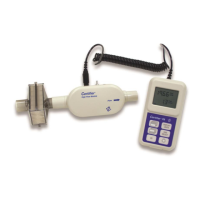
To connect the oxygen sensor kit, attach the airway pressure fitting with screen (1) to the outlet of the
flow module. Cut a length of silicon tubing (2), connect one end of the tubing to the barb on the airway
pressure fitting, and connect the other end of the tubing to the (+) port of the flow module.
Connect the Oxygen Sensor
The model 4073 Oxygen Sensor kit connects to 4081 High Flow Modules only. You can connect or
disconnect an oxygen sensor at any time without interrupting the operation of the instrument. Prior to
use, oxygen sensors should be field calibrated daily. The oxygen sensor should also be field
calibrated following a change in altitude.
To connect an oxygen sensor, unpackage the oxygen sensor cell (1) and screw it into the airway
coupling (2). Attach the airway coupling (2) to the outlet of the high flow module and insert the end of
the sensor cable (3) containing the nut into the top of the O
2
sensor cell. This end of the sensor cable
can be screwed into the oxygen sensor cell. Connect the other end of the sensor cable to the input
Breath Triggers
The Plus Flow Analyzer uses triggers to define start of the inspiratory and expiratory cycles.
Triggers are based on the flow rate, pressure, or from a TTL voltage signal. The Flow
Analyzer is set as its trigger default to automatically detect the breath cycles (using flow rate), but you
can also set your own start and end trigger values. Under most circumstances, it is recommended to
use the Auto Trigger feature.
In manual trigger mode, you select values for the start and end of the breath. A positive slope through
the first value is used for the start of inspiratory and a negative slope through the second value used
for the start of expiratory. To determine manual flow trigger values, it can be helpful to view the Flow
Rate waveform on the Graph screen.
You have the option to set start and end triggers manually based on pressure. To determine pressure
trigger values, it can be helpful to view the Low Pressure waveform on the Graph screen. The
pressure trigger is intended to give advanced users additional setup options for testing high frequency
ventilators or other setups in which flow rate or auto-triggering are not ideal.


 To Next Page